Yale vs August Fingerprint Door Lock
Choosing between a Yale and August fingerprint door lock can be tough. We compare specs, reliability, and real owner feedback to help you decide which smart lock is right for your home.
Quick answer
The August Wi-Fi Smart Lock (4th Gen) wins for seamless integration and a minimalist design, while the Yale Assure Lock 2 Touch with Wi-Fi offers a better built-in keypad and fingerprint reader for a more traditional, keyless entry experience.
Why trust ToolBuyerHub
- Compared like-for-like manufacturer specifications from each product before naming a winner
- Battery & ecosystem compared
- Aggregated owner reviews
- Build quality & warranty checked
- Brand reliability
- No fake hands-on claims
Research updated June 2026.
| Feature | Yale Assure Lock 2 Touch (Wi-Fi) | August Wi-Fi Smart Lock (4th Gen) |
|---|---|---|
| Best For | Built-in keypad & fingerprint | Seamless auto-unlock & style |
| Key Spec | Built-in fingerprint reader | Works with existing deadbolt |
| Connectivity | Wi-Fi, Bluetooth, Z-Wave (optional) | Wi-Fi, Bluetooth, Z-Wave (optional) |
| Rating | 4.2 / 5 | 4.3 / 5 |
| Price | Higher (includes keypad) | Mid-range |
Yale vs August Fingerprint Door Lock: Which One Is Right for You?
Both Yale and August are top contenders in the smart lock market, but they take different approaches. Yale focuses on a complete, standalone solution with a built-in keypad and fingerprint reader, while August emphasizes a sleek, minimalist design that works with your existing deadbolt. We break down the key differences to help you choose.
Key Differences: Yale Assure Lock 2 Touch vs August Wi-Fi Smart Lock
The main difference is the user interface. The Yale Assure Lock 2 Touch features a built-in touchscreen keypad and a fingerprint sensor on the lock itself, allowing for keyless entry without a smartphone. The August Wi-Fi Smart Lock (4th Gen) is designed to be installed over your existing deadbolt, relying on your phone for auto-unlock and a separate keypad accessory for keyless entry. Yale is better for those who want a complete, all-in-one device, while August is ideal for those who prefer a minimalist look and seamless smartphone integration.
Spec-by-Spec Comparison: Yale vs August
Let's look at the specific specs that matter most for a smart lock.
Installation and Compatibility
The August lock is designed to be installed over your existing deadbolt, making it a simpler retrofit in many cases. It works with most standard single-cylinder deadbolts. The Yale Assure Lock 2 Touch replaces your entire deadbolt and requires a new installation. Both are generally straightforward for DIYers, but August's approach is often faster.
Keyless Entry Methods
Yale offers three built-in methods: the fingerprint reader, the touchscreen keypad, and the August app. August offers auto-unlock via Bluetooth/Wi-Fi, a separate keypad (sold separately), and the August app. Yale's built-in fingerprint reader is a major convenience for quick, hands-free entry. August's auto-unlock is its standout feature, unlocking as you approach.
Smart Home Integration
Both locks support Apple HomeKit, Amazon Alexa, and Google Assistant. August has a slight edge with native support for Z-Wave and a broader range of smart home hubs. Yale offers a Z-Wave module separately. Both are reliable, but August's ecosystem is often considered more mature for smart home setups.
Battery Life and Power
Both use 4 AA batteries. Yale claims up to 6 months of battery life, while August claims up to 6 months. Owner reviews generally report similar real-world performance, with battery life varying based on usage and Wi-Fi strength. Both send low-battery alerts to your phone.
Security and Build Quality
Both locks are ANSI Grade 2 certified, meaning they offer good security for residential use. Yale is known for its solid, durable build quality, while August's design is more plastic-based but still robust. Neither is a weak point for security, but Yale's all-metal construction feels more premium.
What to Check Before Buying a Smart Lock
Before choosing, check your door's thickness and backset. Most locks fit standard doors (1-3/8 to 1-3/4 inches thick). Also, ensure your door is pre-drilled for a deadbolt. For August, your existing deadbolt must be compatible. For Yale, you need a standard bore hole. Also, consider your smart home hub; if you use Apple HomeKit, both work, but August is more seamless with HomeKit Secure Video.
Mistakes to Avoid When Choosing a Smart Lock
Avoid buying a lock that doesn't support your smartphone platform (iOS vs Android). Also, don't ignore the importance of Wi-Fi range; a weak signal can cause connectivity issues. Avoid skipping the keypad accessory if you want keyless entry without your phone, as August's base model doesn't include one. Finally, don't assume all locks work with all door types; check compatibility first.
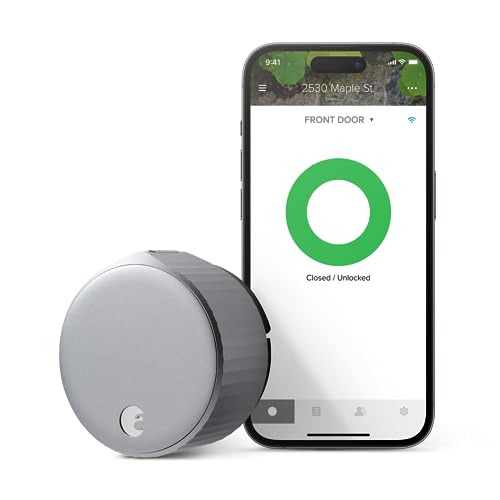
August Wi-Fi Smart Lock (4th Gen)
Best for seamless smartphone integration and minimalist design.
Yale Assure Lock 2 Touch (Wi-Fi)
Best for Built-in FingerprintPros
- Built-in fingerprint reader for quick entry
- Touchscreen keypad included
- Solid, durable build quality
Cons
- More expensive than August
- Fingerprint reader can be finicky with wet fingers
The Yale Assure Lock 2 Touch is a complete, all-in-one smart lock. It features a built-in fingerprint reader and a touchscreen keypad, eliminating the need for a separate keypad accessory. Owner reviews praise its solid construction and the convenience of the fingerprint sensor, though some note it can be less reliable with wet or dirty fingers.
It integrates well with major smart home platforms, including Apple HomeKit and Amazon Alexa. The Wi-Fi version allows for remote access without a separate hub. It is a strong choice for those who want a traditional keyless entry experience with modern smart features.
August Wi-Fi Smart Lock (4th Gen)
Best for Seamless IntegrationPros
- Seamless auto-unlock feature
- Minimalist, sleek design
- Easy installation over existing deadbolt
Cons
- Keypad sold separately
- Auto-unlock can be inconsistent for some users
The August Wi-Fi Smart Lock (4th Gen) is designed for those who prioritize smartphone integration and a clean look. It installs over your existing deadbolt, so you can keep your original keys. The auto-unlock feature uses geofencing to unlock when you approach, which many owners find convenient, though some report occasional delays.
It works with Apple HomeKit, Amazon Alexa, and Google Assistant. The August app is highly rated for its user-friendly interface. For keyless entry without a phone, you need to buy the separate August Keypad. It is a top pick for those who want a minimalist, app-first smart lock.
Yale Assure Lock 2 (No Touch)
Best Budget Yale OptionPros
- Lower price than Touch model
- Same solid build quality
- Works with all major smart home platforms
Cons
- No fingerprint reader
- Keypad can be less responsive in cold weather
The Yale Assure Lock 2 (No Touch) is a more affordable version of the Touch model. It features a touchscreen keypad but omits the fingerprint reader. It offers the same smart home integration and build quality as its more expensive sibling, making it a good value for those who don't need a fingerprint sensor.
Owner reviews are positive, noting the easy installation and reliable app. Some users report the keypad can be less responsive in very cold temperatures. It is a solid choice for a budget-friendly, keyless smart lock from a trusted brand.
August Wi-Fi Smart Lock (3rd Gen)
Best Budget August OptionPros
- Lower price than 4th Gen
- Same auto-unlock feature
- Compatible with all major platforms
Cons
- Older design, slightly bulkier
- No built-in Wi-Fi (needs Connect hub)
The August Wi-Fi Smart Lock (3rd Gen) is a more budget-friendly version of the 4th Gen. It offers the same core features, including auto-unlock and smartphone control, but at a lower price. It does not have built-in Wi-Fi, so you need the August Connect Wi-Fi Bridge (sold separately) for remote access.
Owner reviews are positive, with many praising the reliable auto-unlock. The design is slightly bulkier than the 4th Gen. It is a good choice for those who want August's smart features on a budget and don't mind the extra hub.
Yale Assure Lock 2 (Z-Wave)
Best for Z-Wave HubsPros
- Native Z-Wave support for hubs
- Solid Yale build quality
- Keypad included
Cons
- No Wi-Fi (needs Z-Wave hub for remote)
- No fingerprint reader
The Yale Assure Lock 2 (Z-Wave) is designed for users with a Z-Wave smart home hub, like Samsung SmartThings or Wink. It
Worx vs Greenworks Cordless Lawn Mower
Another buying guide from this category, picked for you.
Check Price →As an Amazon Associate we earn from qualifying purchases. We recommend on merit — see our disclosure.