Best Plug-In Energy Monitors
A plug-in energy monitor turns any standard wall outlet into a data source, showing how much electricity a device actually draws and what that costs over time. These devices range from simple single-outlet meters to whole-home systems that clamp onto your breaker panel and stream live usage to your phone.
Quick answer
The TP-Link Kasa Smart KP115 is the best overall pick for most households thanks to its reliable app, scheduling, and per-device energy tracking.
Why trust ToolBuyerHub
- Cross-checked manufacturer-published specifications before writing any recommendation
- Verified US market availability and configuration for every model discussed
- Owner-feedback themes are summarized as feedback, never presented as our own hands-on testing
- No invented star ratings; see the visible Research Score criteria on this page
- Flagged CAT rating and safe-use guidance wherever a tool is used near live circuits
- We compare manufacturer specifications, supported amperage and voltage ratings, app features, and recurring owner-feedback themes rather than relying on a single retailer rating.
Research updated September 2026.
What Matters Most for This Category
The most important factor is what you want to measure. A single-outlet meter is ideal for tracking one appliance like a fridge or space heater, while a whole-home monitor with current transformers gives you a complete picture of your panel. Check the amperage and wattage rating against the load you plan to monitor, confirm whether the app supports scheduling and historical graphs, and decide if you need 120V only or 240V support for dryers and EV chargers.
| Model | Best for | Key specs | Research Score |
|---|---|---|---|
| TP-Link Kasa Smart KP115 | Best Overall | Single-outlet smart plug, 15A / 1800W | 93/100 |
| P3 International P4400 Kill A Watt | Best Budget | Inline outlet meter, 15A / 1875VA | 88/100 |
| BN-LINK BNC-60/U133T Energy Monitoring Outlet | Best Value | Single-outlet smart plug, 15A / 1800W | 86/100 |
| Emporia Smart Plug with Energy Monitoring | Best for App Experience | Single-outlet smart plug, 15A / 1800W | 90/100 |
| Sense Home Energy Monitor | Best Whole-Home | Panel-mounted monitor, Requires breaker panel access | 89/100 |
| Emporia Vue 2 Home Energy Monitor | Best for Circuit-Level Data | Panel-mounted monitor, Up to 16 branch circuits | 91/100 |
| Kuman KW47-US Electricity Usage Monitor | Best Simple Inline Meter | Inline outlet meter, 15A | 82/100 |
TP-Link Kasa Smart KP115
Best OverallPros
- Tracks real-time and historical energy use per outlet
- Works with Alexa and Google Assistant
- Compact enough to stack two per duplex outlet
Cons
- Requires a 2.4GHz Wi-Fi network
- No 240V support
The KP115 combines a smart plug with energy monitoring, so you can schedule, automate, and see exactly what a device costs to run. Setup is straightforward through the Kasa app, and the historical graphs make it easy to spot always-on phantom loads.

P3 International P4400 Kill A Watt
Budget ClassicPros
- No app or account required
- Measures kWh, voltage, amps, and Hz
- Very affordable and widely available
Cons
- No remote monitoring or scheduling
- Bulky design can block the second outlet
The Kill A Watt is the long-standing entry point for plug-in energy measurement, displaying volts, amps, watts, and cumulative kilowatt-hours directly on its LCD. It is a no-frills tool that works entirely offline, which appeals to users who prefer not to connect appliances to Wi-Fi.
BN-LINK BNC-60/U133T Energy Monitoring Outlet
Value PickPros
- Lower price than most name-brand energy plugs
- Supports timers and schedules
- Tracks kWh and cost estimates
Cons
- App is less polished than Kasa or TP-Link
- Limited third-party integrations
BN-LINK offers a budget-friendly smart plug with energy monitoring, timers, and voice control through Alexa and Google Assistant. The app covers the essentials, including daily and monthly usage summaries, though it lacks the refinement of premium competitors.

Emporia Smart Plug with Energy Monitoring
App FavoritePros
- Detailed real-time and historical energy graphs
- Integrates with the broader Emporia home energy ecosystem
- Supports scheduling and automation
Cons
- Best features assume you may add other Emporia products
- No 240V support
Emporia's smart plug delivers one of the clearer energy dashboards among single-outlet monitors, showing watts, cost projections, and usage trends. It pairs naturally with Emporia's whole-home monitor if you later want panel-level data.
Sense Home Energy Monitor
Whole-Home PickPros
- Tracks whole-home consumption in real time
- Machine learning attempts to identify individual devices
- Solar-compatible models available
Cons
- Professional installation recommended
- Device detection accuracy varies by home
Sense installs inside your electrical panel with current transformers and reports total home usage through its app. Its machine-learning feature tries to fingerprint individual appliances over time, though results depend heavily on your home's wiring and load patterns.
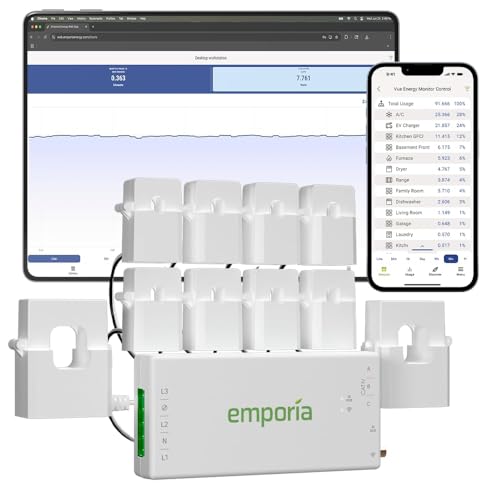
Emporia Vue 2 Home Energy Monitor
Circuit-Level PickPros
- Monitors individual circuits, not just total usage
- Expandable with additional sensors
- Detailed app with cost and solar tracking
Cons
- Requires panel installation
- Setup is more involved than a plug-in meter
The Emporia Vue 2 uses multiple current transformers to measure specific circuits in your panel, giving far more granular data than a single clamp. The app breaks down usage by circuit and supports time-of-use cost calculations.
Kuman KW47-US Electricity Usage Monitor
Simple MeterPros
- Straightforward plug-in operation
- Displays watts, kWh, and cost
- No account or app needed
Cons
- No data logging or remote access
- Build quality is basic
The Kuman KW47-US is a basic inline meter that shows power draw and cumulative energy use on a small LCD. It suits occasional checks on appliances where a smart plug would be overkill.
Who Should Avoid the Top Pick
Skip plug-in monitors if you need to measure hardwired 240V appliances like central air conditioners, electric ranges, or EV chargers, since those require a panel-mounted monitor with current transformers. Also avoid smart plugs on loads that exceed their amperage rating, such as many space heaters on high settings.
Before You Buy
Confirm the amperage and wattage rating of the monitor against the device you plan to measure, and check whether you need 120V only or 240V support. For smart plugs, verify your Wi-Fi band, since most require 2.4GHz. If you want circuit-level or whole-home data, plan for a panel installation and check whether your state or utility requires a licensed electrician.
FAQs
Do plug-in energy monitors really save money?
They do not save money by themselves, but they reveal which devices draw the most power so you can adjust usage, replace inefficient appliances, or cut phantom loads.
Can I use a smart plug energy monitor on a space heater?
Only if the heater's wattage stays within the plug's rating, typically 1800W for a 15A plug. Many heaters on high exceed that, so check the label before use.
Do I need Wi-Fi for a plug-in energy monitor?
No. Inline meters like the Kill A Watt work entirely offline. Smart plugs require a 2.4GHz Wi-Fi connection for app features.
What is the difference between a plug-in monitor and a whole-home monitor?
A plug-in monitor measures one device at a time through an outlet. A whole-home monitor installs in the breaker panel and measures total or circuit-level usage.
Are these monitors accurate?
Reputable models are generally accurate within a few percent for resistive loads. Accuracy can vary with complex electronics and very low standby draws.
Can I monitor solar production with a plug-in meter?
Not directly. Solar monitoring typically requires a panel-mounted system with current transformers, such as the Emporia Vue or a solar-compatible Sense model.
Our verdict
For most people, the TP-Link Kasa Smart KP115 offers the best balance of price, app quality, and per-device energy tracking. If you want circuit-level or whole-home data, the Emporia Vue 2 is the stronger investment, while the Kill A Watt remains the simplest budget option for occasional checks.