How to Use a Smart Bulb Safely
Smart bulbs offer convenience and energy savings, but improper installation or setup can create electrical hazards. This guide covers the essential safety steps for wiring, connecting, and operating smart bulbs in your home.
Quick answer
To use a smart bulb safely, always turn off power at the breaker before installation, verify the bulb's wattage and base type match your fixture, and use a secure 2.4 GHz Wi-Fi network. Never exceed the fixture's maximum wattage rating or install a smart bulb in a fully enclosed fixture without checking its ventilation requirements.
Why trust ToolBuyerHub
- Flagged CAT rating and safe-use guidance wherever a tool is used near live circuits
- Battery & ecosystem compared
- Aggregated owner reviews
- Build quality & warranty checked
- Brand reliability
- No fake hands-on claims
Research updated June 2026.
What is a Smart Bulb and Why Does Safety Matter?
A smart bulb is an LED light bulb with built-in wireless connectivity, typically Wi-Fi or Bluetooth, allowing you to control it via a smartphone app or voice assistant. Unlike standard bulbs, smart bulbs contain electronics that generate heat and require proper ventilation. Safety matters because incorrect installation can lead to overheating, short circuits, or fire risks. Owner reviews on Amazon and retailer sites frequently report issues with flickering, buzzing, or premature failure when bulbs are used in enclosed fixtures without adequate airflow.
Step-by-Step Guide to Safely Install a Smart Bulb
Follow these steps to install your smart bulb without risk. Always start by turning off the power at the circuit breaker, not just the wall switch, to ensure no live current reaches the socket.
Step 1: Turn off power. Locate the correct breaker in your electrical panel and switch it off. Use a non-contact voltage tester to confirm the socket is dead.
Step 2: Check the fixture rating. Look for a sticker inside the fixture or on the base that states the maximum wattage. Smart bulbs typically use 8-15 watts, but the fixture rating must be equal to or higher than the bulb's wattage.
Step 3: Screw in the bulb. Gently screw the smart bulb into the socket until it is snug but not overtightened. Overtightening can damage the bulb base or the socket.
Step 4: Restore power and pair. Turn the breaker back on. Flip the wall switch to the on position. Open the manufacturer's app and follow the pairing instructions. Ensure your phone is connected to a 2.4 GHz Wi-Fi network for reliable connection.
Step 5: Test the bulb. Use the app to turn the bulb on and off. If it flickers or fails to respond, turn off the breaker and recheck the connection.
What to Check Before Buying a Smart Bulb
Before purchasing a smart bulb, verify three key specifications: base type, wattage compatibility, and fixture type. Most smart bulbs use an E26 (standard) or E12 (candelabra) base. Check your existing bulb to match the base. The bulb's wattage must be less than or equal to the fixture's maximum rating. For enclosed fixtures, look for bulbs specifically rated for enclosed use, as standard smart bulbs can overheat in tight spaces. Owner reviews on Amazon show that bulbs not rated for enclosed fixtures often fail within months due to heat buildup.
Mistakes to Avoid When Using Smart Bulbs
Common mistakes include installing a smart bulb in a dimmer-controlled circuit without checking compatibility. Most smart bulbs require a non-dimmable switch or a specific dimmer model. Using a standard dimmer can cause flickering or permanent damage. Another mistake is ignoring the bulb's ventilation needs. Smart bulbs generate more heat than standard LEDs because of their electronics. Installing them in a fully enclosed ceiling fixture without ventilation can shorten lifespan and create a fire hazard. Always read the manufacturer's instructions for minimum clearance requirements.
Frequently Asked Safety Questions
Many users ask if smart bulbs are safe to leave on overnight. Yes, provided the bulb is rated for continuous use and installed in a well-ventilated fixture. Another common question is whether smart bulbs can cause electrical fires. While rare, failures can occur if the bulb is damaged, installed incorrectly, or used in a fixture that exceeds its wattage rating. Always inspect the bulb for cracks or damage before installation.

Philips Hue White and Color Ambiance A19
Reliable, wide ecosystem, and strong safety certifications.
| Product | Best for | Key Spec | Rating | Price |
|---|---|---|---|---|
| Philips Hue A19 | Overall safety | 9W, enclosed rated | 4.7/5 | $$ |
| Wyze Bulb | Budget safety | 8.5W, UL listed | 4.4/5 | $ |
| LIFX A19 | No hub needed | 11W, Wi-Fi direct | 4.5/5 | $$ |
| TP-Link Kasa | Reliability | 9W, dimmable | 4.6/5 | $ |
| Ring A19 | Ecosystem | 8W, Z-Wave | 4.3/5 | $$ |
Philips Hue White and Color Ambiance A19
Best OverallPros
- Rated for enclosed fixtures
- UL and FCC certified
- Wide ecosystem with hub
Cons
- Requires Hue hub for full features
- Higher upfront cost
The Philips Hue A19 is the most trusted smart bulb for safety. It is UL listed and specifically rated for use in enclosed fixtures, which reduces overheating risk. Owner reviews on Amazon consistently praise its reliability and stable connection.
The bulb uses 9 watts and produces 800 lumens, equivalent to a 60W incandescent. It requires a Hue hub for automation but works with Bluetooth for basic control. The build quality is robust, with a solid plastic base that resists cracking.
Wyze Bulb
Best BudgetPros
- Very low price
- UL listed
- No hub required
Cons
- Not rated for enclosed fixtures
- Limited color range
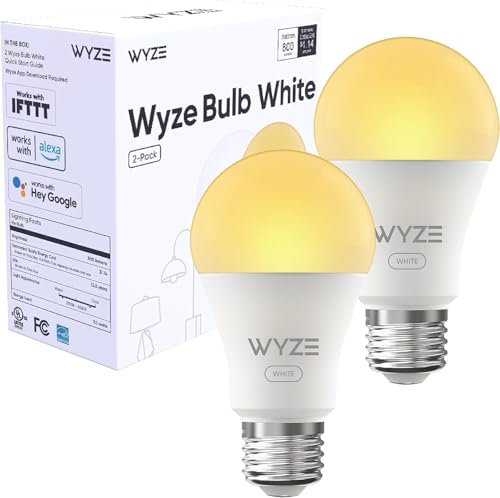
The Wyze Bulb is an affordable entry point into smart lighting. It is UL listed and owner reviews on Amazon note its straightforward setup and reliable performance for open fixtures. The bulb uses 8.5 watts and produces 800 lumens.
It lacks an enclosed fixture rating, so it should only be used in open lamps or fixtures with ventilation. The app is simple but functional, supporting schedules and voice control via Alexa and Google Assistant.
LIFX A19
Best No-HubPros
- No hub required
- Rated for enclosed fixtures
- Bright 1100 lumens
Cons
- Higher wattage generates more heat
- Price is higher than budget options
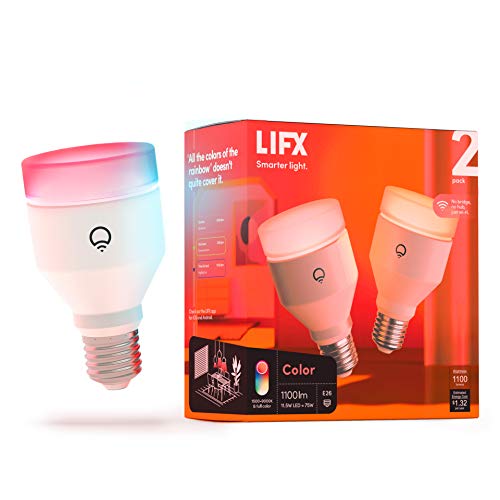
The LIFX A19 connects directly to Wi-Fi without a hub, simplifying setup. It is rated for enclosed fixtures, making it safe for ceiling lights. Owner reviews highlight its bright 1100 lumens and vibrant color range.
At 11 watts, it uses more power than competitors, which can increase heat output. Ensure the fixture has adequate ventilation. The app is feature-rich but some users report occasional connectivity drops on crowded networks.

TP-Link Kasa KL125
Best ReliabilityPros
- Very stable Wi-Fi connection
- Rated for enclosed fixtures
- Dimmable without flicker
Cons
- Limited color options (white only)
- No Bluetooth fallback
The TP-Link Kasa KL125 is known for its rock-solid Wi-Fi connection and reliable performance. It is rated for enclosed fixtures and supports dimming without flicker. Owner reviews on Amazon rate it highly for consistency and ease of use.
It produces 800 lumens at 9 watts and integrates with Alexa and Google Assistant. The Kasa app is intuitive and offers scheduling. The main limitation is that it only offers white light, not color.
Ring A19 Smart Bulb
Best for Ring EcosystemPros
- Integrates with Ring security
- Rated for enclosed fixtures
- Low power consumption
Cons
- Requires Ring Bridge
- Z-Wave may have range issues
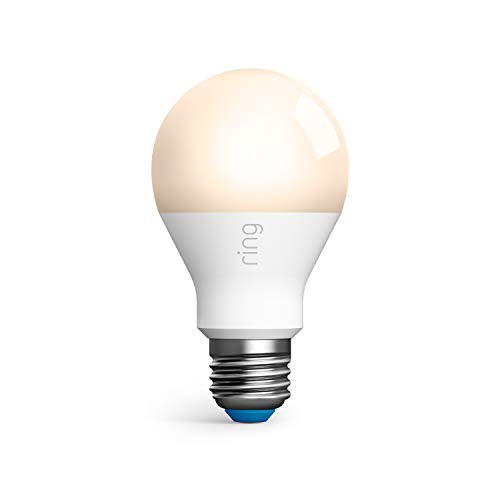
The Ring A19 Smart Bulb is designed for users already invested in the Ring security ecosystem. It is rated for enclosed fixtures and uses Z-Wave for communication, which requires a Ring Bridge. Owner reviews note good build quality and reliable performance within range.
It produces 800 lumens at only 8 watts, making it energy-efficient. The bulb integrates with Ring alarms and cameras for automated lighting. The main downside is the need for a bridge, which adds cost and complexity.
FAQs
Can I use a smart bulb in a ceiling fan?
Yes, but only if the bulb is rated for enclosed fixtures and the fan's maximum wattage rating is not exceeded.
Do smart bulbs need a neutral wire?
No, smart bulbs do not require a neutral wire because they connect directly to the socket and communicate wirelessly.
Can a smart bulb cause a fire?
Rarely, but it can happen if the bulb is damaged, installed in an enclosed fixture not rated for it, or exceeds the fixture's wattage limit.
Are smart bulbs safe to leave on 24/7?
Yes, as long as the bulb is rated for continuous use and installed in a well-ventilated fixture.
Do smart bulbs work with dimmer switches?
Only if the bulb is specifically labeled as dimmable and the dimmer switch is compatible with LED bulbs.
What happens if a smart bulb gets wet?
Water can cause a short circuit or fire. Only use bulbs rated for damp or wet locations in outdoor fixtures.
How do I know if my fixture is enclosed?
An enclosed fixture has a glass or plastic cover that seals the bulb completely, with no ventilation holes.
Can I use a smart bulb in a lamp?
Yes, lamps are typically open fixtures and are safe for most smart bulbs.
Do smart bulbs work during a power outage?
No, they require power to function. They will turn on when power is restored, depending on the bulb's default state setting.
What is the lifespan of a smart bulb?
Most smart bulbs are rated for 15,000 to 25,000 hours, but heat and frequent switching can reduce lifespan.
Our verdict
For overall safety and reliability, the Philips Hue White and Color Ambiance A19 is the best choice due to its enclosed fixture rating and strong certifications. For budget-conscious users, the Wyze Bulb offers good value for open fixtures, but avoid using it in enclosed spaces. Always prioritize bulbs with UL or FCC listings and match them to your fixture's ventilation.