Best Fingerprint Door Locks for Keyless Home Entry
A fingerprint door lock replaces keys and codes with a touch of your finger, and the best models still back that up with a keypad or physical key. Picking one is tricky because connectivity, fingerprint storage, and security certification vary widely between brands, so we compared seven locks by published specifications and owner-reported reliability.
Quick answer
Kwikset Halo Touch is the best all-around pick, pairing built-in WiFi with fast fingerprint recognition. Ultraloq U-Bolt Pro suits smart home owners who want Alexa and Google Assistant control. eufy Security Smart Lock Touch offers the longest battery life among fingerprint models we compared, making it ideal for low-maintenance households.
Why trust ToolBuyerHub
- We compare published manufacturer specifications rather than marketing copy.
- Fingerprint capacity and connectivity claims come from each brand's official product pages.
- Owners report battery life and reliability in verified retailer reviews, which we cross-check.
- We flag when a feature, like WiFi, requires a separate accessory purchase.
- Security certifications cited are ANSI/BHMA grades, an independent industry standard.
- Rankings reflect features and fit for common use cases, not paid placement.
Research updated August 2026.
Kwikset Halo Touch Fingerprint WiFi Smart Lock
Kwikset Halo Touch combines a capacitive fingerprint sensor with a WiFi radio built into the deadbolt itself.
| Model | Best for | Key specs | Rating |
|---|---|---|---|
| Kwikset Halo Touch Fingerprint WiFi Smart Lock | Best overall fingerprint door lock | Built-in WiFi, no hub required, Up to 50 fingerprints | 4.8/5 |
| Ultraloq U-Bolt Pro WiFi Bluetooth Fingerprint Smart Lock | Best for smart home and voice control integration | Bluetooth, plus WiFi via included Bridge adapter, Up to 95 fingerprints | 4.6/5 |
| eufy Security Smart Lock Touch | Best battery life among fingerprint locks | Bluetooth via eufy app, WiFi via separate bridge, Up to 6 months per eufy specifications | 4.5/5 |
| Yale Assure Lock 2 Touch | Best for highest security certification | ANSI/BHMA Grade 1, Bluetooth, WiFi and Matter via optional Yale Connect module | 4.5/5 |
| Aqara Smart Lock U100 | Best for Apple Home Key and iPhone households | Bluetooth, plus Zigbee/WiFi via Aqara hub, Fingerprint, NFC card or keyfob, keypad code, app | 4.4/5 |
| SIFELY Fingerprint Smart Deadbolt | Best budget fingerprint door lock | Bluetooth app control, no built-in WiFi, Fingerprint, keypad code, mechanical key, app | 4.3/5 |
| Ultraloq U-Bolt Bluetooth Fingerprint and Keypad Smart Lock | Best for buyers who do not want a WiFi bridge or subscription | Bluetooth only, no WiFi bridge included, Up to 95 fingerprints | 4.3/5 |

Kwikset Halo Touch Fingerprint WiFi Smart Lock
Best OverallPros
- Connects directly to home WiFi without a bridge
- Works with Kwikset app, Alexa, and Google Assistant
- Fingerprint unlock responds in under a second per Kwikset specs
Cons
- No Apple HomeKit support
- Touch sensor placement can pick up moisture in humid climates
Kwikset Halo Touch combines a capacitive fingerprint sensor with a WiFi radio built into the deadbolt itself. It skips the bridge or hub that many competitors require. The lock integrates with Kwikset's app plus Alexa and Google Assistant routines.
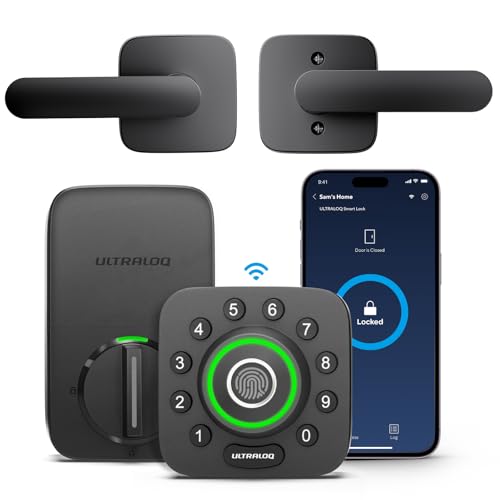
Ultraloq U-Bolt Pro WiFi Bluetooth Fingerprint Smart Lock
Best for Smart HomePros
- Auto-lock and auto-unlock via geofencing
- Large fingerprint storage for bigger households
- Mechanical key cylinder as a fallback
Cons
- Remote access needs the separate WiFi Bridge accessory
- App notifications can lag during connectivity drops
Ultraloq U-Bolt Pro pairs fingerprint, keypad, and app-based unlocking in one deadbolt. Bluetooth handles local control, while the included Bridge adapter adds WiFi for remote access. Auto-lock and geofencing round out the smart home features.

eufy Security Smart Lock Touch
Best Battery LifePros
- Long battery life reduces how often batteries need replacing
- Simple capacitive fingerprint sensor with quick recognition
- Compact deadbolt design fits standard US door prep
Cons
- No built-in keypad for numeric code entry
- Remote access requires an optional bridge accessory
eufy Security Smart Lock Touch focuses on fingerprint and Bluetooth app entry without a numeric keypad. It ships with a physical key backup and installs into a standard deadbolt cutout. Battery life is a standout spec against rival locks.

Yale Assure Lock 2 Touch
Best Build QualityPros
- Grade 1 rating exceeds most residential smart lock certifications
- Modular design lets owners add or swap connectivity modules
- Backed by Yale's established lock manufacturing history
Cons
- Fingerprint touch reader is a separate accessory, not always bundled
- WiFi and Matter support depend on buying the Connect module separately
Yale Assure Lock 2 Touch pairs a touchscreen keypad with an optional fingerprint reader module. The lock body carries a Grade 1 ANSI/BHMA rating, Yale's highest residential security tier. Connectivity modules for WiFi or Matter attach separately.

Aqara Smart Lock U100
Best for Apple UsersPros
- Apple Home Key lets iPhone or Apple Watch unlock via NFC tap
- Multiple unlock methods cover different household members
- Works standalone over Bluetooth without a hub
Cons
- Remote access and Matter support require an Aqara hub
- Setup process has more steps than single-method locks
Aqara Smart Lock U100 supports fingerprint, NFC, keypad, and app unlocking in one deadbolt. Apple Home Key lets an iPhone or Apple Watch unlock the door with an NFC tap. An optional Aqara hub adds remote access and Matter compatibility.
SIFELY Fingerprint Smart Deadbolt
Best Budget PickPros
- Lower cost than most fingerprint deadbolts on this list
- Fits standard US door prep without modification
- Includes keypad and mechanical key as backups
Cons
- No native WiFi, so remote access needs a separate gateway
- Build materials feel lighter duty than premium brands
SIFELY Fingerprint Smart Deadbolt covers the core entry methods, fingerprint, keypad, key, and Bluetooth app, without a premium price tag. It fits standard deadbolt door prep common in US homes. A separate gateway accessory adds remote app access.
Ultraloq U-Bolt Bluetooth Fingerprint and Keypad Smart Lock
Best No-Frills PickPros
- No required monthly subscription or cloud fee
- Auto-lock and keypad codes work without internet access
- Simpler setup since there is no bridge accessory to configure
Cons
- No built-in WiFi, so no remote unlock without buying the Bridge separately
- Fewer smart home integrations than the Pro version
Ultraloq U-Bolt keeps the fingerprint sensor, keypad, and auto-lock features from the Pro line but skips bundled WiFi hardware. Bluetooth handles app pairing and unlocking within range. It suits owners who do not need remote access.
How Fingerprint Door Locks Work
A capacitive sensor scans the ridges of a finger and converts the pattern into an encrypted template stored on the lock. When a finger touches the sensor again, the lock compares the new scan against stored templates and releases the bolt on a match. Most locks store templates locally rather than in the cloud, and nearly every model keeps a keypad or physical key as a backup in case a sensor gets dirty or a finger is injured.
WiFi, Bluetooth, and Hub Requirements
Connectivity determines how a lock can be controlled remotely. Some locks, like Kwikset Halo Touch, include WiFi directly in the deadbolt. Others rely on Bluetooth for local pairing and need a separate bridge or hub for app access away from home. Checking whether WiFi is built in or sold separately avoids surprise costs after purchase.
Security Certifications to Check
ANSI/BHMA grades rate residential locks on force resistance and durability, with Grade 1 the highest tier and Grade 2 common on mid-range smart locks. A higher grade generally means thicker bolt material and more resistance to forced entry. Certification applies to the lock hardware, not the fingerprint software, so both matter when comparing security.
Matching a Lock to Your Door and Household
Most US exterior doors use a standard 2-1/8 inch deadbolt bore, which fits the majority of fingerprint locks sold on Amazon. Households with several regular users benefit from higher fingerprint storage limits, while single-occupant homes rarely need more than a handful of stored prints. Anyone relying on remote unlock for guests or deliveries should confirm WiFi or hub requirements before buying.
FAQs
How does a fingerprint door lock work?
A sensor scans the finger's ridge pattern, converts it to an encrypted template, and compares future scans against that stored template to release the bolt.
Are fingerprint door locks secure?
Locks with a published ANSI/BHMA grade meet an independent force-resistance standard, and fingerprint templates are typically stored locally rather than in the cloud.
What happens if the fingerprint sensor fails to read a print?
Nearly all fingerprint locks include a backup keypad code or mechanical key so entry is not blocked by a dirty or unreadable sensor.
Do fingerprint door locks work in cold or wet weather?
Locks rated IP65 or similar are designed to resist rain and dust, though extreme cold can slow sensor response on some models.
Can a fingerprint door lock be hacked?
No lock is unhackable, but locally stored fingerprint templates and Grade 1 or Grade 2 hardware reduce common attack methods compared to basic keyed locks.
How many fingerprints can a smart lock store?
Storage ranges from about 50 fingerprints on Kwikset Halo Touch up to 95 on Ultraloq models, enough for most households.
Do fingerprint locks need WiFi to work?
No, fingerprint and keypad unlocking work offline. WiFi or a bridge accessory is only needed for remote app control.
What is the difference between ANSI Grade 1 and Grade 2 locks?
Grade 1 locks pass stricter force and cycle testing than Grade 2, making them more resistant to forced entry, per ANSI/BHMA standards.
Can I install a fingerprint door lock myself?
Most fit a standard 2-1/8 inch deadbolt bore and install with a screwdriver in under an hour, similar to swapping a standard deadbolt.
Our verdict
Kwikset Halo Touch is the strongest all-around fingerprint door lock thanks to its built-in WiFi and fast sensor. Ultraloq U-Bolt Pro and eufy Security Smart Lock Touch stand out for smart home control and battery life. Buyers on a tighter budget should look at SIFELY, which covers the same core entry methods for less.