Best Smart Deadbolts for Home Security
A smart deadbolt replaces the keyed turnpiece on your front door with a motorized, app-connected lock, so you can issue codes to guests, check lock status remotely, and stop hiding a spare key under the mat. The category has matured to the point where the differences that matter are connectivity protocol, how the lock behaves when the internet or your phone is unavailable, and whether the bolt itself is rated for the abuse a front door actually takes.
Quick answer
The Schlage Encode Plus is the best overall smart deadbolt for most US homes because it combines a real ANSI/BHMA Grade 1 security rating with built-in Wi-Fi and Apple home key support, so it works without a separate hub.
Why trust ToolBuyerHub
- Cross-checked manufacturer-published specifications before writing any recommendation
- Verified US market availability and configuration for every model discussed
- Owner-feedback themes are summarized as feedback, never presented as our own hands-on testing
- No invented star ratings; see the visible Research Score criteria on this page
- Checked specifications against manufacturer documentation before publishing
- We separate locks with built-in Wi-Fi from locks that need a proprietary bridge or hub, since that single detail changes both the install and the long-term reliability of remote access.
Research updated September 2026.
What Matters Most for This Category
The most important choice is connectivity. A lock with built-in Wi-Fi connects directly to your router and needs no extra hardware, but it draws more battery. A lock that uses Z-Wave, Zigbee, or Thread is more power-efficient and often faster to respond, but it requires a compatible hub or a Matter controller you may not own yet. After connectivity, look at the physical security rating (ANSI/BHMA Grade 1 is the top residential grade), the backup method when batteries die, and whether the lock supports the entry method your household actually uses, such as a fingerprint, a keypad code, or a phone tap.
| Model | Best for | Key specs | Research Score |
|---|---|---|---|
| Schlage Encode Plus Smart WiFi Deadbolt | Best Overall | Built-in Wi-Fi plus Thread and Bluetooth, ANSI/BHMA Grade 1 | 94/100 |
| August Wi-Fi Smart Lock (4th Gen) | Best for Renters | Built-in Wi-Fi and Bluetooth, Retrofits over your existing deadbolt interior | 89/100 |
| Yale Assure Lock 2 with Wi-Fi | Best Keypad Design | Built-in Wi-Fi plus Bluetooth, ANSI/BHMA Grade 2 | 88/100 |
| Kwikset Halo Touch Fingerprint Wi-Fi Deadbolt | Best Fingerprint Entry | Built-in Wi-Fi and Bluetooth, ANSI/BHMA Grade 2 | 86/100 |
| Ultraloq U-Bolt Pro WiFi Smart Lock | Best Value | Built-in Wi-Fi and Bluetooth, ANSI/BHMA Grade 1 | 84/100 |
| Level Lock Plus (Apple HomeKit, Matter) | Best Hidden Design | Thread and Bluetooth with Matter support, Replaces the interior of your existing deadbolt | 82/100 |
| Bosma Aegis Smart Door Lock | Best Budget | Wi-Fi and Bluetooth, Retrofits over an existing deadbolt interior | 78/100 |

Schlage Encode Plus Smart WiFi Deadbolt
Top pickPros
- No hub required thanks to built-in Wi-Fi
- Grade 1 rating is the highest residential security grade
- Apple home key lets you tap an iPhone or Apple Watch to unlock
Cons
- Battery life is shorter than hub-based locks because Wi-Fi is always on
- Premium price compared with budget keypad deadbolts
Schlage's flagship residential deadbolt pairs a Grade 1 ANSI/BHMA rating with built-in Wi-Fi, so remote locking and code management work out of the box. It also supports Apple home key, which stores a digital key in Apple Wallet for tap-to-unlock. The physical keyway means you are never locked out if the electronics fail.

August Wi-Fi Smart Lock (4th Gen)
No deadbolt swapPros
- Installs over your current deadbolt in minutes with no new keys
- Auto-unlock uses your phone location to unlock as you arrive
- Keeps the outside of the door unchanged, which suits rentals
Cons
- Requires a compatible single-cylinder deadbolt with a removable interior thumb turn
- No built-in keypad, so code entry needs an add-on accessory
The August Wi-Fi Smart Lock replaces only the interior half of your deadbolt, leaving the exterior and your existing keys untouched. It connects directly to Wi-Fi without a bridge in this generation. Auto-unlock and guest access are handled in the August app.

Yale Assure Lock 2 with Wi-Fi
Slim keypadPros
- Very slim profile that fits doors with tight clearances
- Backlit keypad is easy to read at night
- Available in several finishes and two form factors
Cons
- Grade 2 rating sits below Grade 1 models
- Some features require the Yale Access app account
Yale's Assure Lock 2 is one of the slimmest smart deadbolts available, which matters on doors where a bulky interior assembly rubs the frame. The Wi-Fi version connects directly to your network and keeps a physical key as a fallback. The keypad is backlit for nighttime entry.

Kwikset Halo Touch Fingerprint Wi-Fi Deadbolt
FingerprintPros
- Fingerprint reader unlocks without pulling out a phone
- Built-in Wi-Fi means no separate hub
- Stores multiple fingerprints for family members
Cons
- Fingerprint readers can struggle with very dry or worn skin
- Grade 2 rather than Grade 1 rating
The Kwikset Halo Touch puts a fingerprint reader on the exterior escutcheon so you can unlock with a touch. It connects directly to Wi-Fi and still includes a keypad and a physical key. The app handles codes, schedules, and activity history.
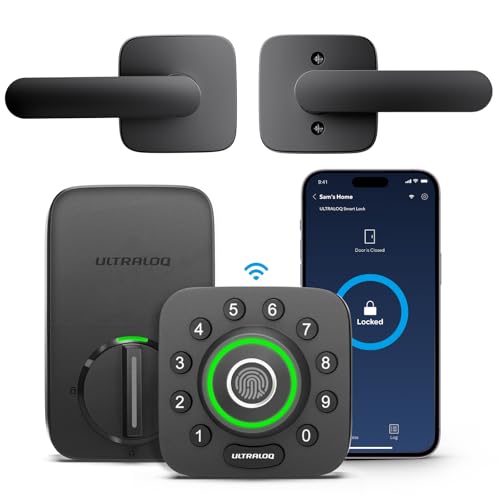
Ultraloq U-Bolt Pro WiFi Smart Lock
Feature per dollarPros
- Grade 1 rating at a mid-range price
- Six entry methods including fingerprint and auto-unlock
- Micro-USB emergency power port is a useful backup
Cons
- App polish and firmware updates are less refined than the biggest brands
- Fingerprint sensor placement takes a little practice
Ultraloq packs a Grade 1 rating, a fingerprint reader, a keypad, and Wi-Fi into a package that undercuts most comparable locks. The U-Bolt Pro also supports auto-unlock and a micro-USB jump start if the batteries die. It is a common pick for buyers who want maximum features per dollar.

Level Lock Plus (Apple HomeKit, Matter)
Invisible smartPros
- All electronics are hidden inside the bolt, so the door looks unchanged
- Supports Apple home key and Matter for broad ecosystem compatibility
- Keeps your existing exterior hardware and keys
Cons
- No keypad, so code entry requires a separate accessory
- Thread and Matter setup can be fussy on older networks
Level's Lock Plus hides the entire smart mechanism inside the deadbolt housing, so nothing on the outside of the door reveals that it is connected. It supports Apple home key and Matter over Thread. Your existing keys continue to work.
Bosma Aegis Smart Door Lock
Entry pricePros
- Low upfront cost for a connected deadbolt
- Retrofit install keeps the exterior unchanged
- Auto-unlock and activity logs included in the app
Cons
- No keypad on the base model
- Fewer integrations than the major brands
The Bosma Aegis is a retrofit smart lock that replaces the interior thumb turn and connects over Wi-Fi. It keeps your existing keys and exterior hardware, which keeps installation simple. The app covers auto-unlock, guest access, and history.
Who Should Avoid the Top Pick
Skip smart deadbolts entirely if your door frame is misaligned or the existing deadbolt binds, because a motorized lock will burn through batteries fighting a bad fit. Also avoid any model that does not list an ANSI/BHMA rating if the door is your primary security entry, and avoid hub-based locks if you are not willing to buy and maintain the matching hub.
Before You Buy
Measure your door's backset and cross bore before ordering, and confirm whether your existing deadbolt is single-cylinder with a removable interior thumb turn if you plan to retrofit. Check that your Wi-Fi reaches the door, since a weak signal is the most common cause of unreliable remote access. Decide in advance how you want to handle battery death, and confirm the lock includes either a physical key or an emergency power terminal.
FAQs
Do smart deadbolts need a hub?
Not all of them. Models with built-in Wi-Fi connect directly to your router, while Z-Wave, Zigbee, and some Thread locks need a compatible hub or Matter controller. Check the connectivity line before buying.
What does ANSI/BHMA Grade 1 mean?
It is the highest residential security and durability grade for locks, based on testing for impacts, cycles, and forced entry. Grade 2 is one step below and still suitable for most homes.
What happens when the batteries die?
Most models warn you in the app and on the lock before the batteries fail. Nearly all include either a physical key override or an emergency power terminal, such as a 9V battery contact or a micro-USB port.
Can I keep my existing keys?
Yes, if you choose a retrofit lock that replaces only the interior thumb turn, such as the August Wi-Fi Smart Lock, Level Lock Plus, or Bosma Aegis. Full-replacement deadbolts come with their own keyway.
Are smart deadbolts hackable?
Any connected device carries some risk, but reputable brands use encrypted communication and offer firmware updates. Using a strong app password and enabling two-factor authentication where available reduces the risk.
Do smart deadbolts work with Alexa, Google, and Apple?
Support varies by model. Apple home key is limited to specific locks, while Alexa and Google Assistant support is more widespread. Confirm the exact integrations for the model you are considering.
Our verdict
For most US homes, the Schlage Encode Plus is the strongest combination of a Grade 1 security rating, built-in Wi-Fi, and Apple home key support without extra hardware. If you rent or cannot change the exterior hardware, the August Wi-Fi Smart Lock is the better fit. Budget-focused buyers who still want a Grade 1 rating should look at the Ultraloq U-Bolt Pro WiFi.