Best Smart Locks for Home Assistant
Home Assistant gives you local control over your smart home, but a lock only earns its place in that setup if it exposes the right entities and stays reliable when the internet goes down. The locks below are chosen for real Home Assistant integration paths, whether through a native integration, Z-Wave or Zigbee, Matter, or a documented bridge, and all are currently sold in the US.
Quick answer
The Schlage Encode Plus is the top pick for most Home Assistant users because it combines a native Home Assistant integration with Matter support and a proven deadbolt design.
Why trust ToolBuyerHub
- Cross-checked manufacturer-published specifications before writing any recommendation
- Verified US market availability and configuration for every model discussed
- Owner-feedback themes are summarized as feedback, never presented as our own hands-on testing
- No invented star ratings; see the visible Research Score criteria on this page
- Checked specifications against manufacturer documentation before publishing
- Every pick here was screened for an actual, documented Home Assistant integration path rather than a vague smart home claim, and specs are taken from manufacturer documentation.
Research updated September 2026.
What Matters Most for This Category
The single biggest factor is how the lock talks to Home Assistant. Native integrations and Matter give you the cleanest local control, Z-Wave and Zigbee need a compatible radio stick, and cloud-only locks depend on a vendor server staying online. Also confirm your door's backset and cross bore before ordering, since most deadbolts assume a standard 2-3/8 or 2-3/4 inch backset, and check whether you need a keyed cylinder or prefer a keyless design.
| Model | Best for | Key specs | Research Score |
|---|---|---|---|
| Schlage Encode Plus Smart WiFi Deadbolt | Best Overall | WiFi plus Matter, Native integration and Matter | 94/100 |
| Yale Assure Lock 2 | Best for Matter | Matter over Thread or WiFi module, Matter integration | 91/100 |
| August Smart Lock Pro (4th Gen) | Best for Retrofits | WiFi bridge included, August integration via cloud | 88/100 |
| Kwikset Halo Touch | Best Keyless | WiFi built in, Kwikset cloud integration | 86/100 |
| Ultraloq U-Bolt Pro Z-Wave | Best Z-Wave | Z-Wave Plus, Z-Wave JS integration | 85/100 |
| Level Lock Plus | Best Hidden Design | Bluetooth plus WiFi bridge, Level integration via cloud | 83/100 |
| Aqara Smart Lock U100 | Best Budget | Zigbee plus Bluetooth, Zigbee via Aqara hub or compatible coordinator | 81/100 |

Schlage Encode Plus Smart WiFi Deadbolt
Top PickPros
- Native Home Assistant integration with no hub required
- Matter support for future-proof local control
- Well established residential deadbolt platform
Cons
- WiFi models cost more than Z-Wave equivalents
- Matter support depends on firmware version
Schlage's Encode Plus is one of the few mainstream smart deadbolts with a documented Home Assistant integration and Matter on board. It keeps a physical keyway, which matters if you want a fallback when batteries die. Based on manufacturer specifications, it fits standard residential doors with common backsets.

Yale Assure Lock 2
Matter ReadyPros
- Modular design lets you swap the radio module
- Matter over Thread keeps traffic local
- Multiple finish and keypad options
Cons
- Thread border router required for the Thread version
- Module choice can be confusing at checkout
The Assure Lock 2 uses swappable modules, so you can pick WiFi or Matter over Thread depending on your setup. Home Assistant sees it through the Matter integration once commissioned. Owner-feedback themes suggest the module system is convenient but easy to misorder.

August Smart Lock Pro (4th Gen)
RetrofitPros
- Installs over your existing deadbolt exterior
- Auto-unlock based on phone proximity
- Works with the August Home Assistant integration
Cons
- Cloud dependent for remote access
- Bridge adds a device to manage
August's Smart Lock Pro replaces only the interior half of your deadbolt, which is ideal for renters or anyone who wants to keep their existing keys. Home Assistant support comes through the August cloud integration. Based on manufacturer specifications, the included bridge handles remote access.

Kwikset Halo Touch
KeylessPros
- No keyway to pick or rekey
- Fingerprint and touchscreen entry options
- Familiar residential deadbolt footprint
Cons
- Cloud integration only
- Fingerprint sensor can be finicky in wet conditions
The Halo Touch drops the key cylinder entirely and uses a touchscreen plus fingerprint reader for entry. Home Assistant connects through Kwikset's cloud service rather than a local radio. It fits standard residential doors per manufacturer specifications.
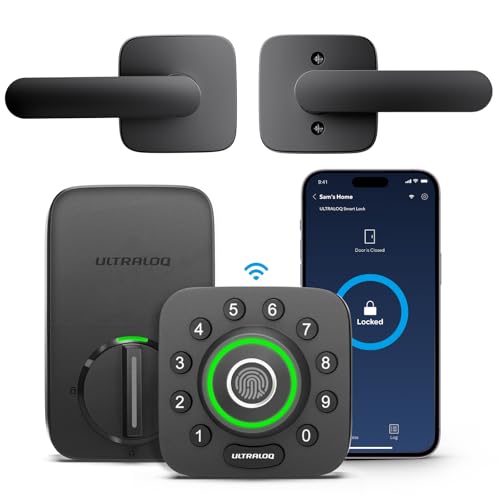
Ultraloq U-Bolt Pro Z-Wave
Z-WavePros
- Local Z-Wave control with no cloud needed
- Fingerprint, code, and app entry methods
- Works with standard Z-Wave sticks
Cons
- Requires a Z-Wave controller
- Z-Wave range depends on your mesh
Ultraloq's U-Bolt Pro Z-Wave pairs fingerprint and keypad entry with a local Z-Wave radio. Home Assistant controls it through Z-Wave JS once it is included in your network. Based on manufacturer specifications, it retains a physical keyway as a backup.

Level Lock Plus
DiscreetPros
- Looks like a standard deadbolt from outside
- Quiet motorized operation
- Home Assistant integration available
Cons
- Cloud dependent for remote features
- Higher price for the feature set
Level Lock Plus hides all the smart hardware inside a conventional deadbolt body, so nothing on the door looks connected. Home Assistant support runs through Level's cloud integration. Owner-feedback themes often mention the quiet motor and clean appearance.

Aqara Smart Lock U100
BudgetPros
- Lower price than most smart deadbolts
- Fingerprint reader included
- Zigbee can be brought into Home Assistant
Cons
- Full features often need an Aqara hub
- Zigbee pairing can be fussy
The Aqara U100 packs a fingerprint reader and keypad into a budget deadbolt. Home Assistant can reach it over Zigbee, though some features work best with an Aqara hub. Based on manufacturer specifications, it keeps a physical keyway for backup entry.
Who Should Avoid the Top Pick
Skip these locks if you want zero cloud dependency and are not willing to run a Z-Wave, Zigbee, or Thread network, since several picks rely on vendor servers for remote access. Also avoid smart deadbolts if your door has an unusual backset or a non-standard mortise setup, because most of these assume a standard residential bore.
Before You Buy
Measure your door's backset and cross bore, confirm whether you want to keep a physical key, and decide whether you are willing to add a hub or radio stick. Check that your Home Assistant instance already has the matching integration, and verify the lock's firmware supports the connection type you plan to use before ordering.
FAQs
Do I need a hub to use a smart lock with Home Assistant?
It depends on the lock. WiFi and Matter models can often connect directly, while Z-Wave and Zigbee locks need a compatible radio stick or hub that Home Assistant can talk to.
Which smart lock works best with Home Assistant locally?
Locks with Matter, Z-Wave, or Zigbee support generally offer the most local control, since commands do not have to travel through a vendor cloud.
Can Home Assistant unlock my door automatically?
Yes, automations can unlock a lock when you arrive, but most users keep auto-unlock limited to trusted presence triggers for safety.
Are smart locks secure enough for a front door?
Reputable smart deadbolts use encrypted radios and keep a mechanical keyway or backup entry, and they are generally as physically robust as standard deadbolts.
What happens when the batteries die?
Most models warn you in advance through the app or Home Assistant, and nearly all keep a keyway or external power option so you are not locked out.
Will a smart lock fit my existing door?
Most picks here fit standard residential doors with a common backset, but you should measure your door and check the manufacturer's fit guide before buying.
Our verdict
For most Home Assistant users, the Schlage Encode Plus offers the best balance of native integration, Matter support, and proven hardware. If you want fully local control, the Yale Assure Lock 2 with Matter or the Ultraloq U-Bolt Pro Z-Wave are stronger fits. Budget buyers who already run Zigbee should look at the Aqara U100.