Best Smart Locks for Home Offices
A home office often holds the laptop, client files, and gear that would be painful to lose, so the lock on that door deserves more thought than the one on a hallway closet. Smart locks add keyless entry, auto-locking schedules, and activity logs that a standard deadbolt cannot match, and the right model depends on whether you want app control, a keypad, or integration with the smart home system you already run.
Quick answer
The Schlage Encode Plus is the best overall smart lock for a home office thanks to its built-in WiFi, Apple Home Key support, and ANSI Grade 1 security rating.
Why trust ToolBuyerHub
- Cross-checked manufacturer-published specifications before writing any recommendation
- Verified US market availability and configuration for every model discussed
- Owner-feedback themes are summarized as feedback, never presented as our own hands-on testing
- No invented star ratings; see the visible Research Score criteria on this page
- Checked specifications against manufacturer documentation before publishing
- Every pick here is a currently sold US model from an established lock or smart home brand, and specs are drawn from manufacturer documentation rather than copied retailer marketing.
Research updated September 2026.
What Matters Most for This Category
The single biggest factor is how the lock connects: WiFi models work without a hub but can drain batteries faster, while Bluetooth and Z-Wave models need a bridge or hub you may already own. After that, check the door prep. Most home office doors use a standard 2-3/8 inch or 2-3/4 inch backset and a 1-3/8 inch to 1-3/4 inch thickness, but older interior doors sometimes fall outside that range. Finally, decide whether you need a keypad for guests and cleaners, auto-lock scheduling for peace of mind, or Apple Home Key and Matter support for a modern smart home setup.
| Model | Best for | Key specs | Research Score |
|---|---|---|---|
| Schlage Encode Plus Smart WiFi Deadbolt | Best Overall | WiFi plus Bluetooth plus Thread, Keypad, app, Apple Home Key, physical key | 94/100 |
| August Smart Lock Pro (4th Gen) | Best for Renters | Bluetooth plus WiFi bridge included, Retrofits existing deadbolt interior | 90/100 |
| Yale Assure Lock 2 Keypad with Wi-Fi | Best Keypad Design | WiFi plus Bluetooth, Backlit keypad, app, optional key | 89/100 |
| Kwikset Halo Touch Fingerprint Wi-Fi Deadbolt | Best Fingerprint Entry | WiFi plus Bluetooth, Fingerprint, keypad, app, key | 87/100 |
| Ultraloq U-Bolt Pro WiFi Smart Lock | Best Value | WiFi plus Bluetooth, Fingerprint, keypad, app, key, shake to open | 85/100 |
| Level Lock Plus with Keypad | Best Invisible Design | Bluetooth plus WiFi via Level Connect, Fits inside existing deadbolt hardware | 83/100 |
| Wyze Lock Bolt Fingerprint Deadbolt | Best Budget | Bluetooth only, Fingerprint and keypad | 80/100 |

Schlage Encode Plus Smart WiFi Deadbolt
Top PickPros
- Built-in WiFi means no separate hub
- Apple Home Key and Matter support for modern ecosystems
- Grade 1 residential security rating
Cons
- Premium price compared with budget keypad locks
- Battery life shortens with heavy WiFi use
Schlage's flagship deadbolt combines a built-in WiFi radio with a keypad, physical keyway, and Apple Home Key tap access. It is one of the few consumer locks rated ANSI/BHMA Grade 1, which matters if the office door is also an exterior entry.

August Smart Lock Pro (4th Gen)
Renter FriendlyPros
- Keeps the existing exterior key and cylinder
- Auto-unlock as you arrive works well for hands-full entries
- Good fit for apartments where the landlord controls the door
Cons
- No built-in keypad unless you buy the separate keypad
- Requires the included Connect bridge for remote access
The August Smart Lock Pro replaces only the interior half of your deadbolt, so the outside of the door looks unchanged. That makes it a practical choice for renters or anyone who cannot swap the full lockset.

Yale Assure Lock 2 Keypad with Wi-Fi
Sleek KeypadPros
- Slim, modern keypad that suits interior doors
- Swappable radio module lets you move to Z-Wave or Matter later
- Comes in multiple finishes to match office decor
Cons
- WiFi module must be installed for remote access
- Some users report keypad wear over years of heavy use
Yale's Assure Lock 2 line uses a modular design, so the same lock body can run on WiFi, Z-Wave, or Matter depending on which module you install. The keypad version is a clean fit for a home office door that guests and family also use.

Kwikset Halo Touch Fingerprint Wi-Fi Deadbolt
Touch EntryPros
- Fingerprint reader avoids typing codes with full hands
- Built-in WiFi needs no hub
- Backlit keypad as a backup entry method
Cons
- Fingerprint sensors can struggle with very dry or worn skin
- Bulkier look than minimalist keypad locks
Kwikset's Halo Touch stores up to 100 fingerprints and pairs them with a standard keypad and app control. For a home office where you walk in carrying coffee and a laptop bag, touch entry is genuinely convenient.
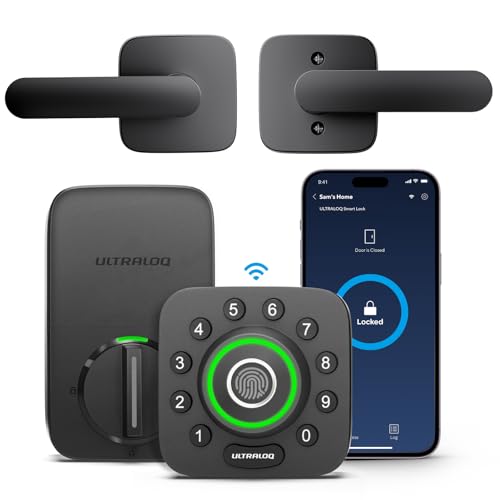
Ultraloq U-Bolt Pro WiFi Smart Lock
Feature HeavyPros
- Six entry methods in one lock for the price
- Grade 1 rating at a mid-range cost
- Auto-lock and auto-unlock scheduling in the app
Cons
- App polish is not as refined as bigger brands
- Fingerprint reader placement takes getting used to
Ultraloq packs fingerprint, keypad, app, key, and even a shake-to-open gesture into a single deadbolt at a price below most flagship locks. It carries an ANSI Grade 1 rating, which is uncommon at this price point.

Level Lock Plus with Keypad
Hidden TechPros
- All electronics hide inside the door, so nothing looks smart
- Works with HomeKit, Alexa, and Google via bridge
- Keeps your existing exterior hardware and finish
Cons
- Remote access needs the separate Level Connect bridge
- Battery access requires removing the lock interior
Level's approach hides the entire smart mechanism inside the door, leaving the exterior looking like a plain deadbolt. The Plus bundle adds a keypad for code entry, and HomeKit users get a clean integration.

Wyze Lock Bolt Fingerprint Deadbolt
Budget PickPros
- Very low price for fingerprint and keypad entry
- Simple installation over an existing deadbolt
- Local fingerprint storage rather than cloud
Cons
- No WiFi, so no remote access or app control away from home
- No auto-unlock on arrival
The Wyze Lock Bolt focuses on the essentials: fingerprint and keypad entry at a budget price. It skips WiFi entirely, which keeps the cost down but also means no remote locking or activity alerts when you are away.
Who Should Avoid the Top Pick
Skip a smart lock for the home office if the door is a flimsy hollow-core interior door with no deadbolt prep, since the lock is only as strong as the door and frame around it. Also avoid WiFi locks if you are not willing to change batteries regularly, and avoid any model that does not list your door's backset and thickness in its compatibility guide.
Before You Buy
Measure your door thickness, backset, and cross bore before ordering, and confirm whether the door already has a deadbolt or only a knob latch. Check whether you want remote access, since that usually means built-in WiFi or a separate bridge, and decide if you need Apple Home Key, Matter, or Z-Wave to match your existing smart home hub.
FAQs
Do I need a deadbolt for a smart lock?
Most smart locks replace an existing deadbolt, so the door needs a standard deadbolt bore and latch hole. Some retrofit models like the August Smart Lock Pro work with your current deadbolt, while others require a full replacement.
Will a smart lock work on an interior door?
Yes, as long as the door has standard deadbolt prep and enough thickness, typically 1-3/8 to 1-3/4 inches. Hollow-core doors are weaker, so a smart lock adds convenience more than real security there.
Do smart locks need WiFi?
Not always. Bluetooth-only models work locally through your phone, while WiFi or a bridge is needed for remote locking, activity logs, and voice assistant control when you are away.
How long do smart lock batteries last?
Most run on AA batteries and last several months to about a year depending on usage. WiFi models and frequent motor operation drain batteries faster than Bluetooth-only locks.
Can I keep my existing keys?
Some retrofit locks like the August Smart Lock Pro keep your current exterior key and cylinder. Full replacement deadbolts usually come with their own keyway, though some brands offer rekeying kits.
Are smart locks secure enough for a home office?
A quality smart lock with an ANSI Grade 1 or Grade 2 rating is as secure as a standard deadbolt, and features like auto-lock and activity logs can make it more secure in practice. The door and frame strength still matter most.
Our verdict
For most home offices, the Schlage Encode Plus is the safest all-around choice because it combines built-in WiFi, Apple Home Key, and a Grade 1 rating in one lock. If you rent or cannot change the exterior hardware, the August Smart Lock Pro is the better fit, and the Wyze Lock Bolt covers basic fingerprint entry for far less money.