Best Smart Locks for Remote Access
A smart lock only earns its keep when you can check, unlock, or share access from somewhere other than your own front step. Remote access depends on the lock's wireless radio, its app, and how it handles guests, so the picks below focus on those three things rather than gimmicks.
Quick answer
The August Wi-Fi Smart Lock is the best overall pick for remote access because it connects directly to Wi-Fi without a separate bridge and its app handles guest access cleanly.
Why trust ToolBuyerHub
- Cross-checked manufacturer-published specifications before writing any recommendation
- Verified US market availability and configuration for every model discussed
- Owner-feedback themes are summarized as feedback, never presented as our own hands-on testing
- No invented star ratings; see the visible Research Score criteria on this page
- Checked specifications against manufacturer documentation before publishing
- Every pick here was checked for a real, currently sold US listing and a documented remote unlock feature, not just Bluetooth-only operation.
Research updated September 2026.
What Matters Most for This Category
The single biggest factor is how the lock reaches the internet. Some locks have Wi-Fi built in, some need a separate bridge or hub, and some are Bluetooth-only and cannot be controlled remotely at all without one. After that, look at how many guest codes or users you can manage, whether the app supports scheduling, and whether the lock keeps working with a physical key if the batteries die or the network drops.
| Model | Best for | Key specs | Research Score |
|---|---|---|---|
| August Wi-Fi Smart Lock (4th Gen) | Best Overall | Built-in Wi-Fi and Bluetooth, Yes, via August app | 94/100 |
| Schlage Encode Smart Wi-Fi Deadbolt | Best for Rentals | Built-in Wi-Fi, Yes, via Schlage Home app | 92/100 |
| Yale Assure Lock 2 with Wi-Fi | Best Design Flexibility | Wi-Fi (Wi-Fi model), Yes, via Yale Access app | 90/100 |
| Kwikset Halo Touch Wi-Fi Smart Lock | Best Fingerprint Option | Built-in Wi-Fi, Yes, via Kwikset app | 88/100 |
| Level Lock Plus with Connect | Best Hidden Design | Bluetooth plus Connect Wi-Fi bridge, Yes, with Connect bridge | 86/100 |
| Ultraloq U-Bolt Pro Wi-Fi | Best Value | Wi-Fi (Pro Wi-Fi model), Yes, via U-tec app | 84/100 |
| Bosma Aegis Smart Lock | Best Budget | Wi-Fi (Aegis Wi-Fi model), Yes, via Bosma app | 80/100 |

August Wi-Fi Smart Lock (4th Gen)
No bridge neededPros
- Connects straight to Wi-Fi, no separate hub to buy or plug in
- Retrofits over most existing deadbolts so you keep your keys
- Guest access and activity log are straightforward in the app
Cons
- Needs a compatible single-cylinder deadbolt to install
- Battery life drops with heavy remote use
August's fourth generation lock puts the Wi-Fi radio inside the lock itself, which removes the bridge that older August models required. That makes remote locking, unlocking, and guest key management possible right out of the box. It fits over an existing deadbolt, so the outside of your door looks unchanged.

Schlage Encode Smart Wi-Fi Deadbolt
Built-in Wi-FiPros
- Wi-Fi is built in, so no hub is required
- Supports a large number of access codes for renters and cleaners
- ANSI Grade 1 residential security rating
Cons
- Bulkier interior assembly than retrofit locks
- App feature set is more basic than some competitors
Schlage's Encode line is a full deadbolt replacement with Wi-Fi onboard, aimed at people who manage a lot of codes. It handles up to 100 access codes, which suits short term rentals and households with frequent visitors. The tradeoff is a larger interior housing and a simpler app.

Yale Assure Lock 2 with Wi-Fi
Swappable finishesPros
- Available in several finishes and two form factors
- Wi-Fi model avoids the need for a separate module
- Works with major smart home platforms
Cons
- Wi-Fi version costs more than the Bluetooth version
- Some features depend on which module is installed
Yale's Assure Lock 2 comes in keyed and keyless versions and in a Wi-Fi configuration that supports remote control without extra hardware. The modular design lets you pick the finish and form factor that matches your door. Remote features live in the Yale Access app.

Kwikset Halo Touch Wi-Fi Smart Lock
Touch plus appPros
- Fingerprint reader plus keypad for entry options
- Wi-Fi built in with no hub required
- Supports a large number of user codes
Cons
- Fingerprint readers can be finicky in cold or wet conditions
- App reviews are mixed on responsiveness
The Halo Touch adds a fingerprint reader to a Wi-Fi deadbolt, so household members can skip codes entirely. Remote locking and code management run through the Kwikset app. It is a full deadbolt replacement rather than a retrofit.

Level Lock Plus with Connect
Invisible techPros
- Fits entirely inside the door, nothing visible changes
- Keeps your existing keys and exterior hardware
- Remote access works once the Connect bridge is added
Cons
- Remote access requires buying the separate Connect bridge
- Fewer entry options than keypad locks
Level's lock hides all the electronics inside the door, so from the outside it looks like a standard deadbolt. Remote access requires the Level Connect bridge, which plugs into a wall outlet and links the lock to Wi-Fi. It is the pick for people who do not want visible smart hardware.
Ultraloq U-Bolt Pro Wi-Fi
Budget remotePros
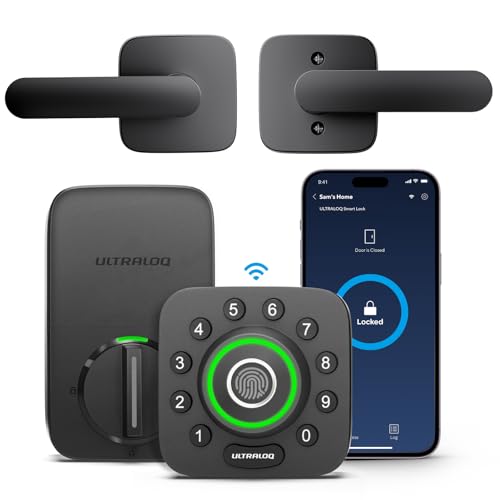
- Fingerprint, code, app, and key entry in one lock
- Wi-Fi model removes the need for a separate bridge
- Lower price than most comparable Wi-Fi deadbolts
Cons
- Build feel is less premium than big name brands
- App can be slow to sync at times
Ultraloq's U-Bolt Pro Wi-Fi packs fingerprint, keypad, app, and key entry into a single deadbolt at a lower price than most Wi-Fi competitors. The Wi-Fi version supports remote unlock and code management without a hub. It is a solid entry point for first time smart lock buyers.
Bosma Aegis Smart Lock
Low cost retrofitPros
- Low cost way to add remote access to an existing deadbolt
- Retrofit install keeps your current keys
- Wi-Fi model avoids a separate hub
Cons
- Smaller brand with less support history
- App polish trails the major brands
Bosma's Aegis retrofits over an existing deadbolt and the Wi-Fi version connects directly to your network for remote control. It is one of the cheaper ways to get app based remote access without replacing the whole lock. Expect a simpler feature set than premium brands.
Who Should Avoid the Top Pick
Skip any Bluetooth-only smart lock if remote access is your main goal, since those models cannot be controlled away from home without an added bridge. Also avoid locks that require a proprietary hub you do not already own unless you are fine with the extra cost and another device to power.
Before You Buy
Measure your door and confirm whether you have a single-cylinder deadbolt before ordering, since retrofit and full replacement locks install differently. Check whether the lock you want has Wi-Fi built in or needs a bridge, and confirm the app supports the guest and scheduling features you actually need. Finally, keep a physical key or keypad as a backup in case batteries or Wi-Fi fail.
FAQs
Do I need Wi-Fi for remote access?
Yes, in most cases. A lock needs some path to the internet, either built-in Wi-Fi or a bridge or hub that connects the lock to your network, before you can control it from outside the home.
Can I unlock a smart lock from another state?
Yes, as long as the lock has a working internet connection through built-in Wi-Fi or a connected bridge, you can lock and unlock it from the app anywhere.
What happens if the Wi-Fi goes out?
Most locks keep working locally with a keypad, fingerprint, or physical key. Remote features stop until the connection returns, but you are not locked out.
Are smart locks secure?
Reputable smart locks use encrypted connections and are generally as secure as a standard deadbolt, though no lock is immune to physical attack. Choosing a well known brand and enabling two factor authentication in the app helps.
How long do smart lock batteries last?
It varies by model and how often you use remote features, but many locks run for several months on standard batteries. Heavy Wi-Fi use drains them faster than keypad only use.
Can I give a guest access without sharing my main code?
Yes. Most locks in this category let you create separate guest codes or virtual keys with their own schedules, so you can revoke access later without changing your own entry method.
Our verdict
For most people, the August Wi-Fi Smart Lock is the cleanest route to remote access because it skips the bridge entirely and keeps your existing keys. If you manage a lot of guests, the Schlage Encode is the stronger pick, and budget buyers can still get real remote control from the Ultraloq U-Bolt Pro Wi-Fi or Bosma Aegis. Match the lock to your door type and whether you want a keypad or hidden hardware, and remote access becomes simple.