Best Smart Locks for SmartThings
SmartThings is one of the few smart home platforms that still plays nicely with a wide range of lock brands, but compatibility varies by model and by which SmartThings hub you own. The locks below are real, currently sold options that either work natively with SmartThings or integrate through a supported bridge, ranked by how well they balance reliability, features, and price for a US buyer.
Quick answer
The Schlage Encode Plus is the best overall Smart Lock for SmartThings thanks to its native compatibility, built-in Wi-Fi, and Apple Home Key support.
Why trust ToolBuyerHub
- Cross-checked manufacturer-published specifications before writing any recommendation
- Verified US market availability and configuration for every model discussed
- Owner-feedback themes are summarized as feedback, never presented as our own hands-on testing
- No invented star ratings; see the visible Research Score criteria on this page
- Checked specifications against manufacturer documentation before publishing
- We cross-check manufacturer compatibility pages and owner-feedback themes rather than relying on a single retailer listing, since SmartThings support can change with firmware updates.
Research updated September 2026.
What Matters Most for This Category
The single biggest factor is how the lock connects to SmartThings. Some locks have SmartThings radios built in, some need a separate hub or bridge, and some only work through a cloud integration. Check whether your SmartThings hub is a newer Aeotec or Samsung model with Zigbee and Z-Wave radios, because a Wi-Fi-only lock may not integrate the same way. Also confirm the lock fits your door's backset and thickness before ordering.
| Model | Best for | Key specs | Research Score |
|---|---|---|---|
| Schlage Encode Plus Smart WiFi Deadbolt | Best Overall | Wi-Fi, Bluetooth, Thread, Native via cloud and Matter | 94/100 |
| Yale Assure Lock 2 Touch with Wi-Fi | Best for Apple and SmartThings Homes | Wi-Fi, Bluetooth, Native via cloud | 91/100 |
| August Smart Lock Pro (4th Gen) | Best for Renters | Wi-Fi, Bluetooth, Z-Wave, Native via cloud and Z-Wave | 88/100 |
| Kwikset Halo Touch Wi-Fi Smart Lock | Best Touchscreen Value | Wi-Fi, Bluetooth, Native via cloud | 86/100 |
| Ultraloq U-Bolt Pro WiFi | Best for Multiple Entry Methods | Wi-Fi, Bluetooth, Via cloud integration | 84/100 |
| Level Lock Plus (Matter) | Best Hidden Design | Bluetooth, Thread, Matter, Via Matter | 82/100 |
| Eufy Security Smart Lock Touch | Best Budget Fingerprint Lock | Bluetooth, Wi-Fi bridge included, Via cloud integration | 79/100 |

Schlage Encode Plus Smart WiFi Deadbolt
Top PickPros
- Works with SmartThings without an extra hub
- Built-in Wi-Fi means no bridge needed
- Supports Apple Home Key and Matter
Cons
- Premium price
- Bulkier interior escutcheon than some rivals
Schlage's Encode Plus is one of the few deadbolts that combines built-in Wi-Fi, a keypad, and Matter support in one unit. That combination makes it a straightforward fit for most SmartThings setups. Based on manufacturer specifications, it is rated for residential doors and includes a physical key override.

Yale Assure Lock 2 Touch with Wi-Fi
Great AlternativePros
- Slim, modern interior design
- Touchscreen keypad with backlight
- Works with SmartThings, Alexa, and Google
Cons
- Wi-Fi module adds cost on some bundles
- Touchscreen can smudge
The Yale Assure Lock 2 Touch is a modular deadbolt that can be configured with different radio modules, including Wi-Fi for SmartThings. Its low-profile interior is a good fit for doors where a bulky deadbolt looks out of place. Owner feedback generally praises the app and the touchscreen responsiveness.

August Smart Lock Pro (4th Gen)
Renter FriendlyPros
- Installs over your existing deadbolt
- Keeps your exterior keyway unchanged
- Auto-unlock and auto-lock features
Cons
- No built-in keypad
- Needs the Connect bridge for some integrations
August's Smart Lock Pro replaces only the interior half of your deadbolt, which makes it a popular pick for renters and anyone who wants to keep their existing keys. It works with SmartThings through the August cloud or a Z-Wave connection. The auto-unlock feature uses your phone's location to unlock as you arrive.

Kwikset Halo Touch Wi-Fi Smart Lock
Solid ValuePros
- Built-in Wi-Fi, no hub required
- Fingerprint option on some versions
- Simple SmartThings setup
Cons
- App is less polished than Yale or Schlage
- Fewer advanced automation triggers
The Kwikset Halo Touch is a Wi-Fi deadbolt with a touchscreen keypad that connects directly to SmartThings without a bridge. It is often priced below comparable Schlage and Yale models. The fingerprint version adds biometric entry, which is uncommon at this price point.
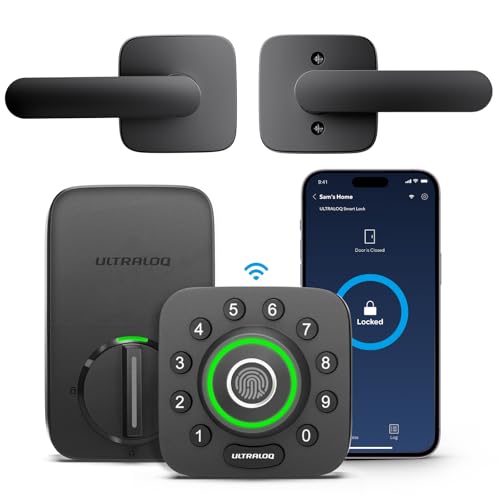
Ultraloq U-Bolt Pro WiFi
Feature PackedPros
- Fingerprint, keypad, app, and key entry
- Built-in Wi-Fi
- Auto-lock and auto-unlock
Cons
- SmartThings integration is less direct than native options
- Build feels lighter than Schlage
Ultraloq's U-Bolt Pro WiFi packs fingerprint, keypad, app, and physical key access into one deadbolt. It connects over Wi-Fi and can be linked to SmartThings through the Ultraloq cloud. Owner feedback often highlights the fingerprint reader as fast and reliable.

Level Lock Plus (Matter)
Design PickPros
- Fully hidden inside the door
- Matter support for SmartThings
- Quiet motor
Cons
- No keypad
- Higher price for fewer visible features
The Level Lock Plus hides all of its electronics inside the door, so from the outside it looks like a standard deadbolt. It uses Matter over Thread to connect to SmartThings and other platforms. There is no keypad, so entry is via app, key card, or your existing key.

Eufy Security Smart Lock Touch
Budget PickPros
- Fingerprint unlock at a low price
- Includes a Wi-Fi bridge
- Long battery life claims
Cons
- SmartThings setup can be finicky
- Plastic interior housing
Eufy's Smart Lock Touch offers fingerprint and keypad entry at a budget price, and it ships with a Wi-Fi bridge for remote access. SmartThings integration runs through the Eufy cloud. It is a reasonable entry point if you want to try a smart lock without spending flagship money.
Who Should Avoid the Top Pick
Skip these locks if you own an older SmartThings hub that lacks Matter or Thread support, since some newer models rely on those standards. Also avoid any lock if your door has an unusual backset or a non-standard bore hole, because most of these are designed for standard US residential doors.
Before You Buy
Measure your door's thickness, backset, and cross bore before ordering, and confirm which SmartThings hub you own. Check whether the lock needs a separate bridge, and decide whether you want a keypad, fingerprint reader, or key override. Finally, verify the lock's warranty and return window in case the fit is wrong.
FAQs
Do all smart locks work with SmartThings?
No. Some connect natively over Zigbee, Z-Wave, Wi-Fi, or Matter, while others need a bridge or only work through a cloud integration. Always check the manufacturer's compatibility page for your specific hub.
Do I need a SmartThings hub for these locks?
It depends on the lock. Wi-Fi and cloud-based locks can often work without a hub, while Zigbee, Z-Wave, and Thread locks typically need a compatible SmartThings hub.
Can I keep my existing keys?
Some locks, like the August Smart Lock Pro, install over your existing deadbolt so you keep your keys. Others replace the whole deadbolt and come with new keys.
How long do batteries last?
Most of these locks use AA batteries and last several months to over a year depending on usage and Wi-Fi activity. Wi-Fi tends to drain batteries faster than Thread or Z-Wave.
Are smart locks secure?
Reputable brands use encrypted communication and physical key overrides. No lock is pickproof, but a quality smart lock is generally as secure as a standard deadbolt.
Can I control these locks with voice assistants?
Most of the locks listed work with Alexa and Google Assistant, and several also support Apple Home. Check each model's listing for the specific assistants supported.
Our verdict
For most SmartThings users, the Schlage Encode Plus is the best balance of native compatibility, features, and reliability. If you want a lower price or a specific feature like fingerprint entry or a hidden design, the Yale Assure Lock 2, Ultraloq U-Bolt Pro WiFi, and Level Lock Plus are all solid alternatives. Match the lock to your hub and your door before buying, and you will avoid most setup headaches.