Best Smart Locks for Vacation Homes
A vacation home lock has a harder job than a primary-residence lock: it has to let cleaners, guests, and contractors in without handing out permanent keys, and it has to keep working when nobody is there to babysit it. The models below were chosen for remote access, guest-code management, and durability in second homes, based on manufacturer specifications and owner-feedback themes rather than hands-on lab testing.
Quick answer
The Schlage Encode Plus is the best overall smart lock for most vacation homes thanks to built-in Wi-Fi, Apple home key support, and a long-standing residential lock reputation.
Why trust ToolBuyerHub
- Cross-checked manufacturer-published specifications before writing any recommendation
- Verified US market availability and configuration for every model discussed
- Owner-feedback themes are summarized as feedback, never presented as our own hands-on testing
- No invented star ratings; see the visible Research Score criteria on this page
- Checked specifications against manufacturer documentation before publishing
- We prioritize locks with offline code storage and local keypad entry, since a vacation home may lose internet while guests are still arriving.
Research updated September 2026.
What Matters Most for This Category
For a vacation home, the deciding factors are usually connectivity and guest management, not raw smart-home tricks. A lock with built-in Wi-Fi avoids a separate hub, and one that stores codes locally keeps working if the router goes down. Look at how many unique guest codes the app supports, whether you can schedule codes to expire automatically, and whether there is a physical keyway as a fallback. Battery life and weather resistance matter more here than in a full-time home because the lock may sit unused in cold or heat for weeks.
| Model | Best for | Key specs | Research Score |
|---|---|---|---|
| Schlage Encode Plus Smart WiFi Deadbolt | Best Overall | Built-in Wi-Fi, no hub required, Apple home keys, keypad codes, app control | 94/100 |
| Yale Assure Lock 2 Touch with Wi-Fi | Best for Rentals | Wi-Fi model available, plus Bluetooth, Keypad codes, app, optional August integration | 91/100 |
| August Wi-Fi Smart Lock (4th Gen) | Best Retrofit | Built-in Wi-Fi, Retrofits over existing single-cylinder deadbolt | 89/100 |
| Kwikset Halo Touch Wi-Fi Smart Lock | Best Touchscreen Keypad | Built-in Wi-Fi, Touchscreen keypad, app codes | 87/100 |
| Ultraloq U-Bolt Pro WiFi | Best Budget | Wi-Fi bridge included in some kits, Keypad, fingerprint, app, and key | 85/100 |
| Level Lock Plus | Best Invisible Design | Bluetooth plus optional Wi-Fi bridge, Fits inside the door, keeps existing hardware look | 83/100 |
| Wyze Lock Bolt | Best Ultra Budget | Bluetooth, no Wi-Fi on the base model, Fingerprint and keypad | 80/100 |

Schlage Encode Plus Smart WiFi Deadbolt
Top pickPros
- Built-in Wi-Fi means no extra bridge or hub
- Supports Apple home keys plus traditional keypad codes
- Schlage residential deadbolt hardware has a long track record
Cons
- Premium price compared with budget keypad locks
- Some advanced features are strongest inside the Apple ecosystem
This is the lock most vacation-home owners end up with because it combines a familiar deadbolt design with built-in Wi-Fi and multiple ways to issue guest access. Apple home keys let repeat guests tap their phone or watch, while the keypad covers everyone else. Based on manufacturer specifications, it is designed for standard residential doors and keeps a physical key as a backup.

Yale Assure Lock 2 Touch with Wi-Fi
Rental friendlyPros
- Modular design lets you pick keypad, touch, or key-free versions
- Works with multiple smart-home platforms
- Easy code sharing through the app
Cons
- Wi-Fi requires the correct model variant
- App experience varies depending on which ecosystem you pair it with
Yale's Assure Lock 2 line is flexible, so you can match the finish and keypad style to the property while keeping app-based code management. The Wi-Fi version removes the need for a separate bridge, which simplifies a vacation home setup. Owner feedback often highlights how quickly temporary codes can be created for cleaners and guests.

August Wi-Fi Smart Lock (4th Gen)
Keeps existing deadboltPros
- Installs on the inside of your existing deadbolt
- Built-in Wi-Fi, no bridge needed on this generation
- Auto-unlock works well for arriving guests
Cons
- Requires a compatible existing deadbolt
- No keypad on the lock itself, so guests need the app or an add-on keypad
The August Wi-Fi Smart Lock is a retrofit option, meaning you keep the exterior hardware already on the door and only swap the interior portion. That is useful for vacation homes with distinctive or historic exterior trim. Guests typically use the app, and an optional keypad can be added for people who prefer codes.

Kwikset Halo Touch Wi-Fi Smart Lock
Fingerprint optionPros
- Built-in Wi-Fi keeps the install simple
- Touchscreen keypad cleans up easily between guests
- Fingerprint model available for owners who want keyless entry
Cons
- Touchscreens can be less responsive in extreme cold
- App feature set is more basic than some competitors
Kwikset's Halo line puts a touchscreen keypad on a familiar deadbolt body and connects directly to Wi-Fi. The fingerprint version is handy for the owner's own entry while still allowing temporary codes for guests. Based on manufacturer specifications, it fits standard doors and keeps a key override.
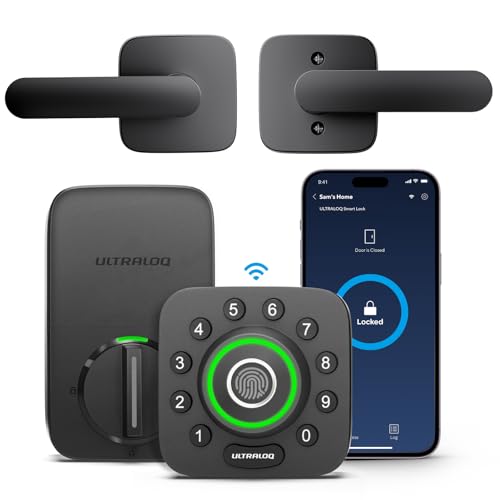
Ultraloq U-Bolt Pro WiFi
Value pickPros
- Multiple entry methods at a lower price point
- Fingerprint reader is uncommon at this price
- Includes several ways to grant temporary access
Cons
- Build feel is less premium than big-name deadbolts
- Wi-Fi setup can depend on which kit you buy
Ultraloq packs fingerprint, keypad, app, and key access into a relatively affordable lock, which suits a vacation home where different people arrive by different methods. The Wi-Fi kit adds remote management so you can issue codes from anywhere. It is a reasonable value option if you accept a less refined finish.

Level Lock Plus
Hidden smart lockPros
- Almost nothing changes on the outside of the door
- Good fit for historic or design-sensitive homes
- Works with major smart-home platforms
Cons
- Remote access needs the separate bridge
- No built-in keypad
Level Lock Plus hides the smart hardware inside the door, so the exterior keeps its original look. That appeals to vacation-home owners in historic districts or with custom doors. Remote access requires the Level Bridge, and guests generally use the app rather than a keypad.

Wyze Lock Bolt
Lowest costPros
- Very low entry price for a fingerprint keypad lock
- Simple setup for a single door
- Fingerprint entry is convenient for family
Cons
- No Wi-Fi means no remote code changes
- No physical key override
The Wyze Lock Bolt is a budget fingerprint and keypad deadbolt for owners who mainly need local entry rather than remote management. Because the base model is Bluetooth only, you cannot issue codes from another state without being nearby. It suits a vacation home where a neighbor or local manager handles access.
Who Should Avoid the Top Pick
Skip any smart lock that relies solely on Bluetooth if you need to manage guests from a distance, and avoid models with no physical key or keypad fallback for a home that sits empty for long stretches. Also be cautious with locks that require a proprietary hub you cannot easily replace, since a failed hub can lock you out of remote control.
Before You Buy
Measure your door's backset and cross bore before ordering, and confirm the door thickness falls within the lock's supported range. Check whether your vacation home has reliable Wi-Fi at the door, since some locks need a strong signal, and decide in advance how you want to handle battery changes when nobody is on site. If the home is in a very cold or hot climate, look for an operating temperature range that covers your area.
FAQs
Do smart locks work without Wi-Fi?
Many do. Keypad and fingerprint entry usually work locally, but remote code changes and app alerts typically require Wi-Fi or a bridge.
Can I give a cleaner a code that only works on certain days?
Yes, most app-connected locks let you schedule codes with start and end times, though the exact feature set varies by brand and model.
What happens if the batteries die?
Most locks warn you in advance through the app or a keypad indicator, and many offer a physical key or a temporary external power option as a backup.
Are smart locks good for a house that sits empty for months?
They can be, but choose one with offline code storage, a key backup, and a battery type that handles temperature swings in your region.
Do I need a hub for a vacation home smart lock?
Not always. Several current models have built-in Wi-Fi, while others need a bridge or hub for remote access, so check the specific model before buying.
Can I still use a regular key?
On many deadbolt-style smart locks, yes. Retrofit and key-free models may not include a keyway, so confirm before you buy.
Our verdict
For most vacation homes, the Schlage Encode Plus offers the best combination of built-in Wi-Fi, flexible guest access, and dependable deadbolt hardware. If you want to keep your existing exterior trim, the August Wi-Fi Smart Lock is the better retrofit path, and the Ultraloq U-Bolt Pro WiFi covers the budget end without dropping keypad or fingerprint entry.