Best Smart Locks with Activity Logs
A smart lock that records who came and went turns a convenience gadget into a genuine security tool, and the activity log is the feature that makes that possible. We compared manufacturer specifications, app documentation, and owner-feedback themes across the current US smart lock market to find models whose history features are actually useful rather than an afterthought.
Quick answer
The Schlage Encode Plus is the best overall smart lock with activity logs for most US homes thanks to its reliable built-in WiFi, detailed Schlage Home history, and broad compatibility.
Why trust ToolBuyerHub
- Cross-checked manufacturer-published specifications before writing any recommendation
- Verified US market availability and configuration for every model discussed
- Owner-feedback themes are summarized as feedback, never presented as our own hands-on testing
- No invented star ratings; see the visible Research Score criteria on this page
- Checked specifications against manufacturer documentation before publishing
- We weight log quality heavily, checking whether a lock timestamps entries, names the user or code used, stores history locally or in the cloud, and lets you export or review it without a paid tier.
Research updated September 2026.
What Matters Most for This Category
The most important thing to understand about activity logs is where they live. Locks that connect directly to WiFi or use a hub can push a full history to an app, while Bluetooth-only locks often keep a shorter on-device record you must be near to read. Check how many events are stored, whether the log names the specific user or keypad code, whether you get real-time notifications, and whether reviewing history requires a subscription. Battery life, entry methods, and smart home ecosystem also matter, but the log is what you will actually rely on when something seems off.
| Model | Best for | Key specs | Research Score |
|---|---|---|---|
| Schlage Encode Plus Smart WiFi Deadbolt | Best Overall | Built-in WiFi, no hub needed, Keypad, app, key, Apple home key | 94/100 |
| August Smart Lock Pro (4th Gen) | Best for Retrofit | Bluetooth plus optional WiFi bridge, App, auto-unlock, keypad accessory | 91/100 |
| Yale Assure Lock 2 | Best for Smart Home Flexibility | Bluetooth, WiFi or Z-Wave modules optional, Keypad, app, key, optional Apple home key | 90/100 |
| Kwikset Halo Touch Fingerprint Smart Lock | Best for Fingerprint Entry | Built-in WiFi, Fingerprint, keypad, app, key | 88/100 |
| Ultraloq U-Bolt Pro WiFi | Best Value | Built-in WiFi, Fingerprint, keypad, app, key, shake to open | 86/100 |
| Eufy Security Smart Lock Touch | Best for Local Storage | Bluetooth with optional WiFi bridge, Fingerprint, keypad, app | 84/100 |
| Level Lock Plus | Best Discreet Design | Bluetooth with optional WiFi bridge, App, key card, key | 82/100 |

Schlage Encode Plus Smart WiFi Deadbolt
Best OverallPros
- Built-in WiFi means the log syncs without a separate hub
- History shows which user or code unlocked the door
- Works with Apple Home, Alexa, and Google Home
Cons
- Premium price compared with basic keypad locks
- Some advanced features depend on the ecosystem you pair it with
The Encode Plus is one of the few deadbolts with WiFi built in, so its activity history reaches your phone without extra hardware. The Schlage Home app timestamps events and ties them to specific users or codes, which is exactly what you want from a log. It also supports Apple home keys for tap-to-unlock convenience.

August Smart Lock Pro (4th Gen)
Retrofit PickPros
- Installs over your existing deadbolt exterior
- Activity feed clearly labels who unlocked the door
- Auto-unlock and doorSense add useful context to events
Cons
- Full remote history needs the separate WiFi bridge
- No built-in keypad unless you buy the accessory
August keeps your existing keys and cylinder, replacing only the interior thumb turn, which makes it a strong choice for renters. Its app feed is one of the more readable activity logs, showing names and timestamps for each event. Adding the WiFi bridge unlocks remote access and real-time notifications.

Yale Assure Lock 2
Ecosystem FriendlyPros
- Swap modules to match WiFi, Z-Wave, or Matter setups
- Slim modern design in several finishes
- Yale Access app logs entries with user detail
Cons
- WiFi or Z-Wave module sold separately for remote logs
- Feature set varies a lot depending on the module you choose
Yale's Assure Lock 2 is built around interchangeable connectivity modules, so you can match it to your smart home now and change later. The Yale Access app records entry history and identifies users, and the lock comes in keyed and key-free versions. It is a flexible platform rather than a single fixed configuration.

Kwikset Halo Touch Fingerprint Smart Lock
Fingerprint LogPros
- Fingerprint reader logs which enrolled finger was used
- Built-in WiFi keeps history synced remotely
- Touchscreen keypad avoids worn buttons
Cons
- Fingerprint readers can be finicky for some users
- App experience is less polished than top competitors
The Halo Touch pairs a fingerprint reader with built-in WiFi, so each unlock is logged and attributed to a specific enrolled user. That makes the activity history more precise than a shared keypad code. The touchscreen keypad also resists the wear patterns that can reveal common codes.
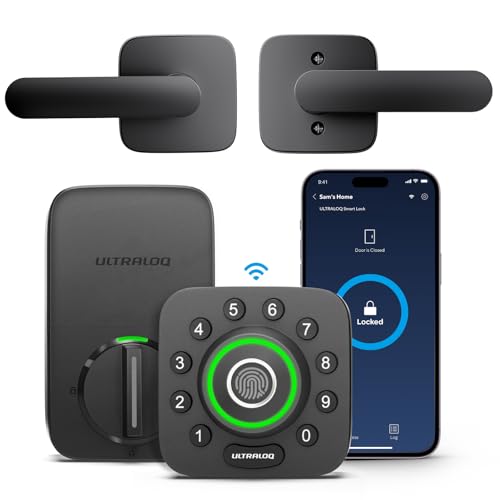
Ultraloq U-Bolt Pro WiFi
Best ValuePros
- Packs fingerprint, keypad, and WiFi at a mid-range price
- App records entry history and access events
- Multiple entry methods suit mixed households
Cons
- App and firmware updates have drawn mixed owner feedback
- Build feel is less premium than big-name rivals
Ultraloq's U-Bolt Pro WiFi offers an unusually broad feature set for the money, including a fingerprint reader and direct WiFi. The U-tec app keeps a timestamped log of entries and access events. It is a practical pick for buyers who want history and multiple entry options without a flagship price.

Eufy Security Smart Lock Touch
Local HistoryPros
- Rechargeable battery avoids constant AA swaps
- Fingerprint entry is fast and logs the user
- Eufy's ecosystem keeps data handling in-house
Cons
- Remote access and syncing need the WiFi bridge
- Fewer third-party smart home integrations
Eufy's Smart Lock Touch uses a rechargeable battery and a responsive fingerprint sensor, with entry history viewable in the Eufy Security app. Owners who prefer a brand that leans toward local data handling often gravitate here. Adding the bridge enables remote access and notifications.

Level Lock Plus
Hidden TechPros
- Electronics hide entirely inside the door
- Activity history available in the Level app
- Keeps a traditional lock look from outside
Cons
- No built-in keypad
- Remote logging requires the Level Connect bridge
Level Lock Plus conceals all its technology inside the deadbolt, so the door looks completely conventional. The Level app records entry activity and can distinguish users when paired with the bridge. It is the pick for buyers who want smart logging without advertising it.
Who Should Avoid the Top Pick
Skip a smart lock with activity logs if you need tamper-proof, court-admissible records, since consumer logs can be cleared, lost with a dead battery, or limited by the app. Also avoid models whose history requires a monthly subscription if you want free long-term records, and think twice if everyone in the home shares one code, because the log cannot tell users apart.
Before You Buy
Before buying, confirm how the lock connects, since built-in WiFi or a hub gives you remote history while Bluetooth-only models need you nearby. Check how many events the log stores, whether it names individual users or codes, and whether notifications or exports cost extra. Finally, verify the deadbolt fits your door thickness and backset, and decide whether you want a keypad, fingerprint reader, or key as backup.
FAQs
Do smart locks with activity logs need a subscription?
Most brands, including Schlage, Yale, August, and Kwikset, provide basic entry history free in their apps. Some advanced features such as extended cloud video or premium automation may require a paid plan, so check the specific model.
Can an activity log tell which person unlocked the door?
Yes, if each user has a unique keypad code, app account, fingerprint, or key card. Shared codes only show that a code was used, not who used it, which is why per-user credentials matter for useful logs.
How long do smart lock activity logs keep history?
It varies by brand and app. Many keep a rolling history of recent events, often weeks to months, while some store more or let you export. Local on-device logs are usually shorter than cloud-synced ones.
Will I get real-time notifications for every unlock?
Locks with built-in WiFi or a connected hub can send push notifications as events happen. Bluetooth-only locks typically sync history when your phone is in range, so notifications may be delayed.
What happens to the log if the batteries die?
Entry history stored in the cloud usually survives a dead battery, but events recorded only on the device may be lost. Keep an eye on battery level and use a lock with app-based history if records matter to you.
Are activity logs secure?
Reputable brands encrypt app traffic and account data, but no consumer log is tamper-proof. Use a strong unique password, enable two-factor authentication where offered, and treat the log as a helpful record rather than legal evidence.
Our verdict
For most US homes, the Schlage Encode Plus offers the best combination of hub-free WiFi, clear per-user activity history, and broad smart home support. If you want to keep your existing deadbolt, the August Smart Lock Pro is the strongest retrofit option, while the Ultraloq U-Bolt Pro WiFi delivers the best value for buyers who want fingerprint entry and WiFi logging on a budget.