Best Smart Locks with Auto-Lock Features
Auto-lock is the feature that turns a smart lock from a convenience into a genuine security upgrade, because it removes the human error of forgetting to lock up. We compared current US-market smart locks on auto-lock reliability, unlock methods, app quality, and how well each one handles guests, renters, and family members.
Quick answer
The Schlage Encode Plus is our top pick for most homes thanks to its built-in WiFi, Apple Home Key support, and dependable auto-lock timer.
Why trust ToolBuyerHub
- Cross-checked manufacturer-published specifications before writing any recommendation
- Verified US market availability and configuration for every model discussed
- Owner-feedback themes are summarized as feedback, never presented as our own hands-on testing
- No invented star ratings; see the visible Research Score criteria on this page
- Checked specifications against manufacturer documentation before publishing
- We prioritize locks with real US retail availability, published ANSI/BHMA ratings where the manufacturer provides them, and auto-lock behavior that can be verified from official documentation rather than marketing copy.
Research updated September 2026.
What Matters Most for This Category
The single most important factor is how the lock triggers auto-lock. Some models lock on a fixed timer after every unlock, while others use door-position sensors or geofencing so the door only locks when it is actually closed. A fixed timer is simpler but can leave a door unlocked if someone props it open, and a sensor-based system is safer but usually costs more. Beyond that, decide whether you need built-in WiFi or are fine with a separate hub, whether you want a keypad, fingerprint reader, or phone-only entry, and whether the lock fits your existing deadbolt footprint so you can avoid drilling.
| Model | Best for | Key specs | Research Score |
|---|---|---|---|
| Schlage Encode Plus Smart WiFi Deadbolt | Best Overall | Built-in WiFi, no hub needed, Keypad, app, Apple Home Key, physical key | 94/100 |
| August Wi-Fi Smart Lock (4th Gen) | Best for Renters | Built-in WiFi, App, auto-unlock, keypad sold separately | 91/100 |
| Yale Assure Lock 2 Touch with Wi-Fi | Best Keypad Design | Wi-Fi module included, Touchscreen keypad, app, optional key | 90/100 |
| Kwikset Halo Touch Fingerprint Smart Lock | Best Fingerprint Entry | Built-in WiFi, Fingerprint, keypad, app, key | 88/100 |
| Ultraloq U-Bolt Pro WiFi | Best Value Multimethod | Built-in WiFi, Fingerprint, keypad, app, key, shake to open | 87/100 |
| Eufy Security Smart Lock Touch | Best Budget Fingerprint | Bluetooth, WiFi bridge sold separately, Fingerprint, keypad, app, key | 85/100 |
| Level Lock Plus | Best Invisible Design | Bluetooth, WiFi bridge included, App, key, optional keypad | 83/100 |

Schlage Encode Plus Smart WiFi Deadbolt
Top PickPros
- Built-in WiFi means no extra hub or bridge
- Apple Home Key and wallet tap support
- ANSI Grade 1 residential security rating
Cons
- Premium price compared with budget keypad locks
- Bulkier interior escutcheon than some rivals
Schlage's Encode Plus combines a built-in WiFi radio with a keypad and Apple Home Key support, so it works without a separate bridge. The auto-lock timer is adjustable in the Schlage Home app, and the lock carries an ANSI Grade 1 rating for residential security. It is the most complete package for a typical US front door.

August Wi-Fi Smart Lock (4th Gen)
Renter FriendlyPros
- Installs over your existing deadbolt interior
- DoorSense confirms the door is actually closed
- Auto-unlock as you arrive
Cons
- No built-in keypad
- Requires a compatible single-cylinder deadbolt
The August Wi-Fi Smart Lock replaces only the interior thumbturn, so renters can keep the existing exterior hardware and keys. DoorSense is a small sensor that tells the lock whether the door is open or closed, which makes auto-lock smarter than a blind timer. It is the least invasive way to add auto-lock to an apartment.

Yale Assure Lock 2 Touch with Wi-Fi
Sleek KeypadPros
- Very slim, modern keypad profile
- Multiple finishes and trim options
- Works with major smart home platforms
Cons
- Wi-Fi module adds bulk to the interior
- Touchscreen can smudge visibly
Yale's Assure Lock 2 Touch pairs a capacitive touchscreen keypad with an included Wi-Fi module and a genuinely slim exterior profile. Auto-lock is configurable through the Yale Access app, and the lock supports Alexa, Google Home, and Apple Home depending on setup. It is the pick for buyers who care about how the lock looks on the door.

Kwikset Halo Touch Fingerprint Smart Lock
FingerprintPros
- Fingerprint reader for fast keyless entry
- Built-in WiFi with no hub
- Familiar deadbolt form factor
Cons
- Fingerprint readers can struggle with wet or worn fingers
- App is less polished than top competitors
The Kwikset Halo Touch adds a fingerprint reader to a standard keypad deadbolt, which is handy for family members who never carry a phone. It connects directly to WiFi and supports a configurable auto-lock delay. The design stays close to a traditional deadbolt, so it blends in on most doors.
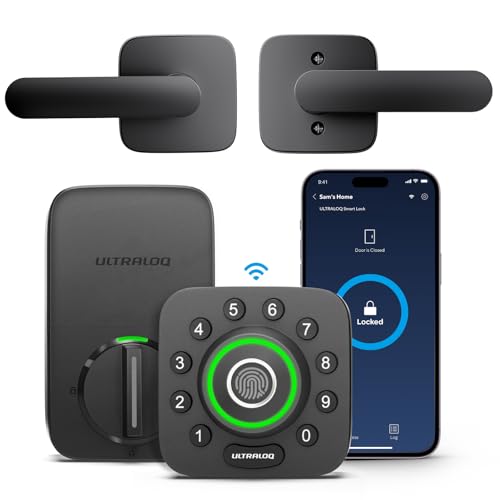
Ultraloq U-Bolt Pro WiFi
VersatilePros
- Six different unlock methods
- Built-in WiFi at a mid-range price
- IP65 weather resistance rating
Cons
- App permissions and sharing can be confusing
- Build feel is less premium than Schlage or Yale
Ultraloq's U-Bolt Pro WiFi packs fingerprint, keypad, app, key, and even a shake-to-open gesture into one lock with built-in WiFi. Auto-lock timing is adjustable in the app, and the lock carries an IP65 weather rating for exposed doors. It offers more entry options per dollar than almost anything else in this group.

Eufy Security Smart Lock Touch
Budget PickPros
- Fingerprint reader at a lower price point
- Solid build quality for the money
- Simple app setup
Cons
- No built-in WiFi, bridge needed for remote access
- Fewer smart home integrations
Eufy's Smart Lock Touch brings a fingerprint reader and keypad down to a budget-friendly price, with auto-lock configurable in the Eufy Security app. The trade-off is that remote access requires a separate WiFi bridge, so out-of-home control is not included out of the box. For local keyless entry it is a strong value.

Level Lock Plus
Hidden TechPros
- All electronics hidden inside the deadbolt
- Keeps the original exterior look
- Works with Apple Home and Ring
Cons
- Highest price here for fewer visible features
- No built-in keypad
Level Lock Plus hides every piece of smart hardware inside the deadbolt body, so from the outside it looks like an ordinary lock. Auto-lock is set through the Level app, and the included bridge enables remote access and smart home integration. It is the choice for buyers who want smart features with zero visible tech.
Who Should Avoid the Top Pick
Skip auto-lock smart locks if you rent and cannot modify the deadbolt at all, if your door has an unusual mortise or multipoint locking system, or if everyone in the house reliably carries keys and you have no interest in app management. Also avoid any lock whose auto-lock cannot be disabled, since a fixed timer that cannot be turned off becomes annoying on doors that are frequently left open.
Before You Buy
Measure your existing deadbolt and door thickness before ordering, and confirm whether your door has a standard single-cylinder deadbolt or something proprietary. Check whether the lock needs a hub for remote access or has WiFi built in, since that changes the total cost. Finally, decide how you want auto-lock to trigger, either a simple timer or a door-position sensor, and confirm the lock supports the smart home platform you already use.
FAQs
What is an auto-lock feature on a smart lock?
Auto-lock automatically relocks the deadbolt after a set period once the door is unlocked, so you do not have to remember to lock it manually. Some models use a fixed timer while others use a door sensor to confirm the door is closed first.
Do smart locks with auto-lock work without WiFi?
Yes. Auto-lock runs on the lock itself, so it works even without WiFi or a hub. WiFi or a bridge is only needed for remote control and notifications when you are away from home.
Can I turn auto-lock off?
On most current models you can disable auto-lock or change the delay in the companion app. Check the manufacturer's app documentation before buying if this matters to you.
How long do batteries last with auto-lock enabled?
Auto-lock uses the motor more often, so battery life is typically shorter than with manual locking. Most manufacturers rate typical use in the range of several months to about a year on standard AA batteries.
Is auto-lock safe if the door is left open?
A fixed timer can lock the bolt while the door is open, which may cause the bolt to hit the frame. Locks with door-position sensing avoid this by only locking once the door is confirmed closed.
Do I need a hub for a smart lock with auto-lock?
Not for auto-lock itself. A hub or built-in WiFi is needed if you want to lock, unlock, or check status remotely, or if you want the lock to work with a smart home platform.
Our verdict
For most US homes, the Schlage Encode Plus is the best balance of built-in WiFi, Apple Home Key support, and reliable auto-lock, while the August Wi-Fi Smart Lock is the smarter choice for renters who cannot swap the exterior hardware. If budget or fingerprint entry is your priority, the Ultraloq U-Bolt Pro WiFi and Eufy Smart Lock Touch deliver solid auto-lock performance for less.