Best Smart Locks with Door Sensors
A smart lock with a built in door sensor does two jobs at once: it controls who gets in, and it tells you whether the door is actually closed and latched. That second job matters more than most buyers expect, because an unlocked door and an open door are very different problems, and only one of them shows up in a typical lock app.
Quick answer
The Schlage Encode Plus is the best overall pick for most US homes thanks to its built in door position sensing, Apple Home Key support, and a long track record of reliability.
Why trust ToolBuyerHub
- Cross-checked manufacturer-published specifications before writing any recommendation
- Verified US market availability and configuration for every model discussed
- Owner-feedback themes are summarized as feedback, never presented as our own hands-on testing
- No invented star ratings; see the visible Research Score criteria on this page
- Checked specifications against manufacturer documentation before publishing
- We separate true door position sensors from simple auto lock timers, since many locks marketed as smart only report lock status, not whether the door is physically open.
Research updated September 2026.
What Matters Most for This Category
The single most important distinction is whether a lock has a real door position sensor or just a lock state sensor. A lock state sensor tells you locked or unlocked. A door position sensor tells you open or closed, which is what you need for alerts when a door is left ajar. Beyond that, decide whether you want a keypad, a physical keyway, Apple Home Key or Matter support, and whether the lock fits a standard US deadbolt bore hole. Check your door thickness and backset before ordering, and confirm the bolt throw matches your strike plate.
| Model | Best for | Key specs | Research Score |
|---|---|---|---|
| Schlage Encode Plus Smart WiFi Deadbolt | Best Overall | WiFi built in, no hub needed, Keypad, physical key, Apple Home Key | 94/100 |
| August Smart Lock Pro (4th Gen) | Best for Renters | Retrofit, keeps existing deadbolt exterior, WiFi via included Connect bridge | 91/100 |
| Yale Assure Lock 2 with Wi Fi | Best Keypad Design | WiFi and Bluetooth models available, Backlit keypad, optional keyway module | 90/100 |
| Level Lock Plus with Door Sensor | Best Hidden Design | Fits inside the door, no visible interior hardware change, Bluetooth with optional WiFi bridge | 88/100 |
| Kwikset Halo Touch Fingerprint Deadbolt | Best Fingerprint Entry | WiFi built in, Fingerprint, keypad, physical key | 86/100 |
| Ultraloq U Bolt Pro WiFi | Best Budget | WiFi built in, Fingerprint, keypad, physical key, app | 83/100 |
| Bosma Aegis Smart Door Lock with Door Sensor | Best Value Bundle | Retrofit over existing deadbolt interior, WiFi built in | 80/100 |

Schlage Encode Plus Smart WiFi Deadbolt
Best OverallPros
- Built in WiFi means no separate bridge or hub
- Apple Home Key and keypad cover most entry scenarios
- Long established brand with widely available US support
Cons
- Premium price compared with basic keypad locks
- Bulkier interior escutcheon than some rivals
Schlage's flagship WiFi deadbolt combines a keypad, a physical keyway, and Apple Home Key in one unit, and it reports door position rather than just lock state. Based on manufacturer specifications it fits standard residential deadbolt prep, which keeps installation simple for most US homes. Owner feedback themes point to reliable app alerts and solid build quality over multi year use.

August Smart Lock Pro (4th Gen)
Renter FriendlyPros
- Installs over your existing deadbolt interior, so the outside key still works
- DoorSense reports whether the door is open or closed
- Good fit for apartments where the exterior hardware cannot change
Cons
- Requires the Connect bridge for remote access
- No built in keypad, that is a separate accessory
August's retrofit design replaces only the interior thumb turn, which makes it the least invasive option for renters and anyone who cannot swap the exterior cylinder. The included DoorSense sensor is a separate magnet mounted on the frame, and it reports open and closed status to the app. Based on comparison, it trades the convenience of an all in one keypad for flexibility.

Yale Assure Lock 2 with Wi Fi
Best KeypadPros
- Slim, modern keypad that suits contemporary doors
- Modular design lets you add or swap modules
- Works with major smart home platforms
Cons
- Door sensor support varies by configuration, so check before buying
- Some features need the correct module installed
Yale's Assure Lock 2 line is built around swappable modules, so the same lock body can run on WiFi, Z Wave, or Matter depending on what you install. The keypad is one of the cleaner designs in the category, and door status sensing is available on certain versions. Based on manufacturer specifications, buyers should confirm the exact configuration includes the sensor before ordering.

Level Lock Plus with Door Sensor
DiscreetPros
- Nearly invisible from both sides of the door
- Keeps the existing deadbolt look
- Quiet motor operation
Cons
- Higher cost than most keypad locks
- Remote access needs the separate bridge
Level hides the entire mechanism inside the door, so the exterior and interior hardware look like a normal deadbolt. The companion door sensor reports open and closed state, and the lock itself runs on a single CR2 battery. Based on comparison, it is the pick for buyers who care about aesthetics over built in keypads.

Kwikset Halo Touch Fingerprint Deadbolt
FingerprintPros
- Fingerprint reader makes keyless entry fast
- Built in WiFi avoids a hub
- Familiar deadbolt footprint for easy swaps
Cons
- Door position sensing is limited compared with dedicated sensor models
- Fingerprint readers can struggle with very dry or worn skin
Kwikset's Halo Touch adds a fingerprint reader to a conventional WiFi deadbolt, which speeds up entry for family members who do not want to type a code. It reports lock status and activity in the app, though door position sensing is not its main strength. Based on manufacturer specifications it fits standard deadbolt prep.
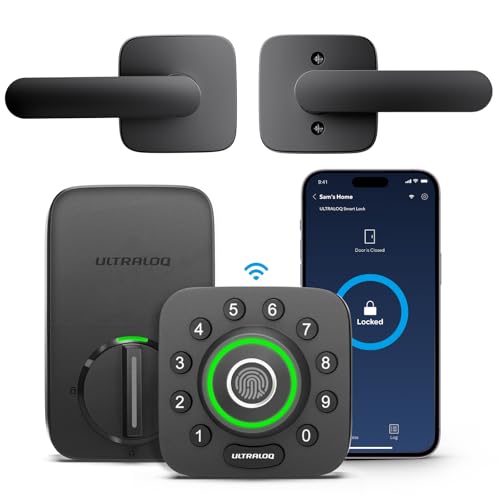
Ultraloq U Bolt Pro WiFi
Budget PickPros
- Very broad entry method list for the price
- Built in WiFi at a lower cost than premium rivals
- Fingerprint and code entry both included
Cons
- Build feel is less premium than Schlage or Yale
- App experience draws mixed owner feedback
Ultraloq packs fingerprint, keypad, key, and app entry into a WiFi deadbolt that undercuts most of the competition. A separate door sensor accessory adds open and closed reporting if you want it. Based on comparison, it is the value pick for buyers who want maximum entry options per dollar.
Bosma Aegis Smart Door Lock with Door Sensor
Value BundlePros
- Door sensor included rather than sold separately
- Retrofit install keeps the existing exterior key
- Auto unlock and auto lock routines work well with the sensor
Cons
- Brand support and ecosystem are smaller than legacy lock makers
- App polish trails the bigger names
Bosma's Aegis is a retrofit lock that ships with a door sensor in the box, which is unusual at this price. It keeps the existing exterior deadbolt, so installation is quick and reversible. Based on owner feedback themes, the sensor driven automations are the main draw, while app refinement is the common complaint.
Who Should Avoid the Top Pick
Skip any lock that only reports locked or unlocked if your real concern is a door left standing open, since that requires a true door position sensor. Also avoid retrofit models if you specifically want a built in keypad, and avoid premium WiFi locks if your home has weak signal at the door, because a hub based system may actually be more reliable there.
Before You Buy
Measure your door thickness, backset, and cross bore before ordering, and confirm the lock supports your door's handedness. Decide up front whether you need Apple Home Key, Matter, Z Wave, or just the manufacturer app. Check whether the door sensor is built in or sold separately, because that changes both the price and the install work. Finally, confirm your WiFi reaches the door or budget for a bridge.
FAQs
What is the difference between a lock sensor and a door sensor?
A lock sensor reports whether the deadbolt is extended or retracted. A door sensor reports whether the door itself is open or closed, usually with a magnet on the frame. Only the second one can tell you a door was left ajar.
Do smart locks with door sensors need a hub?
Some do and some do not. Locks with built in WiFi work directly with your router, while Bluetooth and Z Wave models typically need a bridge or hub for remote access and sensor alerts.
Can I add a door sensor to a lock that does not include one?
In some cases yes. August and Ultraloq, for example, sell door sensors as accessories for compatible locks. Check the specific model before assuming it is supported.
Will a smart lock with a door sensor fit my existing deadbolt hole?
Most full replacement deadbolts fit standard US residential prep, but you should verify backset and cross bore. Retrofit models like August and Bosma reuse the existing deadbolt, so fit is less of a concern.
How long do batteries last in these locks?
It varies by model and usage, but most run on AA batteries and last several months to about a year. WiFi radios and frequent sensor reporting tend to shorten battery life.
Are door sensor alerts reliable enough to trust?
They are useful for awareness, not as a substitute for a monitored security system. Treat them as a convenience and safety nudge, and keep a separate alarm system if you need professional monitoring.
Our verdict
For most US homes the Schlage Encode Plus is the strongest combination of built in door position sensing, keypad and Apple Home Key entry, and no hub requirement. Renters and anyone who cannot change the exterior hardware should look at the August Smart Lock Pro instead. If budget is the deciding factor, the Bosma Aegis bundles a door sensor at a much lower price.