Best Smart Locks with Long Battery Life
Battery life is one of the most overlooked specs in a smart lock, yet it is the one that decides whether you are changing batteries twice a year or once every two years. This guide ranks seven genuinely distinct smart locks sold in the US by how long they last on a set of cells, based on manufacturer specifications and owner-feedback themes rather than lab testing.
Quick answer
The Schlage Encode Plus is the top pick for most buyers, combining WiFi, Apple Home Key, and a rated battery life of about a year on four AA batteries.
Why trust ToolBuyerHub
- Cross-checked manufacturer-published specifications before writing any recommendation
- Verified US market availability and configuration for every model discussed
- Owner-feedback themes are summarized as feedback, never presented as our own hands-on testing
- No invented star ratings; see the visible Research Score criteria on this page
- Checked specifications against manufacturer documentation before publishing
- Battery claims are compared against the power source each lock uses, since a lock running on four AA cells will almost always outlast one running on four AAA cells.
Research updated September 2026.
What Matters Most for This Category
The single biggest factor in real-world battery life is how the lock connects. WiFi radios draw far more power than Z-Wave, Zigbee, or Thread, so a WiFi lock that streams live video or stays always-on will drain faster than a hub-based lock doing the same job. Also check the battery type: locks using AA cells generally last longer per set than those using AAA, and locks with a backup keypad or physical key cylinder give you a fallback when batteries do run down. Finally, consider whether you want a low-battery warning through an app, since a lock that quietly dies is a lock that locks you out.
| Model | Best for | Key specs | Research Score |
|---|---|---|---|
| Schlage Encode Plus Smart WiFi Deadbolt | Best Overall | 4 AA alkaline, Up to 1 year | 94/100 |
| Yale Assure Lock 2 | Best Value | 4 AA alkaline, Up to 1 year | 91/100 |
| August Wi-Fi Smart Lock (4th Gen) | Best for Renters | 2 CR123 lithium, About 3 months | 88/100 |
| Kwikset Halo Touch | Best Keyless | 4 AA alkaline, Up to 1 year | 86/100 |
| Ultraloq U-Bolt Pro WiFi | Best Budget | 4 AA alkaline, Up to 1 year | 84/100 |
| Level Lock Plus | Best Discreet Design | 1 CR2 lithium, About 6 months | 82/100 |
| Bosma Aegis Smart Lock | Best for Apple Home | 4 AA alkaline, Up to 8 months | 80/100 |

Schlage Encode Plus Smart WiFi Deadbolt
Best OverallPros
- Rated around a year on four AA batteries
- Built-in WiFi means no separate hub
- Supports Apple Home Key and Schlage Home app
Cons
- WiFi radios draw more power than hub-based locks
- Premium price for the feature set
The Encode Plus is Schlage's flagship residential deadbolt and one of the few locks that pairs built-in WiFi with Apple Home Key support. It runs on four AA batteries with a manufacturer rating of roughly one year, and it keeps a physical key cylinder as a backup. For most US homes it is the best balance of battery life, features, and brand support.

Yale Assure Lock 2
Best ValuePros
- Modular design lets you add WiFi or Z-Wave later
- Rated up to a year on four AA batteries
- Slim profile fits most standard doors
Cons
- WiFi module sold separately and drains faster
- No built-in WiFi out of the box
The Assure Lock 2 ships as a Bluetooth lock and accepts optional WiFi or Z-Wave modules, so you can start with the lower-power Bluetooth setup and add networking later. Yale rates it at up to a year on four AA batteries, and the modular approach means you are not locked into one ecosystem. It is a strong value pick for buyers who want flexibility.

August Wi-Fi Smart Lock (4th Gen)
Renter FriendlyPros
- Installs on the inside of your existing deadbolt
- No drilling or lock replacement needed
- Auto-unlock works well for hands-free entry
Cons
- Shorter battery life than AA-powered locks
- CR123 lithium cells cost more per set
The August Wi-Fi Smart Lock retrofits onto your existing deadbolt, which makes it the easiest option for renters who cannot replace hardware. It runs on two CR123 lithium batteries with a rated life of roughly three months, shorter than the AA-powered competition because of its always-on WiFi radio. The trade-off is convenience and a no-drill install.

Kwikset Halo Touch
Keyless PickPros
- Fingerprint reader means no key or phone needed
- Rated up to a year on four AA batteries
- Built-in WiFi with no hub required
Cons
- Fingerprint sensor can struggle with worn prints
- App experience is less polished than rivals
The Halo Touch replaces the key cylinder with a fingerprint reader, so you can enter with a touch instead of a key or phone. It runs on four AA batteries with a manufacturer rating of up to a year, and it connects directly over WiFi. It is a good fit for households that want keyless entry without carrying a phone.
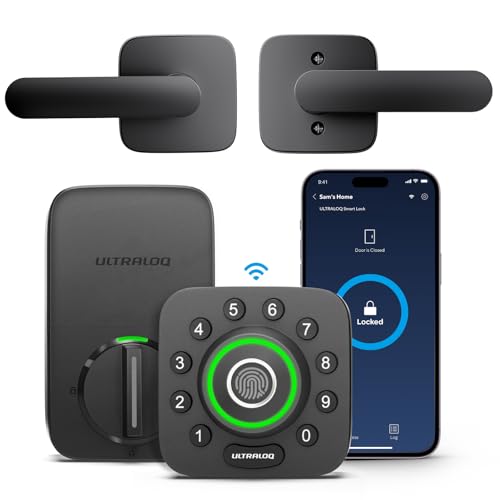
Ultraloq U-Bolt Pro WiFi
Budget PickPros
- Multiple entry methods including fingerprint and key
- Rated up to a year on four AA batteries
- Lower price than most WiFi deadbolts
Cons
- Build feels less premium than Schlage or Yale
- App and firmware updates can be inconsistent
The U-Bolt Pro WiFi packs fingerprint, keypad, app, and key access into a deadbolt that costs less than most WiFi rivals. It runs on four AA batteries with a rated life of up to a year, and it keeps a physical key cylinder as a fallback. It is the best budget route to a full-feature WiFi lock.

Level Lock Plus
Design PickPros
- Hides all smart hardware inside the deadbolt
- Keeps the look of a traditional lock
- Works with Apple HomeKit and Matter
Cons
- Single CR2 battery means shorter life
- WiFi bridge adds cost and another device
The Level Lock Plus puts the electronics inside the deadbolt body, so from the outside it looks like an ordinary lock. It runs on a single CR2 lithium battery with a rated life of around six months, and WiFi requires the separate Level Connect bridge. It is the pick for buyers who care about design over raw battery numbers.
Bosma Aegis Smart Lock
HomeKit PickPros
- Retrofits over an existing deadbolt
- Works with Apple HomeKit and Alexa
- Rated up to 8 months on four AA batteries
Cons
- Shorter rated life than top AA locks
- Setup can be fiddly on some doors
The Bosma Aegis installs over your existing deadbolt interior and adds app, auto-unlock, and smart assistant control without replacing the exterior hardware. It runs on four AA batteries with a rated life of up to eight months, and it supports Apple HomeKit and Alexa. It is a solid retrofit option for Apple-centric homes.
Who Should Avoid the Top Pick
Skip always-on WiFi locks with cameras or live video if battery life is your priority, since those radios and streams drain cells far faster than a keypad-only or hub-based lock. Also avoid any lock that does not report a low-battery warning through an app, because a silent failure is the worst outcome for a smart lock.
Before You Buy
Measure your door thickness and backset before ordering, since most smart deadbolts fit standard 1-3/8 to 1-3/4 inch doors but some retrofit models have tighter tolerances. Confirm whether the lock needs a hub or bridge for remote access, and check that your WiFi network is 2.4 GHz, because many smart locks do not support 5 GHz. Finally, decide whether you want a physical key cylinder as a backup, since keyless-only models leave you dependent on batteries and electronics.
FAQs
How long do smart lock batteries actually last?
Manufacturer ratings range from about three months for always-on WiFi retrofit locks to around a year for AA-powered deadbolts. Real-world life depends on how often the lock is used and whether WiFi stays connected.
Do WiFi smart locks drain batteries faster?
Yes. A built-in WiFi radio draws significantly more power than Bluetooth, Z-Wave, Zigbee, or Thread, which is why hub-based locks often last longer on the same batteries.
Are AA or AAA batteries better for smart locks?
AA cells generally hold more capacity than AAA, so locks using four AA batteries tend to last longer per set than those using AAA cells.
What happens when a smart lock battery dies?
Most locks give an app warning and a low-battery beep before dying. Many also have a physical key cylinder or a temporary external power point so you can still get in.
Can I use rechargeable batteries in a smart lock?
Some manufacturers allow it, but rechargeable cells often run at lower voltage and may trigger false low-battery warnings. Check your lock's manual before switching.
Do I need a hub for a long-lasting smart lock?
Not necessarily, but hub-based locks using Z-Wave, Zigbee, or Thread typically last longer than WiFi locks because the radio uses less power.
Our verdict
For most US buyers, the Schlage Encode Plus is the best mix of battery life, features, and reliability, with a rated year on four AA batteries and no hub required. If you rent or want to keep your existing deadbolt, the August Wi-Fi Smart Lock is the easier install despite shorter battery life. Budget shoppers who still want WiFi and fingerprint entry should look at the Ultraloq U-Bolt Pro WiFi.