Best Smart Locks with Rechargeable Batteries
Rechargeable smart locks cut the cost and hassle of swapping disposable batteries every few months, but the charging method matters as much as the lock itself. Some models use a removable USB-C pack you can top up anywhere, while others rely on a built-in battery that charges through a port on the lock body.
Quick answer
The Aqara Smart Lock U200 is the best overall pick for most US homes thanks to its rechargeable battery pack, broad compatibility, and Matter support.
Why trust ToolBuyerHub
- Cross-checked manufacturer-published specifications before writing any recommendation
- Verified US market availability and configuration for every model discussed
- Owner-feedback themes are summarized as feedback, never presented as our own hands-on testing
- No invented star ratings; see the visible Research Score criteria on this page
- Checked specifications against manufacturer documentation before publishing
- We separate locks with a truly rechargeable battery from those that merely accept lithium AAs, since the two are often confused in marketing copy.
Research updated September 2026.
What Matters Most for This Category
The biggest decision is how you want to recharge. A removable pack lets you keep a spare charged and swap it in seconds, while a built-in battery means running a cable to the door. Also confirm the lock fits your door thickness and backset, check whether it needs a hub or bridge for remote access, and verify the smart home platform you already use, since Matter support is not universal across these models.
| Model | Best for | Key specs | Research Score |
|---|---|---|---|
| Aqara Smart Lock U200 | Best Overall | Rechargeable pack, USB-C, Removable battery pack | 93/100 |
| Lockly Visage Zeno Series | Best for Facial Recognition | Rechargeable lithium battery, USB-C charging | 90/100 |
| Lockly Secure Pro | Best for Keypad Flexibility | Rechargeable battery, USB-C charging | 88/100 |
| Yale Assure Lock 2 Plus | Best for Apple Home | Rechargeable battery option, USB-C on select models | 87/100 |
| Bosma Aegis | Best Value | Rechargeable battery, USB-C charging | 84/100 |
| August Wi-Fi Smart Lock | Best for Renters | Rechargeable battery, USB-C charging | 83/100 |
| Schlage Encode Plus | Best for Durability | Rechargeable battery option, USB-C on select models | 82/100 |
Aqara Smart Lock U200
Top pickPros
- Removable rechargeable pack is easy to swap
- Matter over Thread support for broad ecosystem use
- Multiple entry methods including fingerprint
Cons
- Thread border router needed for full remote features
- Retrofits over an existing deadbolt rather than replacing it
The U200 is a retrofit lock that mounts over your existing deadbolt, so you keep your keys and hardware. Its rechargeable pack can be pulled out and charged over USB-C, and Matter over Thread keeps it usable across major smart home platforms.
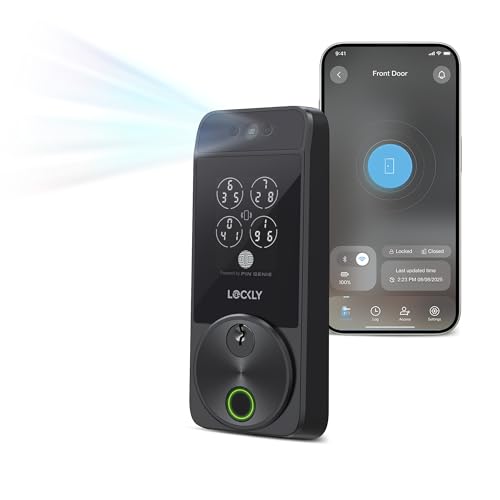
Lockly Visage Zeno Series
Face unlockPros
- Contactless face unlock is genuinely convenient
- Rechargeable battery with USB-C
- Built-in Wi-Fi for remote access without a hub
Cons
- Face recognition can be finicky in harsh light
- Premium price for the feature set
Lockly's Visage line leans on facial recognition as its headline feature, backed by a rechargeable battery and on-board Wi-Fi. It suits buyers who want hands-free entry and do not mind paying for it.
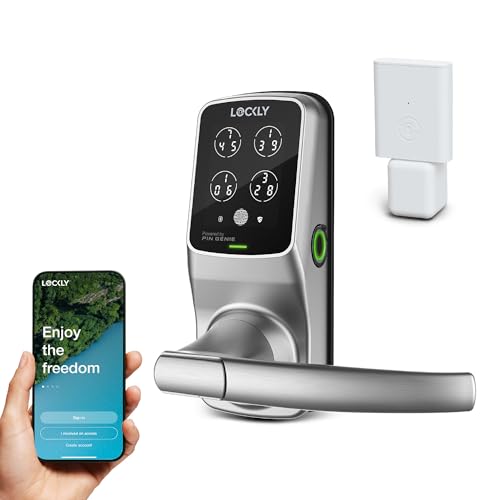
Lockly Secure Pro
Digital keypadPros
- Digital keypad with anti-peek PIN entry
- Rechargeable battery reduces disposable waste
- Wi-Fi built in for remote control
Cons
- App setup can take time
- Bulkier than some retrofit options
The Secure Pro pairs Lockly's digital keypad with a rechargeable battery and built-in Wi-Fi. The anti-peek keypad shuffles digits, which is a nice touch for shared entry codes.

Yale Assure Lock 2 Plus
Apple friendlyPros
- Works well with Apple Home and Home Key
- Matter support on Plus models
- Slim, modern keypad design
Cons
- Rechargeable option is not on every variant
- Some features need the Wi-Fi module
Yale's Assure Lock 2 Plus is a keypad deadbolt with Matter support and Apple Home Key tap-to-unlock. Certain configurations use a rechargeable battery, so check the exact listing before buying.
Bosma Aegis
Budget friendlyPros
- Lower price than most rechargeable rivals
- USB-C charging is convenient
- Fingerprint and PIN entry included
Cons
- App polish trails bigger brands
- Fewer integrations with major ecosystems
Bosma's Aegis offers rechargeable power and multiple entry methods at a price that undercuts most of this list. It is a reasonable entry point if you want rechargeable without a premium spend.

August Wi-Fi Smart Lock
Renter friendlyPros
- Installs on the inside of your existing deadbolt
- Rechargeable battery with USB-C
- Auto-unlock works well for frequent arrivals
Cons
- No keypad on the lock itself
- Needs a compatible deadbolt to retrofit
August's Wi-Fi Smart Lock replaces only the interior side of your deadbolt, which makes it easy to remove when you move. The rechargeable battery charges over USB-C.

Schlage Encode Plus
Built toughPros
- Reputation for sturdy ANSI-rated hardware
- Apple Home Key and Matter support
- Built-in Wi-Fi on many models
Cons
- Rechargeable configuration is limited
- Higher price than budget alternatives
Schlage's Encode Plus is known for solid build quality and broad smart home support, including Apple Home Key. Rechargeable battery options exist, but availability varies by model, so confirm before ordering.
Who Should Avoid the Top Pick
Skip rechargeable smart locks if you have no easy way to charge them, such as a rental with no outlet near the door, or if you want a lock that runs for a year or more between battery changes. Also avoid models that need a separate hub unless you are willing to buy and set one up.
Before You Buy
Measure your door thickness and backset, confirm the lock fits your existing deadbolt or bore hole, and check whether remote access needs a hub or bridge. Verify the rechargeable battery is actually included in the listing you are buying, since some brands sell it as a separate variant.
FAQs
Do rechargeable smart locks last as long as battery-powered ones?
Runtime varies by model and usage, but most rechargeable packs need charging every few months rather than yearly. Heavy use, Wi-Fi, and frequent unlocking shorten that interval.
Can I charge the battery without removing it?
Some locks charge through a USB-C port on the body, while others use a removable pack you take out and charge separately. Removable packs are more convenient because you can keep a spare ready.
Do rechargeable locks work during a power outage?
Yes, the lock runs on its own battery, so a home power outage does not affect it. You only lose remote app access if your Wi-Fi or hub goes down.
Are rechargeable smart locks harder to install?
Installation difficulty depends on the lock type, not the battery. Retrofit models that mount over an existing deadbolt are usually the easiest, while full replacements take more work.
Do I need a hub for remote access?
Not always. Some locks have built-in Wi-Fi, while others use Thread or Bluetooth and need a hub or border router for remote control. Check the specs before buying.
Can I use rechargeable AA batteries instead?
Some locks accept standard AA batteries, and you can use rechargeable AAs in those. However, many rechargeable smart locks use a proprietary pack, so the two are not interchangeable.
Our verdict
The Aqara Smart Lock U200 is the best overall rechargeable pick for most buyers, balancing a removable battery pack with broad Matter support. If you want face unlock, the Lockly Visage is worth the premium, and renters should look at the August Wi-Fi Smart Lock for an easy retrofit.