Best Smart Locks with Temporary Access Codes
Temporary access codes turn a smart lock into a practical tool for dog walkers, cleaners, contractors, and houseguests, letting you hand out entry that expires without copying a physical key. The locks below were selected for how well they handle guest codes, scheduling, and app control, based on manufacturer specifications and owner-feedback themes rather than lab testing.
Quick answer
The Schlage Encode Plus is the top pick for most homes because it combines reliable built-in Wi-Fi, generous guest-code scheduling, and a trusted residential lock design.
Why trust ToolBuyerHub
- Cross-checked manufacturer-published specifications before writing any recommendation
- Verified US market availability and configuration for every model discussed
- Owner-feedback themes are summarized as feedback, never presented as our own hands-on testing
- No invented star ratings; see the visible Research Score criteria on this page
- Checked specifications against manufacturer documentation before publishing
- We prioritize locks with real US retail availability and published guest-access features, and we flag models whose temporary-code tools depend on a hub or subscription.
Research updated September 2026.
What Matters Most for This Category
The most important factor is how you plan to issue and revoke codes. Some locks store many schedules locally and work over Wi-Fi on their own, while others need a separate hub or a paid plan for remote guest management. Also check the lock's entry method mix, since a keypad-only model is simpler but a fingerprint or keyed backup can matter during a dead battery. Finally, confirm the deadbolt fits your door's backset and thickness before ordering.
| Model | Best for | Key specs | Research Score |
|---|---|---|---|
| Schlage Encode Plus Smart WiFi Deadbolt | Best Overall | Built-in Wi-Fi, no hub required, Up to 100 access codes with schedules | 94/100 |
| Yale Assure Lock 2 Key-Free Touchscreen with Wi-Fi | Best for Rentals | Wi-Fi model available, hub-free, Multiple entry codes with scheduling in app | 91/100 |
| August Wi-Fi Smart Lock (4th Gen) | Best Retrofit | Built-in Wi-Fi, Guest access via August app | 89/100 |
| Kwikset Halo Touch Fingerprint Wi-Fi Deadbolt | Best with Fingerprint | Built-in Wi-Fi, Temporary codes via Kwikset app | 88/100 |
| Ultraloq U-Bolt Pro WiFi Smart Lock | Best Value | Wi-Fi bridge included with some kits, Temporary codes with scheduling | 86/100 |
| Level Lock Plus with Keypad | Best Hidden Design | Bluetooth with Wi-Fi via Level Connect, Temporary codes through Level app | 84/100 |
| Bosma Aegis Smart Door Lock | Best Budget | Wi-Fi model available, Temporary codes via Bosma app | 81/100 |

Schlage Encode Plus Smart WiFi Deadbolt
Best OverallPros
- Built-in Wi-Fi means remote code management without an extra hub
- Large code capacity suits rentals and busy households
- Apple Home support adds Home Key and HomeKit convenience
Cons
- Higher price than many keypad-only competitors
- Bulkier interior escutcheon on some door setups
Schlage's Encode Plus is a residential deadbolt that connects directly to Wi-Fi, so you can create, schedule, and delete guest codes from the app without buying a bridge. It supports a long list of codes and works with the major smart-home platforms, including Apple Home. The keyed backup keeps you covered if the batteries run down.

Yale Assure Lock 2 Key-Free Touchscreen with Wi-Fi
Rental FriendlyPros
- Slim, modern design that suits rental interiors
- Key-free option removes lockout risk from lost keys
- Modular design lets you swap modules later
Cons
- Some features depend on which module you install
- Touchscreen can smudge and show wear over time
The Yale Assure Lock 2 is a modular deadbolt that can run on Wi-Fi without a separate bridge when you choose the right module. Temporary codes are managed in the Yale Access app, and the key-free touchscreen version is a good fit for short-term rentals where you do not want physical keys floating around.

August Wi-Fi Smart Lock (4th Gen)
Retrofit PickPros
- Installs over your existing deadbolt on the inside
- Keeps your current keys and exterior hardware
- Built-in Wi-Fi avoids a separate bridge
Cons
- No keypad on the lock itself, so codes need the app or a keypad accessory
- Requires a compatible single-cylinder deadbolt
August's fourth-generation lock attaches to the interior side of your existing deadbolt, so you keep your current keys and exterior trim. Guest access is issued through the August app, and built-in Wi-Fi means you can manage codes remotely. It is the least disruptive way to add temporary access to a door you do not want to replace.

Kwikset Halo Touch Fingerprint Wi-Fi Deadbolt
Fingerprint EntryPros
- Fingerprint reader adds fast keyless entry for regular users
- Built-in Wi-Fi supports remote code management
- Keyed backup covers battery or reader issues
Cons
- Fingerprint performance varies with finger condition
- App feature set is less deep than some rivals
The Kwikset Halo Touch pairs a fingerprint reader with a touchscreen keypad and a keyed backup, all on a Wi-Fi deadbolt that does not need a hub. Temporary codes are created in the Kwikset app, which makes it a practical pick for households that want both biometric entry and guest scheduling.
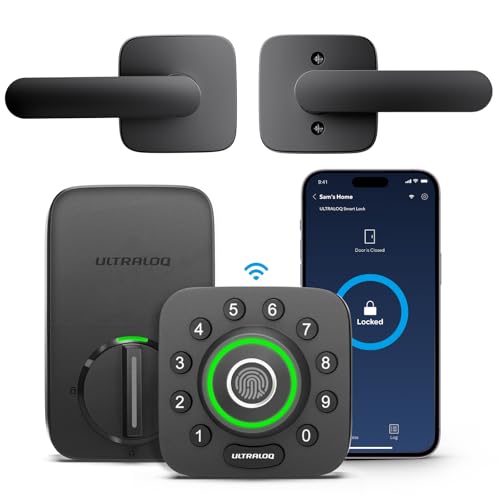
Ultraloq U-Bolt Pro WiFi Smart Lock
Value PickPros
- Multiple entry methods at a mid-range price
- Often bundled with the Wi-Fi bridge needed for remote access
- Auto-unlock and app control add convenience
Cons
- Bridge requirement can vary by kit, so check the listing
- Build feel is less premium than big-name rivals
Ultraloq's U-Bolt Pro WiFi offers fingerprint, keypad, key, and app entry in one deadbolt, and many kits include the bridge needed for remote management. Temporary codes can be scheduled for guests and service providers, making it a budget-friendly way to get flexible access.

Level Lock Plus with Keypad
Discreet DesignPros
- Lock hardware hides inside the door for a clean look
- Keypad can be placed separately from the lock
- Supports major smart-home platforms
Cons
- Remote access needs the Level Connect bridge
- Fewer on-lock controls than keypad-first models
Level Lock Plus keeps the smart electronics inside the door, so the exterior looks like a standard deadbolt. The companion keypad handles code entry, and temporary codes are managed in the Level app. Adding the Level Connect bridge enables remote management and platform integrations.
Bosma Aegis Smart Door Lock
Budget PickPros
- Low entry price for a Wi-Fi keypad deadbolt
- Straightforward app for issuing guest codes
- Keyed backup included
Cons
- App polish and support get mixed owner feedback
- Fewer advanced automation options
Bosma's Aegis is a budget-friendly smart deadbolt with a keypad and keyed backup, and Wi-Fi versions allow remote code management. Temporary codes can be created for guests and workers through the Bosma app, which covers the basics without a premium price.
Who Should Avoid the Top Pick
Skip these locks if you need enterprise-grade audit trails or integration with a commercial access-control system, since most are built for homes and small rentals. Also avoid any model whose remote guest-code features require a subscription you are not willing to pay, and think twice if your door has unusual dimensions or a non-standard deadbolt, because retrofit and replacement options are limited.
Before You Buy
Measure your door's backset, thickness, and cross-bore before ordering, and confirm whether your existing deadbolt is single-cylinder. Decide whether you want built-in Wi-Fi or are fine adding a bridge, since that choice drives both price and how easily you can manage codes remotely. Check the lock's code capacity and scheduling limits against how many guests or workers you expect, and verify battery type and expected life so you are not changing cells constantly.
FAQs
Do temporary access codes work without Wi-Fi?
On most of these locks you can create and use codes locally over Bluetooth or at the keypad, but remote creation and deletion usually needs Wi-Fi or a bridge.
How many guest codes can these locks store?
Capacity varies widely, from a handful on budget models to around 100 on the Schlage Encode Plus, so check the spec if you host often.
Can I set codes to expire automatically?
Yes, most app-managed locks let you set start and end times, which is the main reason to choose a smart lock for guests and service providers.
Do I need a hub for these locks?
Some models have built-in Wi-Fi and need no hub, while others require a bridge or module for remote access, so confirm before buying.
What happens if the batteries die?
Most models include a keyed backup or a jump-start terminal, but check your specific lock so you are not locked out.
Are these locks good for short-term rentals?
Several are, especially models with high code capacity and scheduling, though you should confirm local rules and your platform's integration needs.
Our verdict
For most US homes, the Schlage Encode Plus offers the best balance of built-in Wi-Fi, generous guest-code scheduling, and trusted hardware. If you want to keep your existing deadbolt, the August Wi-Fi Smart Lock is the least invasive route, while the Ultraloq U-Bolt Pro WiFi and Bosma Aegis cover tighter budgets. Match the lock to your door measurements and whether you need remote management before you buy.