Best Smart Locks with Voice Control
Voice control turns a smart lock from a convenience into something you can genuinely use hands-free, whether you are juggling groceries at the front door or checking that everything is locked from bed. The catch is that not every smart lock plays equally well with Alexa, Google Assistant, and Apple Home, and the lock hardware itself still has to fit your door and your security needs. This guide ranks real, currently sold locks by how well they combine reliable voice control with solid day to day performance.
Quick answer
The August Wi-Fi Smart Lock (4th Gen) is our top pick for most homes because it works with Alexa, Google Assistant, and Siri, and it fits over your existing deadbolt without replacing keys.
Why trust ToolBuyerHub
- Cross-checked manufacturer-published specifications before writing any recommendation
- Verified US market availability and configuration for every model discussed
- Owner-feedback themes are summarized as feedback, never presented as our own hands-on testing
- No invented star ratings; see the visible Research Score criteria on this page
- Checked specifications against manufacturer documentation before publishing
- We weigh voice assistant compatibility, hub requirements, and lock mechanism type (retrofit versus full replacement) alongside owner feedback themes, because a lock that needs an extra hub or bridge can quietly add cost and complexity.
Research updated September 2026.
What Matters Most for This Category
The single biggest factor is which voice ecosystem you actually use. Alexa and Google Assistant support is broad, but Apple Home (HomeKit) support is much narrower, so iPhone households should check that box first. After that, decide between a retrofit lock that keeps your existing keys and deadbolt, and a full replacement that swaps the whole lock. Retrofit models are easier to install and renter friendly, while full replacements often add keypad entry, auto lock, and a cleaner look. Finally, confirm whether the lock needs a separate hub or Wi-Fi bridge for remote access and voice control, since that changes both the price and the setup.
| Model | Best for | Key specs | Research Score |
|---|---|---|---|
| August Wi-Fi Smart Lock (4th Gen) | Best Overall | Retrofit (keeps existing deadbolt), Alexa, Google Assistant, Siri | 93/100 |
| Schlage Encode Plus Smart WiFi Deadbolt | Best for Apple Home | Full deadbolt replacement, Alexa, Google Assistant, Siri | 92/100 |
| Yale Assure Lock 2 | Best Full Replacement | Full deadbolt replacement, Alexa, Google Assistant, Siri (varies by module) | 90/100 |
| Kwikset Halo Touch Fingerprint Smart Lock | Best for Fingerprint Plus Voice | Full deadbolt replacement, Alexa, Google Assistant | 88/100 |
| Ultraloq U-Bolt Pro WiFi | Best Value | Full deadbolt replacement, Alexa, Google Assistant | 86/100 |
| Level Lock Plus | Best Hidden Design | Full deadbolt replacement, Alexa, Google Assistant, Siri | 84/100 |
| Eufy Security Smart Lock Touch | Best Budget | Full deadbolt replacement, Alexa, Google Assistant | 82/100 |

August Wi-Fi Smart Lock (4th Gen)
Top pickPros
- Works with all three major voice assistants
- Built-in Wi-Fi means no extra bridge for remote access
- Installs over your existing deadbolt in minutes
Cons
- Retrofit design is bulkier on the interior side of the door
- Battery life depends heavily on Wi-Fi usage
August's fourth generation lock is the easiest recommendation for most people because it keeps your existing keys and deadbolt while adding app, keypad, and voice control. Built-in Wi-Fi removes the bridge that older August models required. Based on manufacturer specifications, it supports Alexa, Google Assistant, and Siri voice commands for locking and checking status.

Schlage Encode Plus Smart WiFi Deadbolt
Apple friendlyPros
- Built-in Wi-Fi with no hub required
- Supports Apple Home keys and Thread
- ANSI Grade 1 residential security rating
Cons
- Higher price than most retrofit locks
- Requires replacing your existing deadbolt
The Encode Plus is one of the few locks that handles Alexa, Google Assistant, and Apple Home without a separate hub. It adds Thread and Apple Home key support for tap-to-unlock with a compatible iPhone or Apple Watch. Based on manufacturer specifications, it carries an ANSI Grade 1 rating, the highest residential grade.

Yale Assure Lock 2
VersatilePros
- Multiple finishes and keypad or touchscreen options
- Voice assistant support depends on the module you choose
- Slim, modern interior design
Cons
- Wi-Fi or Z-Wave module sold separately for remote features
- Setup can be confusing across module variants
Yale's Assure Lock 2 comes in several configurations, and the module you pick determines whether you get Wi-Fi, Z-Wave, or Matter support. That flexibility is great, but it means you need to read the listing carefully before buying. Based on manufacturer specifications, the lock supports voice control once the appropriate module is installed.

Kwikset Halo Touch Fingerprint Smart Lock
FingerprintPros
- Fingerprint reader for keyless entry
- Built-in Wi-Fi with no hub needed
- Touchscreen keypad included
Cons
- No Apple Home support
- Fingerprint reader can struggle with very dry skin
The Halo Touch combines a fingerprint reader, touchscreen keypad, and voice control through Alexa and Google Assistant. Built-in Wi-Fi means you can lock and check status remotely without a bridge. Based on manufacturer specifications, it stores multiple fingerprints for family members.
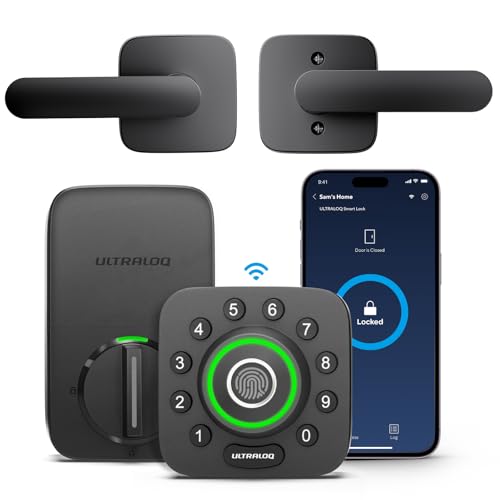
Ultraloq U-Bolt Pro WiFi
Budget friendlyPros
- Fingerprint, keypad, app, and voice entry in one lock
- Built-in Wi-Fi at a lower price than premium brands
- Auto lock and auto unlock options
Cons
- Build feel is less premium than Schlage or Yale
- App experience gets mixed owner feedback
Ultraloq's U-Bolt Pro WiFi packs fingerprint entry, a keypad, and Wi-Fi voice control into a lower price bracket than the big names. Based on manufacturer specifications, it supports Alexa and Google Assistant commands for locking and status. Owner feedback themes often praise the feature set for the money while noting the app could be smoother.

Level Lock Plus
DiscreetPros
- Looks like a standard deadbolt from both sides
- Works with all three major voice assistants
- Quiet motorized locking
Cons
- Higher price for fewer visible features
- No keypad on the lock itself
The Level Lock Plus hides all the smart hardware inside a deadbolt that looks completely ordinary. It supports Alexa, Google Assistant, and Siri, and the Plus bundle includes the Wi-Fi bridge needed for remote access. Based on manufacturer specifications, it uses a single CR2 battery and a quiet motor.

Eufy Security Smart Lock Touch
Entry levelPros
- Fingerprint unlock and keypad included
- Rechargeable battery instead of disposables
- Lower entry price than most competitors
Cons
- Needs the separate Wi-Fi bridge for voice control and remote access
- No Apple Home support
Eufy's Smart Lock Touch offers fingerprint and keypad entry at a budget price, with a rechargeable battery that saves money over time. Voice control through Alexa and Google Assistant requires the separate Eufy Wi-Fi bridge. Based on manufacturer specifications, it stores multiple fingerprints and supports app based management.
Who Should Avoid the Top Pick
Skip voice controlled smart locks if you rent and cannot modify the deadbolt, since most full replacements require landlord approval. Also avoid them if your Wi-Fi is unreliable at the front door, because remote voice control depends on a stable connection. Households that want zero app or account setup should stick with a traditional keyed deadbolt.
Before You Buy
Measure your door thickness and backset before ordering, and confirm whether your existing deadbolt can be retrofitted or must be fully replaced. Check which voice assistants you actually use, and note whether the lock needs a separate hub or bridge for Wi-Fi features. Finally, decide how you want to handle batteries, since rechargeable and disposable options differ in long term cost and convenience.
FAQs
Do smart locks with voice control need a hub?
Some do and some do not. Locks with built-in Wi-Fi like the August Wi-Fi Smart Lock and Schlage Encode Plus work without a hub, while others such as the Eufy Smart Lock Touch need a separate bridge for remote voice control.
Can I use voice control to unlock my door?
Most brands allow voice locking freely but restrict voice unlocking for security, often requiring a PIN or app confirmation. Check the specific assistant and lock combination before relying on voice unlock.
Which voice assistants are most widely supported?
Alexa and Google Assistant have the broadest smart lock support. Apple Home (Siri) support is narrower, so iPhone households should verify HomeKit compatibility before buying.
Will a smart lock work with my existing deadbolt?
Retrofit locks like the August Wi-Fi Smart Lock install over your existing deadbolt and keep your keys. Full replacement locks such as the Schlage Encode Plus swap the entire deadbolt and require more installation work.
How long do smart lock batteries last?
It varies widely by model and usage. Wi-Fi heavy locks tend to drain faster, while Bluetooth only locks can last much longer. Rechargeable models trade disposable battery cost for periodic charging.
Are smart locks as secure as regular deadbolts?
A quality smart lock from a major brand can match or exceed a standard deadbolt, especially models with an ANSI Grade 1 rating. Security also depends on correct installation and keeping firmware updated.
Our verdict
For most homes, the August Wi-Fi Smart Lock (4th Gen) is the best balance of voice assistant support, easy installation, and no extra hub. If you are deep in the Apple ecosystem, the Schlage Encode Plus is worth the higher price for HomeKit and Thread support. Budget buyers who do not need Apple Home should look at the Ultraloq U-Bolt Pro WiFi or the Eufy Smart Lock Touch.