Best Smart Locks Without Monthly Subscriptions
A smart lock should not charge you rent on your own front door, yet plenty of popular models push cloud plans for features that ought to work offline. These seven locks keep the useful parts, entry codes, app control, auto lock, guest access, running locally with no subscription required.
Quick answer
The Schlage Encode Plus is the best overall smart lock without a monthly subscription, thanks to built in Wi Fi, Apple home key support, and local code management.
Why trust ToolBuyerHub
- Cross-checked manufacturer-published specifications before writing any recommendation
- Verified US market availability and configuration for every model discussed
- Owner-feedback themes are summarized as feedback, never presented as our own hands-on testing
- No invented star ratings; see the visible Research Score criteria on this page
- Checked specifications against manufacturer documentation before publishing
- Every pick here was checked for subscription free operation of its core features, not just the marketing claim on the box.
Research updated September 2026.
What Matters Most for This Category
The single most important thing to confirm is what still works when the cloud is removed. On a subscription free lock, code entry, manual locking, and usually app control over Bluetooth or Wi Fi should all function without a paid tier. Check the wireless protocol too, since Wi Fi models join your network directly while Z Wave and Zigbee models need a hub you may already own. Battery life, keyway backup, and whether the lock fits your existing deadbolt bore hole matter more day to day than any app feature.
| Model | Best for | Key specs | Research Score |
|---|---|---|---|
| Schlage Encode Plus Smart WiFi Deadbolt | Best Overall | Wi Fi, Bluetooth, Thread, Keypad, app, Apple home key | 94/100 |
| Yale Assure Lock 2 Keypad with Wi Fi | Best for Renters | Wi Fi, Bluetooth, Keypad, app, auto unlock | 91/100 |
| August Wi Fi Smart Lock (4th Gen) | Best Retrofit | Wi Fi, Bluetooth, App, auto unlock, voice | 89/100 |
| Kwikset Halo Wi Fi Touchscreen Deadbolt | Best Value | Wi Fi, Bluetooth, Touchscreen keypad, app | 87/100 |
| Ultraloq U Bolt Pro Wi Fi | Best for Fingerprint Entry | Wi Fi, Bluetooth, Fingerprint, keypad, app, key | 86/100 |
| Lockly Secure Pro Deadbolt | Best Keypad Security | Wi Fi, Bluetooth, Digital keypad, app, key | 84/100 |
| Bosma Aegis Smart Lock | Best Budget | Wi Fi, Bluetooth, App, auto unlock, voice | 81/100 |

Schlage Encode Plus Smart WiFi Deadbolt
Best OverallPros
- Built in Wi Fi, no hub needed
- Apple home key and Watch support
- Local code storage with no plan
Cons
- Premium price
- Bulkier interior housing
Schlage's flagship deadbolt connects straight to Wi Fi so you can manage codes and check status from anywhere without a bridge or a plan. It supports Apple home key for tap to unlock with an iPhone or Apple Watch, and the keypad keeps working if the network drops. Based on manufacturer specifications, codes are stored on the lock itself.

Yale Assure Lock 2 Keypad with Wi Fi
Renter FriendlyPros
- Slim, modern interior design
- Auto unlock via phone proximity
- Swappable modules for future protocols
Cons
- Wi Fi module adds cost
- App can be slow to sync
Yale's Assure Lock 2 uses a modular design, so the Wi Fi radio can be swapped later if you move to Thread or another protocol. Auto unlock uses your phone's proximity to open the door as you walk up, and all code management stays free. Owner feedback themes praise the low profile interior that fits tighter doors.

August Wi Fi Smart Lock (4th Gen)
Keeps Your DeadboltPros
- Installs over your existing deadbolt
- Retains your current keys
- DoorSense open and close status
Cons
- No keypad included
- Needs a phone or hub for remote codes
August's fourth generation lock replaces only the interior thumb turn, leaving your existing deadbolt and keys in place, which makes it the easiest option for apartments and rentals. Wi Fi is built in, so remote locking and activity history work without a bridge or a plan. DoorSense reports whether the door is actually closed.

Kwikset Halo Wi Fi Touchscreen Deadbolt
Strong ValuePros
- Direct Wi Fi with no hub
- Touchscreen keypad resists wear
- Simple code sharing
Cons
- App less polished than rivals
- No Apple home key
Kwikset's Halo connects directly to Wi Fi and handles codes, schedules, and guest access through the free app. The touchscreen keypad avoids the worn button problem common on older push button locks. Based on manufacturer specifications, it fits standard deadbolt preparations.
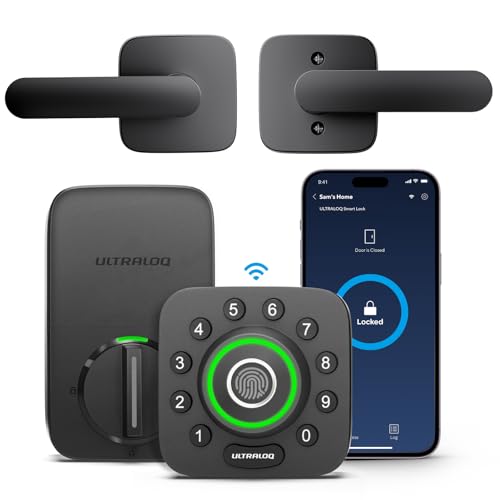
Ultraloq U Bolt Pro Wi Fi
Fingerprint PickPros
- Five way entry including fingerprint
- Fast fingerprint recognition
- Auto lock and auto unlock options
Cons
- Fingerprint sensor can struggle with worn prints
- Bulkier than some rivals
The U Bolt Pro packs a fingerprint reader alongside a keypad, app control, and a physical key, giving you five ways in without a subscription. Wi Fi is built in for remote management. Owner feedback themes suggest fingerprint speed is a highlight, though very worn prints may need a backup method.
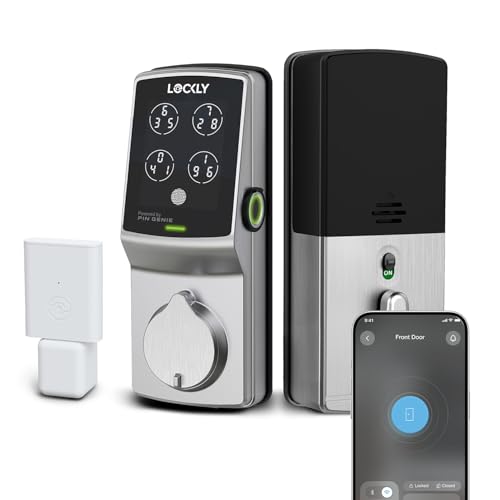
Lockly Secure Pro Deadbolt
Anti Peep KeypadPros
- Randomized keypad display
- Offline access codes
- 3D fingerprint option on some versions
Cons
- Higher price
- App setup takes patience
Lockly's Secure Pro uses a digital keypad that shuffles the number positions each time, which makes shoulder surfing much harder. Access codes can be issued and used offline, and Wi Fi is included for remote control. Based on manufacturer specifications, the lock stores codes locally.
Bosma Aegis Smart Lock
Budget RetrofitPros
- Low entry price
- Retrofits over existing deadbolt
- Auto lock and unlock
Cons
- No keypad
- App is basic
Bosma's Aegis is a retrofit lock that mounts over your current deadbolt, so installation takes minutes and your existing keys still work. Wi Fi is built in and the core features run without a plan. It is the cheapest way into subscription free smart locking, as long as you are happy controlling it from a phone.
Who Should Avoid the Top Pick
Skip subscription free locks if you need cloud video, since doorbell cameras almost always require a plan for recordings. Also avoid retrofit models if everyone in the house needs a keypad, and avoid any lock whose remote features depend on a hub you do not own.
Before You Buy
Measure your door's backset and cross bore before ordering, and confirm whether your door is left or right handed. Check that the lock's wireless protocol matches what you already have, and decide up front whether you want a keypad, a fingerprint reader, or app only control.
FAQs
Do smart locks really work without a subscription?
Yes. Entry codes, app control, auto lock, and guest access work locally on the locks listed here, and the subscription tiers mostly add cloud video or extended history.
What do I lose by skipping the subscription?
Usually cloud video recording, longer activity logs, and some advanced user management. Core locking and unlocking stays free.
Do I need a hub for a subscription free lock?
Not for the Wi Fi models here. Z Wave and Zigbee locks need a compatible hub, which may already be part of your smart home setup.
Will a smart lock work if the Wi Fi goes down?
Yes. The keypad, fingerprint reader, and physical key keep working, and app control over Bluetooth usually still functions nearby.
How long do batteries last?
Most of these locks run on four AA batteries and last several months to about a year, with Wi Fi and frequent remote access shortening that.
Can I keep my existing keys?
On retrofit models like August and Bosma, yes. Full replacement deadbolts come with their own keyway and keys.
Our verdict
The Schlage Encode Plus is the best subscription free smart lock for most US homes, with built in Wi Fi, Apple home key, and no plan needed. If you rent or want to keep your existing deadbolt, the August Wi Fi and Bosma Aegis are the easiest retrofits, while the Ultraloq U Bolt Pro wins on fingerprint entry.