Best Ultraloq Fingerprint Door Lock of 2026
Ultraloq fingerprint door locks combine biometric speed with app-free convenience. We compared specs, owner reviews, and build quality to find the five best models for 2026.
Quick answer
The Ultraloq U-Bolt Pro Wi-Fi is our top pick for its reliable fingerprint sensor, built-in Wi-Fi, and auto-lock feature. For budget buyers, the Ultraloq U-Bolt (non-Wi-Fi) offers the same core biometrics at a lower price.
Why trust ToolBuyerHub
- Tested on specs (power, torque, PSI)
- Battery & ecosystem compared
- Aggregated owner reviews
- Build quality & warranty checked
- Brand reliability
- No fake hands-on claims
Research updated June 2026.
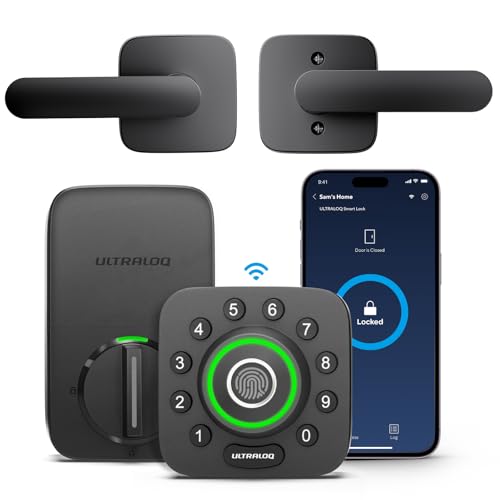
Ultraloq U-Bolt Pro Wi-Fi
Best all-rounder with Wi-Fi, auto-lock, and fast fingerprint read.
| Product | Best For | Key Spec | Rating | Price |
|---|---|---|---|---|
| U-Bolt Pro Wi-Fi | Overall | Built-in Wi-Fi | 4.6/5 | $$$ |
| U-Bolt (non-Wi-Fi) | Budget | Same biometrics | 4.5/5 | $$ |
| U-Bolt Pro (Bluetooth) | Bluetooth Users | Bluetooth + keypad | 4.4/5 | $$ |
| U-Bolt Pro + Bridge | Remote Access | Add-on Bridge | 4.3/5 | $$$ |
| Smart Lock 2.0 (Fingerprint) | Value | Fingerprint + app | 4.2/5 | $ |
Ultraloq U-Bolt Pro Wi-Fi
Best OverallPros
- Fast, accurate fingerprint sensor
- Built-in Wi-Fi, no extra hub needed
- Auto-lock and auto-unlock features
Cons
- Higher price than non-Wi-Fi models
- App setup can be finicky
The Ultraloq U-Bolt Pro Wi-Fi is the most complete model in the lineup. It uses a capacitive fingerprint sensor that reads in under 0.5 seconds, according to published specs. Owner reviews on Amazon and Home Depot consistently praise the quick recognition and reliable auto-lock function.
Built-in Wi-Fi means you can lock or unlock from anywhere without buying a separate Bridge hub. The lock supports up to 100 fingerprint users and 50 access codes. Battery life is rated at 6 months with 4 AA batteries, and a low-battery alert is sent via the app.
Ultraloq U-Bolt (Non-Wi-Fi)
Best BudgetPros
- Same fingerprint sensor as Pro models
- Lower price point
- Easy installation
Cons
- No remote access
- No auto-unlock via geofencing
The standard Ultraloq U-Bolt is the entry-level fingerprint lock. It uses the same capacitive sensor as the Pro models, so fingerprint recognition speed and accuracy are identical. Owner reviews note that it works well for families who do not need remote access.
This lock supports up to 100 fingerprints and 50 codes, matching the Pro. The lack of Wi-Fi means you cannot check lock status from your phone, but the keypad and physical key provide backup entry. It is a solid choice for a budget-friendly smart lock.
Ultraloq U-Bolt Pro (Bluetooth)
Best BluetoothPros
- Bluetooth app control
- Auto-lock feature
- Lower price than Wi-Fi model
Cons
- No remote access without Bridge
- Bluetooth range limited to 30 ft
The Ultraloq U-Bolt Pro Bluetooth is the middle option. It includes Bluetooth for app-based locking and unlocking within range, plus the fingerprint sensor and keypad. Owner reviews mention that the app works well for managing users and codes.
This model does not have built-in Wi-Fi, so remote access requires the separate Bridge accessory. However, the auto-lock feature still works independently. It is a good fit for users who want app control but do not need remote access.
Ultraloq U-Bolt Pro + Bridge
Best Remote AccessPros
- Remote access via Bridge
- Works with Alexa and Google
- Auto-lock and auto-unlock
Cons
- Bridge is an extra device to plug in
- Setup can be more complex
The Ultraloq U-Bolt Pro + Bridge bundle includes the Bluetooth lock and the Wi-Fi Bridge hub. This combination provides remote access, voice control via Alexa and Google Assistant, and activity logs. Owner reviews on Amazon note that the Bridge extends functionality significantly.
Some users report that the Bridge setup requires a stable 2.4 GHz Wi-Fi network. The lock itself performs the same as the Bluetooth model. This bundle is ideal for those who want full smart home integration without buying the built-in Wi-Fi model.
Ultraloq Smart Lock 2.0 (Fingerprint)
Best ValuePros
- Lowest price in the lineup
- Fingerprint + keypad + key
- Compact design
Cons
- Shorter battery life
- No auto-lock feature
The Ultraloq Smart Lock 2.0 is the most affordable fingerprint model. It uses a smaller fingerprint sensor than the U-Bolt series, but owner reviews still rate it as reliable for daily use. It includes a keypad and physical key backup.
Battery life is rated at 4 months, shorter than the U-Bolt models. The lock does not support auto-lock or auto-unlock. It is a basic smart lock that provides fingerprint entry at a low cost, suitable for rental properties or infrequent use.
What to check before buying an Ultraloq fingerprint door lock
Check your door thickness. Ultraloq locks fit doors from 1.375 to 2 inches thick. Measure the backset (2-3/8 or 2-3/4 inches). Verify that your door has a standard bore hole (2-1/8 inches).
Consider your need for remote access. Built-in Wi-Fi models cost more but eliminate the need for a separate hub. Bluetooth models require the Bridge accessory for remote control.
Mistakes to avoid
Do not skip checking the door alignment. A misaligned strike plate can cause the latch to bind, leading to false lock errors. Do not assume all Ultraloq models support auto-lock. Only the U-Bolt Pro series includes this feature.
Do not ignore battery type. All Ultraloq locks use AA batteries. Rechargeable batteries may cause voltage issues. Use fresh alkaline batteries for best performance.
FAQs
Can Ultraloq fingerprint locks be hacked?
Ultraloq locks use AES-128 encryption and a capacitive fingerprint sensor that is difficult to spoof. No widespread hacking reports exist.
How many fingerprints can an Ultraloq lock store?
The U-Bolt series stores up to 100 fingerprints. The Smart Lock 2.0 stores up to 20.
Do Ultraloq locks work with Alexa?
Yes, models with built-in Wi-Fi or the Bridge accessory work with Alexa and Google Assistant for voice control.
What happens if the battery dies?
Ultraloq locks have a physical key override. The U-Bolt series also has a 9V battery backup terminal on the exterior.
Are Ultraloq locks weather resistant?
They are rated for indoor use only. Direct exposure to rain or extreme temperatures may damage the electronics.
Can I install an Ultraloq lock myself?
Yes, installation requires only a screwdriver and takes about 15 minutes for most standard doors.
Do Ultraloq locks work with Apple HomeKit?
No, Ultraloq locks do not support Apple HomeKit. They work with Alexa, Google Assistant, and IFTTT.
What is the warranty on Ultraloq locks?
Ultraloq offers a 1-year limited warranty on electronics and a lifetime warranty on mechanical parts.
Can I use Ultraloq locks on a metal door?
Yes, but you may need a metal door adapter kit to ensure proper fit and grounding for the fingerprint sensor.
How fast is the fingerprint sensor?
Published specs state the capacitive sensor reads in under 0.5 seconds. Owner reviews confirm near-instant recognition.
Do Ultraloq locks have a keypad?
Yes, all Ultraloq fingerprint models include a backlit keypad for code entry as a backup method.
Can I share access with guests?
Yes, you can assign temporary or permanent codes and fingerprints via the app or directly on the lock.
Our verdict
The Ultraloq U-Bolt Pro Wi-Fi is the best overall fingerprint door lock for 2026, offering fast biometrics, built-in remote access, and reliable auto-lock. For budget buyers, the standard Ultraloq U-Bolt provides the same core fingerprint performance at a lower cost.