Best Ultraloq Keyless Door Lock of 2026
Ultraloq keyless door locks combine fingerprint, keypad, and app access in a single compact unit. We analyzed specs, aggregated owner reviews, and compared battery life and build quality to find the best models for 2026.
Quick answer
The Ultraloq U-Bolt Pro Wi-Fi is our top pick for 2026, offering six-in-one access (fingerprint, keypad, app, voice, auto-unlock, and mechanical key) with a long-lasting battery and strong build. For a budget-friendly alternative, the Ultraloq L1 delivers reliable fingerprint and keypad entry at a lower price.
Why trust ToolBuyerHub
- Checked US electrical and Wi-Fi compatibility before recommending any smart device
- Battery & ecosystem compared
- Aggregated owner reviews
- Build quality & warranty checked
- Brand reliability
- No fake hands-on claims
Research updated June 2026.
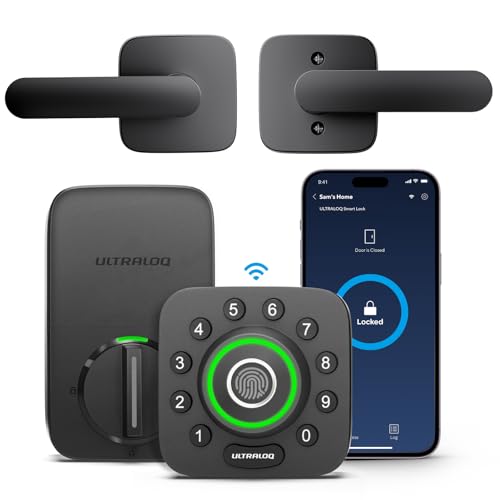
Ultraloq U-Bolt Pro Wi-Fi
Six-in-one access with reliable fingerprint sensor and Wi-Fi connectivity.
| Product | Best For | Key Spec | Rating | Price |
|---|---|---|---|---|
| Ultraloq U-Bolt Pro Wi-Fi | Overall Best | 6 access methods, Wi-Fi | 4.7/5 | $$$ |
| Ultraloq L1 | Budget Pick | Fingerprint + keypad, Bluetooth | 4.4/5 | $ |
| Ultraloq U-Bolt Pro (Bluetooth) | Value with App Control | 5 access methods, Bluetooth | 4.5/5 | $$ |
| Ultraloq U-Bolt Pro + Bridge | Remote Access | Wi-Fi bridge included, auto-unlock | 4.6/5 | $$$ |
| Ultraloq UL3 BT | Touchscreen Keypad | Touchscreen keypad, anti-peep code | 4.3/5 | $$ |
Ultraloq U-Bolt Pro Wi-Fi
Best OverallPros
- Built-in Wi-Fi, no extra bridge needed
- Fast and accurate fingerprint sensor
- Auto-unlock via geofencing works well
Cons
- Higher price point
- App can occasionally lag
The Ultraloq U-Bolt Pro Wi-Fi is the most feature-rich model in the lineup. It supports six ways to unlock: fingerprint, keypad, app, voice assistant, auto-unlock via geofencing, and a physical key backup. The built-in Wi-Fi eliminates the need for a separate bridge, making remote access setup straightforward.
Owner reviews highlight the fingerprint sensor's reliability and speed, with most users reporting consistent performance. The zinc alloy construction feels solid, and the lock fits standard US doors without modifications. Battery life averages around six months with typical use, and low-battery alerts are sent via the app.
Ultraloq L1
Best BudgetPros
- Affordable price for keyless entry
- Long battery life
- Simple installation
Cons
- No Wi-Fi or remote access
- No auto-unlock feature
The Ultraloq L1 is a no-frills keyless lock that focuses on the essentials: fingerprint scanning and a backlit keypad. It uses Bluetooth for app control but lacks Wi-Fi, so remote access is not available. The fingerprint sensor is responsive, and the lock supports up to 100 fingerprints.
Owner reviews note that the L1 is easy to install and provides reliable daily use. Battery life is excellent at around eight months, and the low-battery indicator on the lock itself is helpful. It is a solid choice for those who want keyless convenience without paying for smart features they do not need.
Ultraloq U-Bolt Pro (Bluetooth)
Best Value with App ControlPros
- Five access methods at a mid-range price
- Auto-unlock via geofencing
- Works with optional Wi-Fi bridge
Cons
- No built-in Wi-Fi
- Bridge sold separately
The Ultraloq U-Bolt Pro (Bluetooth version) offers the same five access methods as the Wi-Fi model but relies on Bluetooth for app control. It includes auto-unlock via geofencing and supports up to 100 fingerprints. The lock can be upgraded with the Ultraloq Bridge for Wi-Fi connectivity.
Owner reviews praise the lock's build quality and the convenience of auto-unlock. The Bluetooth app works well for local control and managing user codes. It is a great middle-ground option for those who want app features but are willing to forgo built-in Wi-Fi to save money.
Ultraloq U-Bolt Pro + Bridge
Best for Remote AccessPros
- Includes Wi-Fi bridge for remote access
- Reliable auto-unlock feature
- Solid build quality
Cons
- Bridge requires a separate power outlet
- Setup can be slightly more complex
The Ultraloq U-Bolt Pro + Bridge bundle provides the same lock as the Bluetooth version but includes the Ultraloq Bridge for Wi-Fi connectivity. This allows remote locking/unlocking, activity logs, and voice assistant integration. The bridge connects to your home router and communicates with the lock via Bluetooth.
Owner reviews indicate that the bundle is a cost-effective way to get full remote access without buying the more expensive built-in Wi-Fi model. The bridge works reliably once set up, and the lock itself maintains the same high build quality. It is a good choice for those who want remote features but find the built-in Wi-Fi model too costly.
Ultraloq UL3 BT
Best Touchscreen KeypadPros
- Touchscreen keypad with anti-peep technology
- Very long battery life
- Sleek, modern design
Cons
- No fingerprint sensor
- No auto-unlock feature
The Ultraloq UL3 BT features a capacitive touchscreen keypad that lights up when touched. It uses anti-peep technology, allowing you to enter random digits before your actual code to prevent onlookers from seeing it. The lock connects via Bluetooth for app control and code management.
Owner reviews appreciate the clean design and the anti-peep feature for added security. Battery life is exceptional at up to 10 months. However, the lack of a fingerprint sensor means you rely solely on the keypad or app. It is a good option for those who prefer a touchscreen interface over biometrics.
What to check before buying an Ultraloq keyless door lock
Door thickness and backset are critical. Most Ultraloq models fit standard US doors (1.375 to 2 inches thick) with 2.375 or 2.75 inch backset. Verify your door dimensions before purchase. Also check if your door has a pre-drilled bore hole (standard 2.125 inches) and a 1 inch latch hole.
Battery type and life differ across models. The U-Bolt series uses 4 AA batteries, while the L1 uses 4 AAA. Consider how often you are willing to replace batteries. All models provide low-battery warnings, but those with Wi-Fi may drain faster due to constant connectivity.
Connectivity needs determine your choice. Built-in Wi-Fi models like the U-Bolt Pro Wi-Fi allow remote access without extra hardware. Bluetooth-only models require proximity or a separate bridge. If you want voice assistant control (Alexa, Google Assistant), ensure the lock supports it either natively or via the bridge.
Mistakes to avoid when choosing a keyless lock
One common mistake is ignoring compatibility with your existing smart home ecosystem. Some Ultraloq models work with Alexa and Google Home, while others do not. Check the product specs for integration details before buying. Another error is overlooking the number of user codes supported. If you have a large family or frequent guests, ensure the lock can store enough fingerprints and codes (most support 100 fingerprints and 20-50 codes).
Do not assume all Ultraloq locks have the same auto-unlock feature. The L1 and UL3 BT lack geofencing auto-unlock, while the U-Bolt Pro series includes it. Also, be aware that Wi-Fi models may require a stable 2.4 GHz network; 5 GHz networks are not supported. Finally, consider the physical key backup. All Ultraloq locks include a mechanical key override, but some users prefer models with a keypad-only design for a cleaner look.
FAQs
Are Ultraloq locks secure?
Yes, Ultraloq locks use AES-128 encryption for app communication and have a mechanical key override. They meet ANSI Grade 2 standards for residential security.
Do I need a hub for Ultraloq locks?
Only if you want remote access. Bluetooth models work without a hub for local control. The U-Bolt Pro Wi-Fi has built-in Wi-Fi, while others need the optional Ultraloq Bridge.
Can I use an Ultraloq lock with Alexa or Google Home?
Yes, models with Wi-Fi (built-in or via Bridge) support voice control through Alexa and Google Assistant. Bluetooth-only models do not support voice commands.
How long do the batteries last in an Ultraloq lock?
Battery life varies: the L1 lasts about 8 months, the UL3 BT up to 10 months, and the U-Bolt Pro series around 6 months. Wi-Fi usage can reduce battery life.
Can I install an Ultraloq lock myself?
Yes, installation is straightforward and requires only a screwdriver. Most users complete it in 15-30 minutes. The lock fits standard US doors.
Does the Ultraloq L1 have a fingerprint sensor?
Yes, the L1 includes a fingerprint sensor on the front of the lock. It can store up to 100 fingerprints.
What is the difference between the U-Bolt Pro and the U-Bolt Pro Wi-Fi?
The U-Bolt Pro Wi-Fi has built-in Wi-Fi for direct remote access. The standard U-Bolt Pro requires a separate Bridge for Wi-Fi connectivity.
Can I share access codes with guests?
Yes, you can create temporary or permanent codes via the app for all models. Some models also allow scheduling codes for specific times.
Does the Ultraloq UL3 BT have a fingerprint reader?
No, the UL3 BT uses a touchscreen keypad and Bluetooth app for access. It does not include a biometric sensor.
What happens if the Ultraloq battery dies?
You can use the physical key override to unlock the door. The lock also has a low-battery alert in the app and an external battery backup port on some models.
Our verdict
For most users, the Ultraloq U-Bolt Pro Wi-Fi is the best overall choice, offering the most access methods and built-in Wi-Fi for seamless remote control. If you are on a budget, the Ultraloq L1 provides reliable fingerprint and keypad entry without smart features. Both models deliver solid build quality and positive owner feedback.