Fingerprint vs Keypad Smart Locks: Which Entry Method Wins for Your Door
Fingerprint and keypad smart locks both remove the key from your daily routine, but they solve the problem in very different ways. One reads your finger in under a second, the other asks you to remember and type a code, and the better choice depends on who uses the door and how often.
Quick answer
For most households a keypad lock wins overall because codes work for every family member, guests, and delivery drivers, while fingerprint locks win on speed and convenience for the primary user.
Why trust ToolBuyerHub
- Cross-checked manufacturer-published specifications before writing any recommendation
- Verified US market availability and configuration for every model discussed
- Owner-feedback themes are summarized as feedback, never presented as our own hands-on testing
- No invented star ratings; see the visible Research Score criteria on this page
- Checked specifications against manufacturer documentation before publishing
- We compare locks by entry method, backup access, battery behavior, and smart home compatibility using manufacturer specifications and recurring owner-feedback themes, not sponsored placements.
Research updated September 2026.
| Factor | Schlage Encode Plus Smart WiFi Deadbolt | Lockly Secure Pro Fingerprint Deadbolt |
|---|---|---|
| Factor | Schlage Encode Plus | Lockly Secure Pro |
| Primary entry | Keypad code | Fingerprint scan |
| Backup entry | Physical key | Physical key plus keypad |
| WiFi included | Yes, built in | Yes, via included bridge |
| Best for | Families and guests | Fast solo entry |
| Fingerprint reader | No | Yes |

Schlage Encode Plus Smart WiFi Deadbolt
Best keypad overallPros
- Built-in WiFi means no separate bridge or hub to buy
- Backlit keypad stays usable at night and in bad weather
- Works with Apple home key so you can tap an iPhone or Apple Watch
Cons
- Costs more than most basic keypad deadbolts
- Fingerprint entry is not offered on this model
A well-known keypad deadbolt that connects directly to WiFi, so you can manage codes remotely without extra hardware. It suits households where several people, sitters, or contractors need their own code. The lack of a fingerprint reader is the main tradeoff.
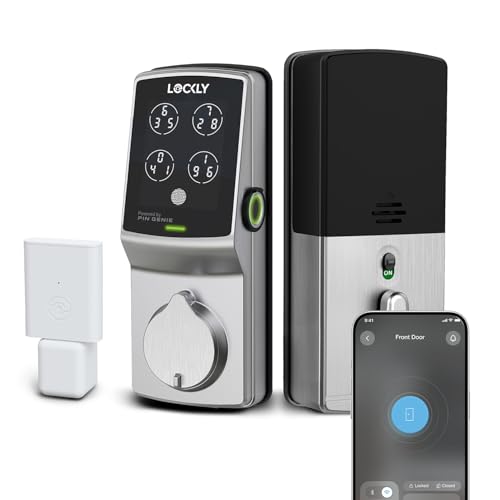
Lockly Secure Pro Fingerprint Deadbolt
Best fingerprint pickPros
- Fingerprint reader unlocks quickly for the main user
- Still includes a keypad, so it is not fingerprint only
- Digital keypad scrambles digits to reduce code guessing
Cons
- Fingerprint reliability can vary with wet or worn fingers
- Setup and app pairing take more patience than a simple keypad
A fingerprint-first deadbolt that keeps a keypad as a secondary method, which makes it a good middle ground if you want both. The included WiFi bridge supports remote code management. Owners often note that enrolling a clean, dry fingerprint matters for consistent reads.
Where Schlage Encode Plus Smart WiFi Deadbolt Wins
The keypad side wins on sharing and flexibility. A code can be handed to a dog walker, a cleaner, or a visiting relative in seconds, and it can be changed or deleted remotely. Codes also work for kids and older adults who may struggle with fingerprint enrollment, and a keypad lock does not care if your hands are wet, dirty, or covered by gloves.
Where Lockly Secure Pro Fingerprint Deadbolt Wins
The fingerprint side wins on speed and on not having to remember anything. A good reader opens the door in about a second with one touch, which is handy when your hands are full. Fingerprint locks also avoid the small risk of a code being watched or shared too widely, since your finger is the credential. Many models keep a keypad anyway, so you get both methods.
FAQs
Are fingerprint locks more secure than keypad locks?
Both rely on the same underlying deadbolt, so physical security is similar. Fingerprints cannot be guessed or shared, while keypad codes can be observed or passed around. A quality lock of either type with a strong deadbolt and good encryption is the bigger factor.
What happens if the battery dies?
Most smart locks warn you in the app and on the device before the battery runs down. Nearly all models include a physical key override, and many offer a temporary 9V battery jump or USB power point on the exterior.
Can I use both fingerprint and keypad on one lock?
Yes. Several fingerprint deadbolts, including the Lockly Secure Pro, also include a keypad, so you can choose either method. That combination is often the most flexible setup for a busy household.
Do fingerprint locks work with wet or dirty hands?
Not reliably. Moisture, lotion, and grime can interfere with the reader, which is a common owner complaint. A keypad or the backup key is the practical fallback in those moments.
Are keypad locks good for renters?
They can be, but check your lease and local rules before replacing a deadbolt. Some renters prefer a keypad lock that keeps the existing keyway so the landlord still has access, or a smart lock that fits over the existing deadbolt.
Which type is better for Airbnb or short term rentals?
A keypad lock is usually the better fit because you can issue a unique code per guest and delete it after checkout. Fingerprint locks are less practical when every visitor is a new person.
Our verdict
Choose a keypad lock if multiple people, guests, or renters use the door, since codes are easy to share and revoke. Choose a fingerprint lock if speed and keyless convenience for one or two regular users matter most. If you want the best of both, a fingerprint deadbolt that also includes a keypad covers nearly every situation.