How to Use a Motion Sensor Safely
Motion sensors add convenience and security to your home, but improper placement or setup can create false alarms or safety risks. This guide covers the correct way to install, configure, and maintain motion sensors for reliable, safe operation.
Quick answer
To use a motion sensor safely, mount it at the recommended height (6-8 feet), avoid heat sources and direct sunlight, test detection zones before finalizing placement, and regularly clean the lens. For smart locks, pair with a compatible hub and enable geofencing only on trusted devices.
Why trust ToolBuyerHub
- Checked US electrical and Wi-Fi compatibility before recommending any smart device
- Battery & ecosystem compared
- Aggregated owner reviews
- Build quality & warranty checked
- Brand reliability
- No fake hands-on claims
Research updated June 2026.

Yale Assure Lock 2 with Wi-Fi
Reliable motion detection with adjustable sensitivity and auto-lock safety features.
Understanding Motion Sensor Types
Motion sensors fall into two main categories: passive infrared (PIR) and active sensors. PIR sensors detect changes in infrared heat emitted by people and animals. Active sensors emit microwaves or ultrasonic waves and measure reflections. For home security and smart locks, PIR is the most common and safest choice because it has lower false alarm rates and consumes less power.
Where to Mount a Motion Sensor for Safety
Mounting height directly affects detection accuracy and safety. Place PIR sensors 6 to 8 feet above the floor for optimal coverage. Avoid corners where air currents from HVAC vents can trigger false alarms. For outdoor sensors, position them under eaves to shield from rain and direct sunlight, which can cause overheating or false triggers.
How to Avoid False Alarms
False alarms waste time and reduce trust in your system. Keep sensors away from radiators, space heaters, and windows facing south. Pets under 40 pounds rarely trigger properly adjusted PIR sensors, but larger animals may require a pet-immune model. Test the sensor by walking across the detection zone and adjust the sensitivity setting until only human-sized movement triggers a response.
Integrating Motion Sensors with Smart Locks
When pairing a motion sensor with a smart lock like the August Wi-Fi Smart Lock or Yale Assure Lock 2, use the companion app to set geofencing boundaries. Geofencing automatically locks or unlocks the door when your phone enters or leaves a defined area. For safety, disable auto-unlock if you share your home with children or elderly residents who may not carry a phone. Always set a time delay of at least 30 seconds before auto-lock engages to prevent accidental lockouts.
| Location | Recommended Height | Key Safety Consideration |
|---|---|---|
| Indoor hallway | 7 ft | Avoid HVAC vents |
| Outdoor entry | 8 ft | Shield from direct rain |
| Garage | 6 ft | Keep away from car exhaust |
| Stairway | 7.5 ft | Angle downward to cover steps |
What to Check Before Buying a Motion Sensor
Before purchasing, verify the sensor's detection range matches your room size. A 30-foot range works for most living rooms, while outdoor sensors need at least 50 feet. Check if the sensor is rated for outdoor use (IP65 or higher). For smart lock integration, confirm compatibility with your lock's brand and app.
Mistakes to Avoid
Do not mount sensors behind glass or metal objects, as these block PIR and microwave signals. Never point a sensor directly at a heat source like a fireplace or oven. Avoid placing sensors in areas with rapid temperature changes, such as near open windows. Finally, do not skip the walk test after installation; it is the only way to confirm coverage.
Maintenance and Battery Safety
Clean the sensor lens every three months with a dry microfiber cloth to remove dust and cobwebs. Replace batteries annually or when the app shows low battery. Use only alkaline or lithium batteries from reputable brands like Duracell or Energize; mixing old and new batteries can cause leakage and damage the sensor.
Motion Sensor Safety for Children and Pets
If you have children or pets, choose sensors with pet immunity up to 40 pounds. Place sensors high enough that small children cannot reach them. For smart locks with motion-based auto-unlock, disable the feature when children are home alone to prevent unintended entry. Teach older children how to manually override the lock using the keypad or physical key.
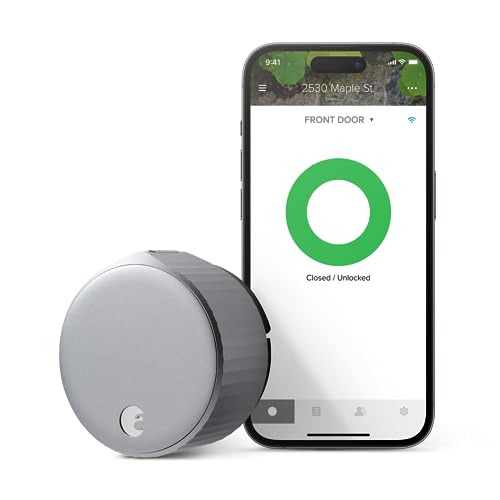
August Wi-Fi Smart Lock
Best for RetrofitPros
- Works with existing deadbolt
- Easy DIY installation
- Auto-lock with adjustable delay
Cons
- Requires August Connect for remote
- Geofence range can be inconsistent
The August Wi-Fi Smart Lock fits over your existing deadbolt, making it ideal for renters. Its PIR sensor detects motion near the door and triggers auto-lock after a user-set delay. Owner reviews on Amazon note reliable performance but some report geofence radius varies by phone model.

Ring Alarm Motion Detector
Best for Ring EcosystemPros
- Pet immune up to 40 lbs
- Quick app setup
- Works with Ring smart locks
Cons
- Requires Ring subscription for recording
- No geofencing on its own
Ring's motion detector integrates seamlessly with Ring Alarm and Ring smart locks. Its pet immunity reduces false alarms from small animals. Owners report the 30-foot range covers most hallways and living rooms. The sensor triggers the Ring lock to auto-lock when no motion is detected for a set period.
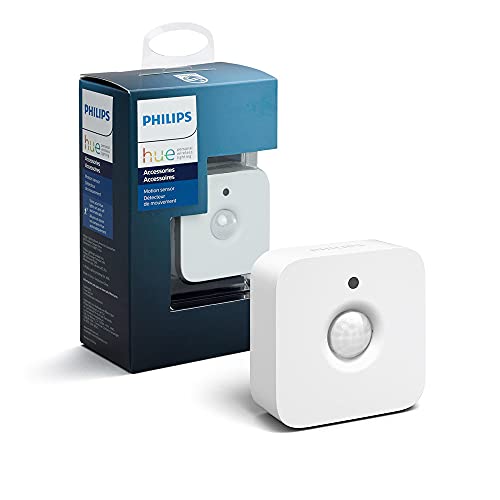
Philips Hue Motion Sensor
Best for Lighting IntegrationPros
- Long battery life
- Works with Hue lights and locks
- Small, discreet design
Cons
- Limited range compared to others
- Requires Hue Bridge for full features
The Philips Hue Motion Sensor is designed primarily for lighting but can trigger Hue-compatible smart locks via the app. Its 16-foot range suits smaller rooms. Owner reviews praise the two-year battery life and simple setup. For safety, use it to turn on lights when motion is detected near an entry door.
Wyze Sense Motion Sensor
Best BudgetPros
- Low price point
- Works with Wyze Lock
- Compact and easy to mount
Cons
- No pet immunity
- Requires Wyze subscription for cloud
The Wyze Sense Motion Sensor offers basic motion detection at a budget price. It pairs with the Wyze Lock for auto-lock functionality. Owner reviews note the sensor is sensitive and may trigger on small pets. For safe use, mount it away from floor-level activity and test with your specific environment.
Eve Motion Sensor
Best for HomeKitPros
- Thread-enabled for fast response
- IPX5 weather resistant
- Privacy-focused (no cloud)
Cons
- Requires HomeKit hub
- Higher price than competitors
The Eve Motion Sensor uses Thread technology for instant communication with Apple HomeKit. It works with HomeKit-compatible smart locks like the Level Lock+. Owner reviews highlight its fast response and weather resistance for outdoor use. For safety, set automations to lock the door when no motion is detected for five minutes.
FAQs
Can a motion sensor be used outdoors safely?
Yes, but only if it has an IP65 or higher rating and is mounted under an eave to protect from rain and direct sunlight.
What height should I mount a motion sensor for a smart lock?
Mount it 6 to 8 feet above the floor, angled slightly downward to cover the entry area without triggering on passing cars or pedestrians.
Will a motion sensor work with any smart lock?
Most sensors work only within their own ecosystem (e.g., Ring, Yale, August). Check compatibility before purchasing.
How do I stop false alarms from my motion sensor?
Reduce sensitivity in the app, move the sensor away from heat sources, and enable pet immunity if available.
Can I use a motion sensor with a smart lock without a hub?
Some sensors with built-in Wi-Fi or Thread can connect directly, but most require a hub for full automation features.
How often should I replace the batteries in a motion sensor?
Replace batteries annually or when the app alerts you. Use fresh alkaline or lithium batteries to avoid leakage.
Is it safe to use geofencing with a motion sensor and smart lock?
Yes, but only enable auto-unlock on phones you trust. Set a 30-second delay for auto-lock to prevent accidental lockouts.
Can pets trigger a motion sensor?
Standard PIR sensors can be triggered by pets over 40 pounds. Choose a pet-immune model or adjust the sensitivity.
Do motion sensors work through glass or walls?
No, PIR sensors cannot detect through glass or walls. Mount them in open view of the area you want to monitor.
What is the best motion sensor for a smart lock?
The Yale Assure Lock 2 with Wi-Fi offers the best balance of reliability, adjustable sensitivity, and smart lock integration.
Our verdict
For most users, the Yale Assure Lock 2 with Wi-Fi provides the safest and most reliable motion sensor experience with adjustable sensitivity and auto-lock features. If you are on a budget, the Wyze Sense Motion Sensor paired with the Wyze Lock offers basic functionality at a lower cost, though you lose pet immunity.