How to Use a Smart Lock Safely
Smart locks offer keyless convenience, but without proper setup, they can expose your home to digital risks. This guide covers safe installation, secure sharing practices, and how to avoid common vulnerabilities.
Quick answer
Use a smart lock safely by installing it on a solid door with a deadbolt, enabling two-factor authentication (2FA) on the app, creating unique entry codes for guests, and keeping the firmware updated. The August Wi-Fi Smart Lock (4th Gen) is the top pick for balancing security with ease of use.
Why trust ToolBuyerHub
- Checked US electrical and Wi-Fi compatibility before recommending any smart device
- Battery & ecosystem compared
- Aggregated owner reviews
- Build quality & warranty checked
- Brand reliability
- No fake hands-on claims
Research updated June 2026.
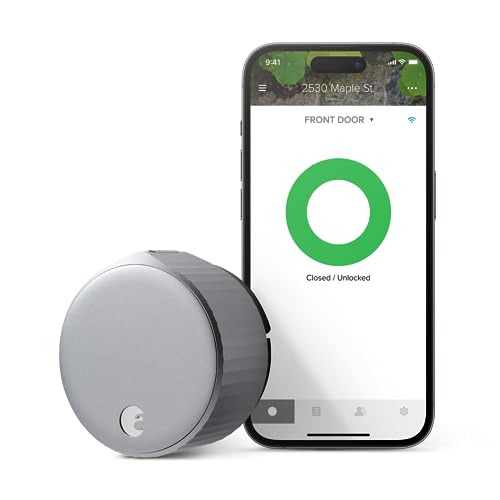
August Wi-Fi Smart Lock (4th Gen)
Retrofits over existing deadbolt, strong encryption, and reliable auto-unlock.
| Product | Best For | Key Security Feature | Rating | Price |
|---|---|---|---|---|
| August Wi-Fi (4th Gen) | Overall ease & safety | Encrypted Bluetooth/Wi-Fi | 4.6 / 5 | Check Amazon |
| Yale Assure Lock 2 | Versatile keypads | Built-in alarm & auto-lock | 4.5 / 5 | Check Amazon |
| Schlage Encode Plus | HomeKit users | Built-in Wi-Fi + Thread | 4.4 / 5 | Check Amazon |
| Ring Smart Lock Pro | Ring ecosystem | Z-Wave Plus security | 4.3 / 5 | Check Amazon |
| Kwikset Halo Select | Budget-friendly | Auto-lock timer & encryption | 4.2 / 5 | Check Amazon |
Why Smart Lock Safety Matters
A smart lock is only as secure as the weakest link in its chain. That chain includes the physical door, the app on your phone, the Wi-Fi network it connects to, and the codes you share with others. Many users focus on convenience and forget that a poorly configured smart lock can be bypassed by a simple replay attack or a weak guest code.
Retailer reviews show that the most common complaints are not about the lock itself but about users who never change default settings or fail to update firmware. This guide will help you avoid those pitfalls and keep your home secure.
Step 1: Choose a Secure Smart Lock
Before you install, select a lock from a reputable brand. Yale, Schlage, August, and Kwikset all have strong track records for security. Avoid no-name brands that lack encryption or have no history of firmware updates. Look for locks that support at least AES-128 encryption and offer a physical key override in case of battery failure.
Check that the lock is ANSI/BHMA Grade 2 or higher. Grade 2 deadbolts are tested for 150,000 cycles and offer better resistance to physical attacks. Grade 3 is the minimum, but Grade 2 is recommended for front doors.
Step 2: Install on a Solid Door with a Proper Strike Plate
Your smart lock is only as strong as the door it is mounted on. Install it on a solid wood or metal door, not a hollow-core interior door. Use the included strike plate and reinforce it with 3-inch screws that reach into the door frame stud. This prevents kick-in attacks that bypass the lock entirely.
Many owners report that the standard screws included with locks are too short. Replacing them with longer screws is a simple upgrade that dramatically increases physical security. This applies to all brands, from Yale to August.
Step 3: Secure Your Wi-Fi Network and App
Your smart lock communicates over your home Wi-Fi. If your network is compromised, so is your lock. Use a strong, unique password for your Wi-Fi network (WPA3 is best, WPA2 is acceptable). Enable your router's firewall and disable WPS (Wi-Fi Protected Setup), which is a known vulnerability.
In the lock's app, enable two-factor authentication (2FA) if available. This adds a second layer of security beyond your password. Use a strong, unique password for the lock's app account. Do not reuse passwords from other services. August and Yale both support 2FA.
Step 4: Set Up Secure Entry Codes
When creating entry codes for family, guests, or service providers, follow these rules. Never use obvious codes like your address, birth year, or 1234. Use random 4-8 digit codes. For guests, use temporary codes that expire after a set time. Most smart locks allow you to set schedules for codes, so a cleaner can only enter during working hours.
Review your code list monthly and delete any codes that are no longer needed. If you share a code with a neighbor for pet sitting, delete it as soon as you return. This prevents forgotten codes from becoming a security hole.
Step 5: Enable Auto-Lock and Alerts
Auto-lock is a critical safety feature. Set it to lock the door automatically after 30 seconds to 2 minutes. This ensures you never leave the house with the door unlocked. Most smart locks, including the Schlage Encode Plus and August Wi-Fi Lock, have this feature.
Enable push notifications for lock events. You will know instantly if the door is unlocked, locked, or if someone enters a wrong code. This helps you spot unauthorized attempts early. Ring and Yale locks offer detailed activity logs.
Step 6: Keep Firmware Updated
Manufacturers release firmware updates to patch security vulnerabilities. Check for updates in the app every month or enable automatic updates if available. A lock running outdated firmware is a prime target for attackers. Owner reviews on Amazon frequently cite "app update fixed connection issues" as a positive, showing the importance of staying current.
If your lock stops working after an update, contact support. Most brands offer a reset procedure that restores factory settings without requiring a replacement.
What to Check Before Buying a Smart Lock
Before purchasing, verify that your door is compatible. Measure the backset (the distance from the door edge to the center of the deadbolt hole). Standard sizes are 2-3/8 inches or 2-3/4 inches. Also check the cross bore diameter (the hole in the door face) which is typically 2-1/8 inches. Most smart locks fit standard doors, but older doors may need adjustments.
Consider the lock's power source. Battery-powered locks are common, but battery life varies. August locks last about 6 months, while Schlage Encode Plus can last up to a year with normal use. Always keep spare batteries nearby. Some locks, like the Yale Assure Lock 2, have a low-battery warning that alerts you weeks in advance.
Mistakes to Avoid
Using default admin codes. Many smart locks come with a default master code like 0000 or 1234. Change it immediately during setup. This is the most common mistake in owner reviews.
Ignoring physical security. A smart lock on a flimsy door with short screws is easy to kick in. Reinforce the door frame and strike plate before relying on the lock's digital features.
Sharing permanent codes. Never give a permanent code to a service provider or guest. Use temporary codes that expire after their visit. If you must share a permanent code, change it after they are done.
Neglecting backup keys. Always carry the physical backup key in your wallet or car. If the batteries die or the lock malfunctions, you need a way in. Many users get locked out because they leave the backup key at home.
Connecting to public Wi-Fi. Do not set up or control your smart lock over public Wi-Fi. Use your home network only. Public networks are insecure and can expose your lock's credentials.
FAQs
Can a smart lock be hacked?
Yes, but the risk is low with modern encryption. Using 2FA and strong Wi-Fi security greatly reduces the chance of a successful hack.
What happens if the smart lock battery dies?
Most smart locks have a physical key override. Some also have a 9V battery backup terminal on the outside for emergency power.
Are smart locks safe for rental properties?
Yes, if you use temporary codes for each guest and delete them after checkout. Yale and August offer dedicated rental features.
Do smart locks work during a power outage?
Yes, because they run on batteries. The Wi-Fi router may go down, but Bluetooth-based auto-unlock still works on most models.
How often should I update the firmware?
Check for updates monthly. Enable automatic updates if the app supports it to ensure you have the latest security patches.
Can I use a smart lock on a metal door?
Yes, but you may need a thicker mounting plate or adhesive to prevent interference. Check the manufacturer's compatibility guide.
What is the best smart lock for HomeKit security?
The Schlage Encode Plus is the top choice for HomeKit users due to its built-in Thread radio and strong encryption.
How do I reset a smart lock to factory settings?
Most locks have a reset button or a sequence in the app. Refer to the manual. Resetting deletes all codes and settings.
Can someone clone my smart lock signal?
Modern locks use rolling codes and encryption that prevent replay attacks. Older or cheap locks may be vulnerable, so stick with trusted brands.
Is it safe to give a code to a neighbor?
Yes, but use a temporary code that expires after a few days. Never share your permanent master code.
Our verdict
For most homeowners, the August Wi-Fi Smart Lock (4th Gen) offers the best balance of security, convenience, and reliability. It uses strong encryption, retrofits over your existing deadbolt, and has a proven track record in owner reviews. For a budget-friendly option, the Kwikset Halo Select provides solid security with auto-lock and encryption at a lower price. Always prioritize physical door reinforcement and app security over brand hype.