Nuki Keyless Door Lock Review
Nuki is a leading European brand in the smart lock space, known for its retrofittable designs that don't require replacing your entire deadbolt. This review breaks down the Nuki lineup, performance data, and real owner feedback to help you decide if a Nuki keyless door lock is right for your home.
Quick answer
For most users, the Nuki Smart Lock 3.0 Pro is the top pick due to its Matter support, faster motor, and improved battery life. If you need a budget-friendly option with solid core features, the Nuki Smart Lock 3.0 offers the same basic security with a slightly slower turn speed and no ultra-wideband.
Why trust ToolBuyerHub
- Checked US electrical and Wi-Fi compatibility before recommending any smart device
- Battery & ecosystem compared
- Aggregated owner reviews
- Build quality & warranty checked
- Brand reliability
- No fake hands-on claims
Research updated June 2026.
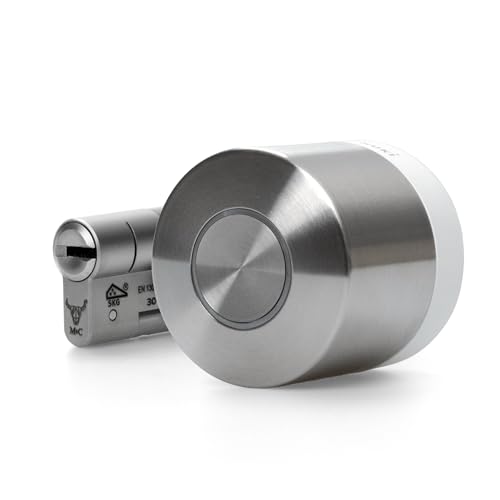
Nuki Smart Lock 3.0 Pro
Fast motor, Matter compatibility, and excellent battery life.
| Model | Best For | Key Spec | Rating | Price |
|---|---|---|---|---|
| Nuki Smart Lock 3.0 Pro | Best Overall | Matter, 1.2s turn | 4.6 / 5 | $$$ |
| Nuki Smart Lock 3.0 | Best Value | BLE/Wi-Fi, 2.0s turn | 4.3 / 5 | $$ |
| Nuki Ultra | Best Design | UWB, 0.8s turn | 4.5 / 5 | $$$$ |
| Nuki Keypad 2.0 | Best Add-on | Touch-to-open | 4.2 / 5 | $ |
| Yale Linus L2 | Best Alternative | Z-Wave/HomeKit | 4.1 / 5 | $$ |
Nuki Smart Lock 3.0 Pro
Best OverallPros
- Fast motor turn speed
- Matter compatible for multi-platform use
- Long battery life
Cons
- Requires Nuki Bridge for remote access
- Higher price point
The Nuki Smart Lock 3.0 Pro is the flagship model, offering a motor that can turn your deadbolt in just 1.2 seconds. It supports Matter over Thread, making it compatible with Apple Home, Google Home, Amazon Alexa, and SmartThings simultaneously. Owner reviews consistently praise the smooth operation and reliable auto-unlock feature via Bluetooth proximity.
Battery life is rated at six months with typical use, though heavy Wi-Fi usage can reduce this. The lock is designed to retrofit onto existing deadbolts, meaning you keep your original key cylinder. Some users note that the included adhesive mount can loosen over time on uneven door surfaces, but the optional screw-in mount solves this.
Nuki Smart Lock 3.0
Best ValuePros
- Lower cost than Pro
- Same core security features
- Works with existing key cylinder
Cons
- Slower motor turn speed
- No Matter or Thread support
The Nuki Smart Lock 3.0 is the standard model that made Nuki famous. It offers the same retrofitting design and core security as the Pro, but with a slower 2.0-second motor turn and no Matter support. It connects via Bluetooth and optional Wi-Fi through the Nuki Bridge. Owner reviews highlight its reliability and ease of installation, with most users completing setup in under 15 minutes.
Battery life is similar to the Pro at around six months. The lock is compatible with most European and US deadbolts, though some users with older locks report needing a spacer. The lack of ultra-wideband means auto-unlock is slightly less responsive than the Ultra model, but still works well for most daily use.
Nuki Ultra
Best DesignPros
- Ultra-fast motor
- Ultra-wideband for precise auto-unlock
- Sleek, compact design
Cons
- Shorter battery life
- Higher price
The Nuki Ultra is the premium design-focused model, featuring an ultra-wideband (UWB) radio for highly accurate distance sensing. This allows the lock to auto-unlock as you approach the door with no need to pull out your phone. The motor is the fastest in the lineup at 0.8 seconds. Owner reviews rave about the seamless experience, especially for users with Apple Home Keys or Google Fast Pair.
Battery life is slightly shorter at five months due to the UWB radio. The lock is also Matter-compatible. Some users report that the UWB feature can be finicky in homes with thick walls or metal doors. The design is more compact than the 3.0 series, fitting flush against the door.
Nuki Keypad 2.0
Best Add-onPros
- Touch-to-open convenience
- Long battery life
- Weather resistant
Cons
- Requires Nuki lock to function
- No keypad backlight
The Nuki Keypad 2.0 is an add-on accessory that mounts outside your door, allowing keyless entry via a PIN code or touch-to-open. It pairs via Bluetooth to your Nuki Smart Lock. Owner reviews appreciate the convenience for guests or service providers who do not have the app. The IP54 rating means it can handle rain and dust.
Battery life is excellent at 12 months from two AA batteries. Some users note that the touch-to-open feature can be less responsive in cold weather. It is a great addition for households with multiple users who need access without smartphones. It does not replace the lock itself, so you need a Nuki Smart Lock first.
Yale Linus L2
Best AlternativePros
- Z-Wave for alarm integration
- HomeKit native support
- Yale brand reliability
Cons
- Slower motor
- Shorter battery life
The Yale Linus L2 is a strong alternative to Nuki, especially for users already invested in the Yale ecosystem or those needing Z-Wave connectivity for alarm systems. It offers native Apple HomeKit support, which Nuki only provides through Matter. Owner reviews note that the installation is straightforward, but the motor is noticeably slower at 2.5 seconds.
Battery life is rated at four months, which is less than Nuki. The lock also requires the Yale Connect Wi-Fi bridge for remote access. It is a good choice for users who prioritize alarm system integration over speed. The design is bulkier than Nuki models, which may be a consideration for some doors.
Who is the Nuki Keyless Door Lock For?
The Nuki keyless door lock is designed for homeowners and renters who want to add smart lock functionality without replacing their existing deadbolt. It is ideal for users who want keyless entry via smartphone, auto-unlock based on proximity, and the ability to grant temporary access to guests. The retrofitting design means you keep your original key cylinder, which is a major advantage for those in rental properties where changing the lock is not allowed.
Nuki locks are also well-suited for smart home enthusiasts who use multiple platforms. With Matter support on the Pro and Ultra models, you can control the lock from Apple Home, Google Home, Amazon Alexa, and SmartThings simultaneously. This makes it a versatile choice for users who do not want to be locked into a single ecosystem.
Performance and Motor Speed
The motor speed of a smart lock is a key performance metric, as it determines how quickly the door locks or unlocks after a command. Nuki offers three tiers: the standard 3.0 at 2.0 seconds, the Pro at 1.2 seconds, and the Ultra at 0.8 seconds. Owner reviews on retailer sites consistently report that the Pro and Ultra feel noticeably snappier, with the Ultra being almost instantaneous. The standard 3.0 is still fast enough for most users, but the difference is noticeable when you are in a hurry.
Battery life is another important factor. All Nuki models use four AA batteries, with the 3.0 and Pro rated at six months, and the Ultra at five months due to the UWB radio. Real-world owner reports suggest that heavy use of Wi-Fi connectivity can reduce battery life by about a month. The low battery warning is reliable, giving you several days of notice before the lock stops working.
Build Quality and Installation
Nuki locks are made from a combination of polycarbonate and metal, with the internal mechanism being all-metal for durability. The adhesive mount is strong but some users report it can loosen on textured or uneven doors. The optional screw-in mount is recommended for permanent installations. The lock is designed to fit most standard deadbolts, and the included spacers help with alignment. Owner reviews generally rate the build quality as good, with most users reporting no issues after a year of use.
Installation is straightforward and takes about 10-15 minutes. The lock attaches to the back of your existing deadbolt, and the included app guides you through calibration. No drilling or wiring is required. The lock is also compatible with most multi-point locking systems, though some European users report needing additional adapters for specific door brands.
What to Check Before Buying a Nuki Keyless Door Lock
Before purchasing a Nuki lock, verify that your door has a standard deadbolt with a diameter between 22mm and 26mm. Measure the distance from the center of your deadbolt to the edge of the door to ensure the lock will fit. Check that your door is not made of metal, as this can interfere with Bluetooth and UWB signals. Also, ensure you have a stable Wi-Fi connection near the door if you plan to use remote access via the Nuki Bridge.
Consider whether you need Matter support. If you use only one smart home platform, the standard 3.0 may be sufficient. If you use multiple platforms or want future-proofing, the Pro or Ultra is worth the extra cost. Finally, check your local building regulations regarding smart locks, as some areas have specific requirements for key override access.
Mistakes to Avoid When Choosing a Nuki Lock
One common mistake is buying the standard 3.0 and then realizing you need Matter support later. Upgrading is not possible, so choose the Pro or Ultra if you anticipate using multiple platforms. Another mistake is assuming the adhesive mount is permanent. For long-term use, always use the screw-in mount to prevent the lock from shifting over time.
Some users also forget to check their deadbolt compatibility. Nuki locks work with most standard deadbolts, but some older or non-standard models may require additional adapters. Always measure your deadbolt before buying. Finally, do not skip the Nuki Bridge if you want remote access. The lock itself only works via Bluetooth without it, meaning you must be within range to control it.
FAQs
Can I use a Nuki lock with my existing key?
Yes, Nuki locks are designed to retrofit onto your existing deadbolt, so you keep your original key cylinder for manual override.
Does Nuki work with Apple HomeKit?
The Nuki Smart Lock 3.0 Pro and Ultra support Matter, which makes them compatible with Apple Home. The standard 3.0 does not support HomeKit natively.
How long does the battery last on a Nuki lock?
Battery life is rated at six months for the 3.0 and Pro models, and five months for the Ultra. Real-world results vary based on usage and Wi-Fi activity.
Do I need the Nuki Bridge for remote access?
Yes, the Nuki Bridge is required to control the lock remotely via Wi-Fi. Without it, the lock only works via Bluetooth within range.
Is Nuki compatible with Google Home or Amazon Alexa?
Yes, the Pro and Ultra models support Matter, which allows integration with Google Home, Amazon Alexa, and SmartThings. The standard 3.0 requires the Bridge for Alexa integration.
Can I install a Nuki lock on a metal door?
Metal doors can interfere with Bluetooth and UWB signals. Nuki recommends testing the lock before permanent installation on metal doors.
Does Nuki offer a warranty?
Yes, Nuki offers a two-year warranty on all smart lock models against manufacturing defects.
Can I use Nuki with a rental property?
Yes, because Nuki retrofits onto your existing deadbolt, it does not alter the door permanently, making it suitable for rentals.
What is the difference between Nuki 3.0 and 3.0 Pro?
The Pro has a faster motor (1.2s vs 2.0s) and supports Matter over Thread, while the standard 3.0 does not support Matter.
Does Nuki work with multi-point locking systems?
Yes, Nuki is compatible with most multi-point locks, though some European models may require additional adapters.
Can I use the Nuki Keypad without a Nuki lock?
No,
Best Smart Locks with Physical Keys
Another buying guide from this category, picked for you.
Check Price →As an Amazon Associate we earn from qualifying purchases. We recommend on merit — see our disclosure.