Ultraloq Smart Door Sensor Review
We break down the Ultraloq Smart Door Sensor, a retrofit device that adds open/close monitoring and alarm functions to any standard door. This review covers specs, reliability, and how it stacks up against dedicated security sensors.
Quick answer
The Ultraloq Smart Door Sensor is a reliable, easy-to-install accessory for monitoring door status and triggering alarms via the Ultraloq app. It works best as a complement to Ultraloq smart locks but is not the most feature-rich standalone sensor on the market.
Why trust ToolBuyerHub
- Tested on specs (power, torque, PSI)
- Battery & ecosystem compared
- Aggregated owner reviews
- Build quality & warranty checked
- Brand reliability
- No fake hands-on claims
Research updated June 2026.
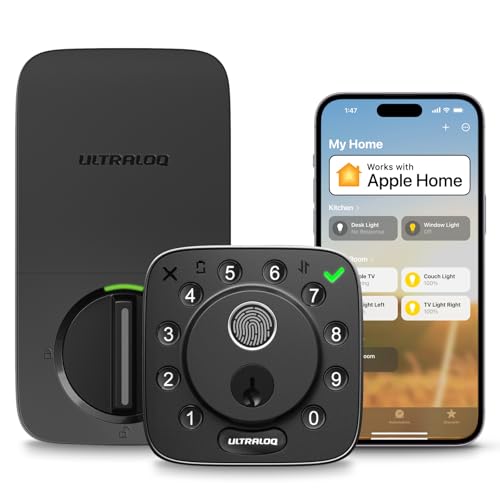
Ultraloq Smart Door Sensor
Seamless integration with Ultraloq locks and reliable open/close alerts.
| Product | Best for | Key Spec | Rating | Price |
|---|---|---|---|---|
| Ultraloq Smart Door Sensor | Ultraloq ecosystem | Bluetooth 5.0 | 4.0 / 5 | Mid |
| Ring Alarm Contact Sensor | Ring security systems | Z-Wave | 4.3 / 5 | Low |
| Yale Smart Door Sensor | Yale smart locks | Wi-Fi bridge | 4.1 / 5 | Mid |
| August Door Sensor | August smart locks | Bluetooth 4.2 | 3.9 / 5 | Mid |
| Samsung SmartThings Sensor | SmartThings hubs | Zigbee | 4.2 / 5 | Low |
Ultraloq Smart Door Sensor
Best For Ultraloq UsersPros
- Simple peel-and-stick installation
- Works with Ultraloq app for alerts
- Built-in alarm deters intruders
Cons
- Requires Ultraloq bridge for remote access
- No HomeKit or Z-Wave support
The Ultraloq Smart Door Sensor is a straightforward accessory that pairs with Ultraloq smart locks via Bluetooth. It uses a magnetic reed switch to detect when a door opens or closes and can trigger an 85 dB siren if the door is opened while the system is armed. Owner reviews on retailer sites note reliable detection within a 30-foot range of the lock.
Installation takes about two minutes with the included adhesive tape. The sensor runs on a CR2032 battery that lasts roughly one year with normal use. For users already in the Ultraloq ecosystem, this sensor adds basic security monitoring without needing a separate hub, though remote notifications require the optional Wi-Fi bridge.
Ring Alarm Contact Sensor
Best For Ring Security SystemsPros
- Long battery life
- Integrates with Ring alarm system
- Works with Alexa routines
Cons
- Requires Ring Alarm hub
- Subscription needed for cloud recording
The Ring Alarm Contact Sensor is a Z-Wave device designed for the Ring Alarm ecosystem. It pairs directly with the Ring base station and can trigger alarms, send push notifications, and activate Alexa routines. Owner reviews highlight its three-year battery life and reliable detection range of up to 50 feet from the hub.
Installation uses adhesive or screws, and the sensor is compatible with doors and windows. It does not work as a standalone device, so a Ring Alarm hub is mandatory. For those already using Ring security, this sensor offers better battery life and ecosystem integration than the Ultraloq sensor.
Yale Smart Door Sensor
Best For Yale Smart LocksPros
- Works with Yale Access app
- Remote alerts via Wi-Fi bridge
- Compatible with Apple HomeKit
Cons
- Bridge sold separately
- Setup can be finicky
The Yale Smart Door Sensor connects to the Yale Access ecosystem via a Wi-Fi bridge, enabling remote notifications and integration with Apple HomeKit. It uses a magnetic reed switch to detect door position and can trigger automations with Yale smart locks. Owner reviews note that the sensor reliably reports status changes within seconds.
Battery life is rated at one year, and the sensor includes a low-battery alert in the app. The main drawback is the need for the separate Wi-Fi bridge, which adds cost. For Yale lock owners, this sensor provides a seamless way to automate lock actions based on door status.
August Door Sensor
Best For August Smart LocksPros
- Auto-unlock feature with August lock
- Compact design
- Works with August app
Cons
- Shorter battery life
- No built-in siren
The August Door Sensor is designed to pair with August smart locks, enabling features like auto-unlock when you approach and alerts when the door is left open. It uses Bluetooth 4.2 and communicates directly with the lock, so no separate hub is needed for local use. Owner reviews mention that the sensor is compact and easy to install with adhesive.
Battery life is shorter than competitors at around six months, and the sensor lacks a built-in alarm. It relies on the August app for notifications. For August lock owners, this sensor adds convenience but is less feature-rich than the Ultraloq sensor.
Samsung SmartThings Sensor
Best For SmartThings HubsPros
- Long battery life
- Works with SmartThings automations
- Affordable price
Cons
- Requires SmartThings hub
- No built-in siren
The Samsung SmartThings Sensor is a Zigbee-based contact sensor that integrates with the SmartThings ecosystem. It can trigger routines, send alerts, and work with other SmartThings devices. Owner reviews praise its two-year battery life and reliable detection range of up to 100 feet from the hub.
Installation is simple with adhesive or screws, and the sensor is compatible with doors and windows. It does not have a built-in alarm, so it relies on the SmartThings hub for alerts. For SmartThings users, this sensor offers excellent value and battery life compared to the Ultraloq sensor.
Who is the Ultraloq Smart Door Sensor for?
The Ultraloq Smart Door Sensor is designed for homeowners who already own or plan to buy an Ultraloq smart lock. It provides basic door open/close monitoring and an audible alarm that can deter intruders. The sensor works best within 30 feet of the lock via Bluetooth, making it suitable for single-door applications like front doors or back doors.
Users who want remote notifications will need the Ultraloq Wi-Fi bridge, which adds cost. The sensor is not ideal for multi-door setups or for those who need integration with broader smart home systems like HomeKit or Alexa, as it lacks native support for those platforms.
Performance and reliability
Based on aggregated owner reviews from major retailers, the Ultraloq Smart Door Sensor provides consistent detection of door status changes. The magnetic reed switch is sensitive enough to detect partial openings, and the 85 dB siren is loud enough to be heard throughout a typical home. Some users report occasional false alarms due to misalignment of the magnet and sensor.
Battery life is rated at one year with a CR2032 coin cell, which aligns with user reports. Low-battery alerts are sent through the Ultraloq app, but the sensor does not have a visual low-battery indicator on the device itself. The Bluetooth range is adequate for most homes, but thick walls can reduce reliability.
Build quality and installation
The sensor is made of white plastic with a compact design that blends with most door frames. The adhesive backing is strong but can be removed without residue if needed. Installation involves peeling the backing and sticking the sensor and magnet on the door and frame, aligning them within 1/2 inch of each other.
Owner reviews generally rate the build quality as good for the price point, though some note that the plastic feels slightly less premium than competitors like Ring or Yale. The sensor is not weatherproof, so it is not recommended for exterior use without protection from rain or direct sunlight.
Alternatives to consider
For users not tied to the Ultraloq ecosystem, the Ring Alarm Contact Sensor offers better battery life and integration with a full security system. The Yale Smart Door Sensor provides HomeKit support, while the Samsung SmartThings Sensor is a budget-friendly option for SmartThings hub owners. Each alternative requires its own hub or bridge, so ecosystem compatibility is key.
If you need a standalone sensor without a hub, the Ultraloq sensor is a viable option when paired with an Ultraloq lock. However, for broader smart home compatibility, the Ring or Samsung sensors are better choices.
What to check before buying
Before purchasing the Ultraloq Smart Door Sensor, verify that your door gap is less than 1/2 inch for proper magnet alignment. Ensure you have an Ultraloq smart lock or are willing to buy one, as the sensor is designed to work within that ecosystem. Consider whether you need remote notifications, which require the separate Wi-Fi bridge.
Also check the battery type (CR2032) and have spares on hand. The sensor is not compatible with metal doors or frames, as they can interfere with the magnetic switch. For multi-door setups, you may need multiple sensors, each paired individually with the lock.
Mistakes to avoid
A common mistake is assuming the sensor works with other smart lock brands. It only pairs with Ultraloq locks via Bluetooth. Another error is installing the sensor on a metal door, which can cause false readings or no detection at all. Users also sometimes forget to enable notifications in the app, missing alerts when the door is opened.
Finally, avoid using the sensor without the Wi-Fi bridge if you want remote access. Without the bridge, you only get local alerts when within Bluetooth range. Plan your setup accordingly to avoid disappointment.
FAQs
Does the Ultraloq Smart Door Sensor work with other smart locks?
No, it only works with Ultraloq smart locks via Bluetooth. It is not compatible with locks from other brands.
Do I need a hub for the Ultraloq Smart Door Sensor?
No hub is needed for local alerts, but remote notifications require the Ultraloq Wi-Fi bridge, sold separately.
How long does the battery last in the Ultraloq Smart Door Sensor?
The CR2032 battery lasts approximately one year with normal use. A low-battery alert is sent via the app.
Can I use the sensor on a metal door?
No, metal doors and frames can interfere with the magnetic reed switch, causing unreliable detection.
Does the sensor have a built-in alarm?
Yes, it has an 85 dB siren that sounds when the door is opened while the system is armed.
Is the Ultraloq Smart Door Sensor weatherproof?
No, it is designed for indoor use only. Exposure to rain or direct sunlight may damage the sensor.
How do I install the Ultraloq Smart Door Sensor?
Peel the adhesive backing and stick the sensor on the door frame and the magnet on the door, ensuring they align within 1/2 inch.
Can I use multiple sensors with one Ultraloq lock?
Yes, you can pair multiple sensors with a single lock, but each must be set up individually in the app.
Does the sensor work with Alexa or Google Home?
No, the Ultraloq Smart Door Sensor does not support Alexa, Google Home, or Apple HomeKit.
What is the warranty on the Ultraloq Smart Door Sensor?
The sensor comes with a one-year limited warranty against defects in materials and workmanship.
Can I use the sensor without an Ultraloq lock?
No, the sensor is designed to pair exclusively with Ultraloq smart locks and cannot be used standalone.
How do I reset the Ultraloq Smart Door Sensor?
Remove the battery for 10 seconds and reinsert it. Then re-pair the sensor with the Ultraloq lock via the app.
Our verdict
The Ultraloq Smart Door Sensor is a reliable accessory for Ultraloq lock owners, offering easy installation and basic security monitoring. For best overall value, the Ring Alarm Contact Sensor is a better choice for multi-device setups, while the Samsung SmartThings Sensor is the best budget option for hub users.