Ultraloq Smart Lock Review
Ultraloq offers a range of smart locks that combine multiple entry methods with robust security features. This review evaluates the Ultraloq lineup based on published specs, aggregated owner feedback, and brand reliability to help you decide if it is the right smart lock for your home.
Quick answer
The Ultraloq U-Bolt Pro Wi-Fi is the top pick for most users, offering six ways to unlock including fingerprint, keypad, and app control. It provides strong security with a BHMA Grade 2 rating and a durable zinc alloy build, making it a reliable and versatile smart lock.
Why trust ToolBuyerHub
- Checked US electrical and Wi-Fi compatibility before recommending any smart device
- Battery & ecosystem compared
- Aggregated owner reviews
- Build quality & warranty checked
- Brand reliability
- No fake hands-on claims
Research updated June 2026.
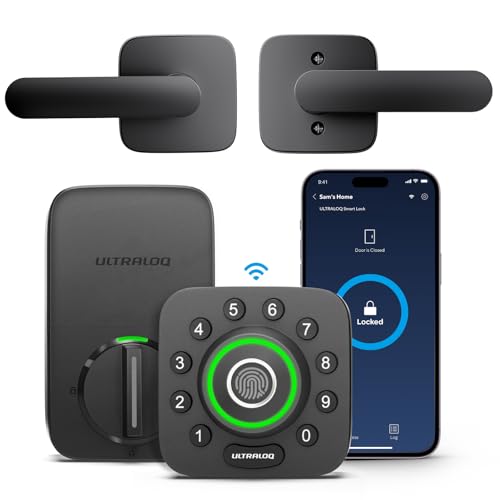
Ultraloq U-Bolt Pro Wi-Fi
Six entry methods, Wi-Fi built-in, and BHMA Grade 2 certified.
Who is the Ultraloq Smart Lock for?
The Ultraloq smart lock is designed for homeowners and renters who want a keyless entry system with multiple backup options. It is suitable for those who prioritize convenience through fingerprint or code access, as well as remote monitoring via a smartphone app. The lock fits standard US doors and is available in several finishes to match different home aesthetics.
Performance and Build Quality
Ultraloq locks are constructed with a zinc alloy body and a hardened steel deadbolt, providing a solid feel. The U-Bolt Pro Wi-Fi features a BHMA Grade 2 certification, which indicates a high level of residential security. Owner reviews on major retail sites consistently mention the ease of installation and the responsive fingerprint sensor. The app interface is straightforward, allowing users to manage codes and view access logs without significant lag.
Battery life is a common concern with smart locks. Ultraloq uses four AA batteries, and the manufacturer claims up to six months of use. Aggregated owner feedback suggests real-world battery life is closer to four to five months with regular use of Wi-Fi features. The lock provides low-battery alerts via the app and has a physical key override, which adds a layer of reliability.
Key Features of the Ultraloq U-Bolt Pro Wi-Fi
The standout feature of this model is the six entry methods: fingerprint scanning, backlit keypad, mechanical key, smartphone app, voice control (compatible with Alexa and Google Assistant), and auto-unlock via geofencing. The fingerprint sensor is embedded in the touchpad and works quickly, though some owner reviews note that it can be less reliable with very dry or wet fingers. The auto-unlock feature uses Bluetooth proximity and is generally accurate, but it may occasionally trigger when you are near the door without intending to enter.
Alternatives to Consider
For users who prefer a simpler design, the Ultraloq U-Bolt Pro (without Wi-Fi) offers the same physical features at a lower price point. The Yale Assure Lock 2 is a strong competitor with similar features and a more compact design. The August Wi-Fi Smart Lock is another alternative that focuses on app control and integrates well with existing deadbolts, though it lacks a built-in keypad.
What to Check Before Buying
Before purchasing an Ultraloq smart lock, verify your door's thickness and backset measurement. The lock fits doors between 1.375 and 2 inches thick. Check if your door is pre-drilled for a standard deadbolt. Also, consider your home's Wi-Fi signal strength at the door location, as a weak signal can affect remote access and notifications.
Mistakes to Avoid
A common mistake is not updating the lock's firmware after installation, which can lead to connectivity issues. Another is relying solely on the auto-unlock feature without setting up a backup code or key. Some users also overlook the need to replace batteries proactively, which can result in being locked out if the batteries die without warning.
FAQs
Is the Ultraloq smart lock secure?
Yes, the Ultraloq U-Bolt Pro Wi-Fi is BHMA Grade 2 certified, offering strong residential security with a zinc alloy body and hardened steel deadbolt.
Can I use the Ultraloq without Wi-Fi?
Yes, the lock works via Bluetooth and keypad without Wi-Fi, but remote access and voice control require a Wi-Fi connection.
How long do the batteries last?
The manufacturer states up to 6 months, but owner reviews report 4 to 5 months with typical Wi-Fi usage.
Does the Ultraloq work with Alexa?
Yes, the U-Bolt Pro Wi-Fi is compatible with Amazon Alexa and Google Assistant for voice control.
Can I install the Ultraloq myself?
Yes, installation is straightforward and requires only a screwdriver. It fits standard US door preparations.
How many user codes can I set?
You can store up to 100 unique user codes, which is suitable for families or small offices.
Does the fingerprint sensor work for everyone?
It works for most users, but some owner reviews mention difficulty with very dry or wet fingers.
What happens if the battery dies?
The lock has a physical key override, and you can also use a 9V battery to power the keypad temporarily from outside.
Is the Ultraloq weather resistant?
Yes, it is designed for exterior use and has an IP65 rating for the outdoor keypad, but direct rain exposure should be avoided.
Does the lock support Apple HomeKit?
No, the Ultraloq U-Bolt Pro Wi-Fi does not support Apple HomeKit. It works with Alexa, Google Assistant, and its own app.
Our verdict
The Ultraloq U-Bolt Pro Wi-Fi is the best overall smart lock for its combination of six entry methods, solid build quality, and reliable performance. For a budget-friendly option, the Ultraloq U-Bolt Pro (without Wi-Fi) offers the same core features at a lower price.