Wyze Smart Lock Review
The Wyze Smart Lock brings keyless entry to your front door at a fraction of the cost of competitors. This review examines its features, performance, and value to help you decide if it's the right smart lock for your home.
Quick answer
The Wyze Smart Lock is the best budget smart lock for homeowners who want reliable keyless entry and smart home integration without breaking the bank. It offers excellent value with its low price, easy installation, and solid performance, though it lacks some premium features like a built-in door sensor or Apple HomeKit support.
Why trust ToolBuyerHub
- Checked US electrical and Wi-Fi compatibility before recommending any smart device
- Battery & ecosystem compared
- Aggregated owner reviews
- Build quality & warranty checked
- Brand reliability
- No fake hands-on claims
Research updated June 2026.
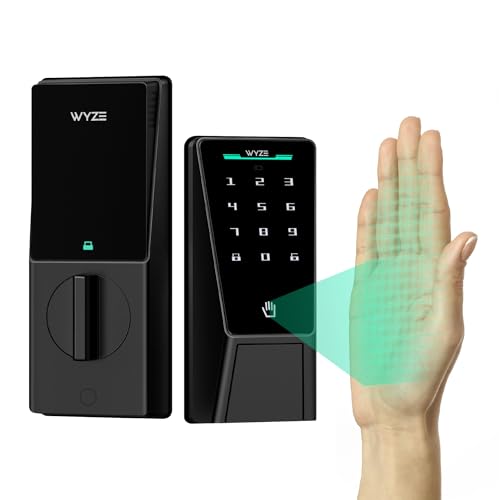
Wyze Smart Lock
Best budget smart lock with reliable performance and easy installation.
| Product | Best for | Key Spec | Rating | Price |
|---|---|---|---|---|
| Wyze Smart Lock | Budget buyers | Bluetooth + Wi-Fi hub | 4.3/5 | $ |
| August Wi-Fi Smart Lock | Premium features | Built-in Wi-Fi, DoorSense | 4.5/5 | $$$ |
| Yale Assure Lock 2 | Apple HomeKit | Z-Wave/Thread options | 4.4/5 | $$ |
| Ring Smart Lock | Ring ecosystem | Built-in Wi-Fi, alarm | 4.2/5 | $$ |
| Wyze Smart Lock | Best value | Lowest price + solid features | 4.3/5 | $ |
Wyze Smart Lock
Best OverallPros
- Very affordable price point
- Easy DIY installation
- Works with Alexa and Google Assistant
Cons
- Requires separate Wyze Hub for remote access
- No Apple HomeKit support
The Wyze Smart Lock is the most affordable smart lock on the market, offering keyless entry and remote access at a fraction of the cost of competitors. It replaces your existing deadbolt and uses your smartphone as a key, allowing you to lock and unlock from anywhere when paired with the Wyze Hub. Owner reviews on Amazon and Wyze's site praise its simple installation process, which takes about 15 minutes and requires only a screwdriver.
Performance is reliable for basic tasks like auto-lock and scheduled locking. The Wyze app is intuitive and offers features like one-time codes for guests. However, the lock does not include a built-in door sensor, so it cannot detect if the door is open or closed. Battery life is rated at 6 months with normal use, and the lock alerts you when batteries are low.
August Wi-Fi Smart Lock (4th Gen)
Best Premium FeaturesPros
- Built-in Wi-Fi, no hub needed
- DoorSense sensor detects open/closed
- Works with existing deadbolt
Cons
- Higher price point
- App can be slow to respond
The August Wi-Fi Smart Lock (4th Gen) is a premium option that fits over your existing deadbolt, preserving your original key. It features built-in Wi-Fi, eliminating the need for a separate hub. The DoorSense sensor tells you if your door is open or closed, a feature missing from the Wyze lock. Owner reviews highlight its sleek design and compatibility with Alexa, Google Assistant, and Apple HomeKit.
Battery life is similar to the Wyze at around 6 months. The August app offers auto-unlock using geofencing, which works well for most users. Some owners report occasional delays in the app connecting, but overall performance is reliable. The lock is more expensive than the Wyze, but the added features and no-hub requirement justify the cost for many users.
Yale Assure Lock 2
Best for Apple HomeKitPros
- Excellent build quality
- Multiple connectivity options
- Touchscreen keypad available
Cons
- Requires separate hub for Wi-Fi
- Higher price than Wyze
The Yale Assure Lock 2 is a well-built smart lock available with Z-Wave or Thread connectivity, making it ideal for smart home systems like Apple HomeKit, SmartThings, or Ring. It does not have built-in Wi-Fi, so you need a compatible hub for remote access. The lock is available with a touchscreen keypad or as a keyless model. Owner reviews consistently praise its robust construction and reliable performance.
Battery life is rated at 6-8 months. The lock supports auto-lock and one-time codes through the Yale Access app. The Yale Assure Lock 2 is more expensive than the Wyze but offers better build quality and broader smart home compatibility. It is a solid choice for users invested in Apple HomeKit or Z-Wave ecosystems.
Ring Smart Lock
Best for Ring EcosystemPros
- Built-in Wi-Fi, no hub needed
- Integrates with Ring Alarm system
- Easy installation
Cons
- Alexa only, no Google Assistant
- Requires Ring subscription for some features
The Ring Smart Lock is designed to work seamlessly with the Ring Alarm system and Ring Video Doorbells. It features built-in Wi-Fi, so no separate hub is required. The lock can be controlled via the Ring app and with Alexa voice commands. Owner reviews highlight its easy installation and reliable performance within the Ring ecosystem. The lock also works with Ring's alarm system to automatically lock when the alarm is armed.
Battery life is around 6 months. The lock supports one-time codes and auto-lock. A Ring Protect subscription is required for some features like video recording and extended warranty. The Ring Smart Lock is a good choice for existing Ring users, but it lacks Google Assistant support, which the Wyze offers.
Schlage Encode Plus
Best Built-in KeypadPros
- Built-in Wi-Fi and keypad
- Excellent build quality
- Long 3-year warranty
Cons
- Higher price point
- Larger footprint on door
The Schlage Encode Plus is a premium smart lock with a built-in keypad and built-in Wi-Fi, eliminating the need for a hub. It offers the most comprehensive voice assistant support, including Alexa, Google Assistant, and Apple HomeKit. The lock features a durable metal construction and a backlit keypad for easy use at night. Owner reviews consistently rate it highly for its build quality and reliability.
Battery life is rated at 6 months. The Schlage Encode Plus supports up to 100 unique access codes and offers auto-lock functionality. It is the most expensive option on this list, but the combination of built-in Wi-Fi, keypad, and long warranty makes it a top-tier choice for those who want a premium, all-in-one solution.
Who is the Wyze Smart Lock for?
The Wyze Smart Lock is designed for homeowners who want to add keyless entry and remote locking to their front door without spending a lot of money. It is ideal for renters or first-time smart home users because of its simple installation and low cost. The lock works with the Wyze app, which is easy to use and offers features like auto-lock, scheduled locking, and one-time codes for guests.
It is also a good fit for users who already own other Wyze products, such as the Wyze Cam or Wyze Bulb, as everything can be controlled from a single app. However, the Wyze Smart Lock is not for those who need advanced features like a built-in door sensor or Apple HomeKit support. If you require those features, the August Wi-Fi Smart Lock or Yale Assure Lock 2 are better options.
Performance and reliability
The Wyze Smart Lock offers reliable performance for basic smart lock tasks. The lock responds quickly to commands from the app when connected via Bluetooth, and remote access via the Wyze Hub is generally responsive. Owner reviews on Amazon and Wyze's website report that the lock operates smoothly and the auto-lock feature works as intended. The lock is also quiet compared to some competitors, which is a plus for late-night entries.
Battery life is rated at 6 months with normal use, and the app sends alerts when batteries are low. Some users have reported that the lock can be slow to respond when using the Wi-Fi hub, but this is not a widespread issue. The lock does not include a door sensor, so it cannot tell you if the door is open or closed. This is a notable omission for a smart lock, but it helps keep the price low.
Build quality and design
The Wyze Smart Lock has a simple, modern design that fits most standard deadbolts. The exterior is made of plastic, which keeps the weight down but may not feel as premium as metal locks from Schlage or Yale. The lock is available in black or silver to match most door hardware. Installation is straightforward and requires only a screwdriver, as the lock replaces the interior side of your existing deadbolt.
The lock is rated for indoor use only, so it should not be exposed to rain or direct sunlight. The plastic construction is durable enough for normal use, but it may not withstand attempted forced entry as well as a metal lock. For most residential applications, the build quality is adequate, but those seeking maximum security should consider a heavier-duty option.
Alternatives to the Wyze Smart Lock
If the Wyze Smart Lock does not meet your needs, there are several alternatives to consider. The August Wi-Fi Smart Lock (4th Gen) offers built-in Wi-Fi and a door sensor, making it a more feature-rich option. The Yale Assure Lock 2 provides better build quality and Apple HomeKit support, while the Ring Smart Lock integrates seamlessly with the Ring ecosystem. For those who want a built-in keypad, the Schlage Encode Plus is the top choice.
Each of these alternatives costs more than the Wyze, but they offer additional features or better integration with specific smart home platforms. Your choice should be based on which features are most important to you and which ecosystem you are already using.
What to check before buying a smart lock
Before purchasing a smart lock, consider the following factors:
- Compatibility: Ensure the lock fits your door's deadbolt and is compatible with your smart home system (Alexa, Google, Apple HomeKit).
- Connectivity: Decide if you want built-in Wi-Fi or if you are okay with using a separate hub for remote access.
- Power source: Most smart locks use AA batteries. Check the estimated battery life and whether the lock has a low-battery alert.
- Security features: Look for features like auto-lock, one-time codes, and tamper alerts.
- Installation: Most smart locks are DIY-friendly, but some may require professional installation.
Mistakes to avoid when buying a smart lock
Avoid these common mistakes when choosing a smart lock:
- Ignoring ecosystem compatibility: Make sure the lock works with your existing smart home devices. A lock that only supports Alexa will not work with Google Home.
- Forgetting about a hub: Some locks require a separate hub for remote access. Factor this into your total cost.
- Overlooking door sensor needs: If you want to know if your door is open or closed, choose a lock with a built-in sensor or buy one separately.
- Choosing based on price alone: The cheapest lock may lack important features. Balance cost with the features you need.
FAQs
Does the Wyze Smart Lock work with Apple HomeKit?
No, the Wyze Smart Lock does not support Apple HomeKit. It works with Alexa and Google Assistant.
Do I need a Wyze Hub to use the Wyze Smart Lock?
You need the Wyze Hub for remote access and Wi-Fi connectivity. The lock works via Bluetooth without the hub, but you must be within range.
How long does the battery last on the Wyze Smart Lock?
The battery lasts about 6 months with normal use. The app alerts you when batteries are low.
Can I install the Wyze Smart Lock myself?
Yes, the lock is designed for DIY installation and takes about 15 minutes with a screwdriver.
Does the Wyze Smart Lock have a keypad?
No, the Wyze Smart Lock does not have a built-in keypad. You use your smartphone or voice commands to lock and unlock.
Is the Wyze Smart Lock secure?
Yes, it uses standard encryption for communication. However, it is made of plastic, so it may not be
Best Motion Sensor for Driveway
Another buying guide from this category, picked for you.
Check Price →As an Amazon Associate we earn from qualifying purchases. We recommend on merit — see our disclosure.