How to Use a Cable Tester Safely
A cable tester is an essential tool for verifying wiring integrity in everything from network cables to household electrical circuits. This guide covers the safe operation of different cable testers, from simple continuity checkers to advanced network certifiers, with a focus on preventing electrical shock and equipment damage.
Quick answer
Using a cable tester safely means always verifying the circuit is de-energized before connecting the tester, reading the manufacturer's manual for voltage limits, and never using a damaged tester on live wires. For most DIY tasks, the Klein Tools VDV501-851 Scout Pro 3 is the safest and most reliable choice for coax, data, and phone cables.
Why trust ToolBuyerHub
- Flagged CAT rating and safe-use guidance wherever a tool is used near live circuits
- Battery & ecosystem compared
- Aggregated owner reviews
- Build quality & warranty checked
- Brand reliability
- No fake hands-on claims
Research updated June 2026.
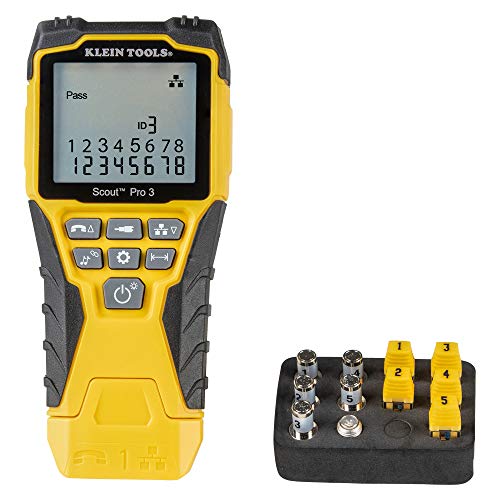
Klein Tools VDV501-851 Scout Pro 3
Safe, intuitive, and built for low-voltage cable testing with clear wire mapping.
What is a Cable Tester and Why Safety Matters
A cable tester is an electronic device used to verify the electrical connections in a cable assembly. Common types include simple continuity testers, network cable testers for RJ45 and RJ11, coax testers, and multifunction testers that check for shorts, opens, miswires, and split pairs. Safety is critical because using a tester on a live circuit can damage the tester, cause inaccurate readings, and expose the user to electric shock. Even low-voltage data cables can carry dangerous voltages if they run alongside power lines or are improperly terminated.
Most cable testers are designed for low-voltage applications (under 50V) and are not intended for testing mains power. Using a standard network cable tester on a live AC outlet can destroy the tester and create a shock hazard. Always check the tester's voltage rating before connecting it to any circuit.
Types of Cable Testers and Their Safe Use
Continuity Testers
These are the simplest testers, often built into multimeters. They emit a tone or light an LED when a circuit is complete. Safety rule: always disconnect power from the circuit before testing continuity. Continuity testers send a small current through the wire; if the wire is live, the tester can be damaged and you risk shock.
Network Cable Testers
These testers have a main unit and a remote unit. They check for correct pin-to-pin wiring in Ethernet (RJ45) and phone (RJ11) cables. They are safe for use on unpowered data cables only. Never plug a network tester into a live network port that is Power over Ethernet (PoE) enabled without checking that the tester is rated for PoE. Most basic testers are not.
Coax Testers
Used for testing coaxial cables (RG6, RG59). They typically check for continuity and shorts. Safety: ensure the coax cable is not connected to any active antenna, cable TV, or satellite system that might carry voltage. Some cable systems carry 15-30V for line amplifiers.
Multifunction Testers
These advanced testers can check multiple cable types and sometimes include a tone generator for tracing wires. They often have a higher safety rating (CAT II 100V or CAT III 300V). Always respect the voltage limits printed on the device.
Step-by-Step Guide: How to Use a Cable Tester Safely
Follow these steps to safely test any cable. The process is similar for network, coax, and continuity testers.
Step 1: Identify the Cable Type and Ensure It is De-Energized. Before touching any cable, verify that it is not connected to any power source. For network cables, unplug both ends from switches, routers, or computers. For coax, disconnect from the wall outlet or cable box. Use a non-contact voltage tester to confirm the cable carries no voltage if you suspect it might be near power lines.
Step 2: Visually Inspect the Tester and Cables. Check the tester's housing for cracks, frayed leads, or damaged connectors. Inspect the cable under test for cuts, kinks, or exposed conductors. Never use a damaged tester or cable.
Step 3: Connect the Main Unit. Plug the cable into the appropriate port on the main unit of the tester. For network testers, this is usually an RJ45 or RJ11 jack. Ensure the connector clicks fully into place.
Step 4: Connect the Remote Unit (if applicable). For network and coax testers, plug the other end of the cable into the remote unit. The remote unit is what allows the tester to check for continuity and correct wiring across the entire length of the cable.
Step 5: Power On and Interpret Results. Turn on the tester. Most testers will automatically begin scanning. A simple continuity tester will beep or light up. A network tester will light up LEDs in sequence from pin 1 to pin 8 (or 4 for phone). Compare the pattern to the tester's manual to identify shorts, opens, or miswires. If the tester indicates a fault, do not touch the bare wires while the tester is active.
Step 6: Disconnect in Reverse Order. Turn off the tester, remove the remote unit, then remove the main unit. This prevents accidental shorting when disconnecting.
What to Check Before Buying a Cable Tester
Before purchasing a cable tester, consider these factors to ensure it meets your safety and performance needs:
- Voltage Rating: Check the tester's CAT rating and maximum voltage. For data cables, CAT II 50V is standard. For occasional use near power, look for CAT III 300V.
- Cable Type Support: Does it test the cables you use? Common types include RJ45 (Ethernet), RJ11 (phone), BNC (coax), and USB.
- Remote Units: More remote units allow you to label and test multiple cables without moving the remote. 4-8 remotes are common for professional use.
- Display Type: LED arrays are simple and durable. LCD screens provide more detail but are more fragile.
- Build Quality: Look for a rugged housing, strain relief on cables, and a reliable power switch. Klein Tools and Fluke are known for durable testers.
- Battery Type: Most use a 9V battery. Some use AA or AAA. Avoid testers with non-replaceable batteries for long-term use.
Mistakes to Avoid When Using a Cable Tester
Even experienced users can make errors. Here are the most common mistakes and how to avoid them:
- Testing Live Circuits: The number one mistake. Always verify the circuit is dead before connecting the tester. Use a non-contact voltage tester first.
- Using the Wrong Port: Plugging an RJ11 (phone) cable into an RJ45 (Ethernet) port can damage the tester or give false readings. Check the port labels.
- Ignoring the Manual: Each tester has a specific sequence and interpretation. Skipping the manual can lead to misdiagnosis.
- Forcing Connectors: If a connector does not fit easily, do not force it. You may damage the tester's port or the cable.
- Not Testing Both Ends: For network cables, always test with the remote unit at the far end. Testing only one end cannot verify the entire cable.
- Using a Damaged Tester: A cracked case or frayed lead can expose you to shock. Replace damaged testers immediately.
Best Cable Testers for Safety and Reliability
We have reviewed the top cable testers based on owner reviews, brand reliability, and safety features. These picks cover different needs and budgets.
Klein Tools VDV501-851 Scout Pro 3
Best Overall for DIY & ProsPros
- Tests 3 cable types in one unit
- Clear LED wire map display
- Durable Klein Tools build
Cons
- No LCD for detailed diagnostics
- Remotes are easy to lose
The Klein Tools Scout Pro 3 is the most popular cable tester for good reason. It supports RJ45, RJ11, and coax cables with a simple LED interface that shows wire-by-wire continuity. Owner reviews consistently praise its reliability and ease of use, making it a safe choice for beginners and professionals.
The tester comes with seven remote identifiers, allowing you to label and test multiple cables quickly. Its rugged build can withstand drops on job sites. The only downside is the lack of an LCD screen for more advanced diagnostics like length measurement, but for basic continuity and wiring verification, it is excellent.
Fluke Networks TS19 Pro
Best for Professional Network TechsPros
- Professional-grade accuracy
- Large number of remotes
- Detects split pairs
Cons
- Higher price point
- No coax support
The Fluke TS19 Pro is a step up for network professionals. It offers advanced diagnostics including split pair detection, which is critical for gigabit Ethernet performance. Owner reviews from IT technicians highlight its accuracy and durability on job sites.
It supports up to 12 remote identifiers, making it ideal for large cable runs. The tester is built to Fluke's high standards, with a robust case and clear LCD display. It does not support coax cables, so you will need a separate tester for that. The price is higher than most DIY testers, but for daily professional use, it is a worthwhile investment.
iMBAPrice RJ45 RJ11 Network Cable Tester
Best Budget OptionPros
- Very affordable
- Simple LED display
- Includes carrying case
Cons
- Lower build quality
- No coax support
The iMBAPrice tester is the most popular budget option on Amazon, with thousands of positive owner reviews. It performs basic continuity and wire mapping for RJ45 and RJ11 cables. The LED display lights up pins 1 through 8 in sequence, making it easy to identify opens and shorts.
It comes with a single remote unit and a small carrying case. The build quality is adequate for occasional home use, but it is not as durable as Klein or Fluke testers. The safety rating is lower (CAT I 30V), so it should only be used on unpowered data cables. For the price, it is a great entry-level tool.
Klein Tools VDV512-851 Coax Explorer 2
Best for Coax CablesPros
- Dedicated coax tester
- Clear LED mapping
- Rugged build
Cons
- Only tests coax
- No tone generation
For anyone working with coaxial cables for TV, satellite, or internet, the Klein Tools Coax Explorer 2 is the top choice. It tests RG6 and RG59 cables with F-type connectors, providing a clear LED display that shows continuity and identifies shorts. It comes with four remote identifiers for labeling multiple cables.
Owner reviews praise its reliability and the fact that it can test cables up to 2,000 feet. The tester is built to Klein's high standards, with a durable case and a CAT II 50V safety rating. It does not test network cables or generate a tone for wire tracing, so it is a specialized tool for coax work only.
Southwire M520P 120-Volt Circuit Tester
Best for Mains Voltage TestingPros
- Tests live AC outlets
- Simple 3-light system
- Detects common wiring faults
Cons
- Only for 120V outlets
- No continuity testing
This Southwire tester is not a traditional cable tester but is essential for safely checking mains voltage outlets. It plugs directly into a standard 120V outlet and uses three LEDs to indicate correct wiring, open ground, reverse polarity, and other common faults. It is a critical safety tool for any electrician or homeowner.
Owner reviews highlight its simplicity and reliability. It is rated CAT II 120V and is built to withstand drops. It does not test data cables or provide continuity checks, so it is a specialized tool for AC outlet testing only. Always use it on de-energized circuits when possible, though it is designed for live testing.
Comparison Table: Top Cable Testers
| Product | Best For | Key Spec | Rating | Price |
|---|---|---|---|---|
| Klein Scout Pro 3 | Overall DIY & Pro | RJ45, RJ11, Coax | 4.7 | $$ |
| Fluke TS19 Pro | Professional Network | Split pair detection | 4.8 | $$$ |
| iMBAPrice | Budget DIY | RJ45, RJ11 only | 4.4 | $ |
| Klein Coax Explorer 2 | Coax Cables | F-type connectors | 4.6 | $$ |
| Southwire M520P | AC Outlet Testing | 120V live testing | 4.3 | $ |