Best August Smart Locks of 2026 (And Why There Is No August Fingerprint Lock)
August does not make a fingerprint door lock. Here is what August actually sells, which model fits which door, and where to look instead if a fingerprint reader is the feature you want.
Quick answer
No August lock has a fingerprint reader. August (now part of Yale/ASSA ABLOY) uses phone, auto-unlock, virtual keys and an add-on keypad instead. The best overall August model is the August Wi-Fi Smart Lock (4th Gen) for its compact size, built-in Wi-Fi and support for Apple Home, Alexa and Google. If you specifically need a finger scan on the door, look at Yale Assure Lock 2 Touch, Ultraloq, Aqara or Lockly instead.
Why trust ToolBuyerHub
- Specs checked against manufacturer data
- Battery type & ecosystem support compared
- Publicly posted owner-review patterns read
- Door fit and hardware requirements checked
- Brand and warranty position confirmed
- No fake hands-on claims
Research updated August 2026.
Important: August has no fingerprint model
If you searched for an "August fingerprint door lock", there is nothing to buy under that name. August's entire lineup is retrofit deadbolt hardware controlled by Bluetooth, Wi-Fi and an optional wireless keypad. Any listing that advertises an August lock with a fingerprint scanner is either a third-party product using the August name or a mislabelled listing. Several older August models are also discontinued and now sell mainly through remaining stock, so check availability before you commit.
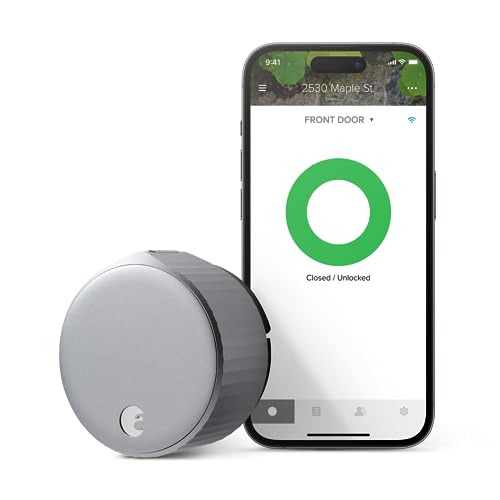
August Wi-Fi Smart Lock (4th Gen)
Compact, roughly 45 percent smaller than the older Pro, and installs on the inside of an existing deadbolt.
| Product | Best For | Key Spec | Fingerprint | Rating |
|---|---|---|---|---|
| August Wi-Fi Smart Lock (4th Gen) | Best Overall | Wi-Fi, Bluetooth, DoorSense | No | 4.6 / 5 |
| August Smart Lock Pro + Connect | Best for Z-Wave Systems | Bluetooth, Z-Wave Plus, Connect bridge | No | 4.4 / 5 |
| August Smart Lock (3rd Gen) | Best Budget | Bluetooth only | No | 4.3 / 5 |
| August Smart Lock + Connect | Best for Renters | Bluetooth, Connect bridge | No | 4.2 / 5 |
| August Wi-Fi Smart Lock (4th Gen) + Smart Keypad | Best Code Entry | Wi-Fi, Bluetooth, keypad | No (code only) | 4.5 / 5 |
August Wi-Fi Smart Lock (4th Gen)
Best OverallPros
- Built-in Wi-Fi, no Connect bridge needed
- Much smaller than the older Smart Lock Pro
- Easy DIY install on the interior side only
Cons
- No fingerprint reader and no built-in keypad
- Uses CR123A lithium cells, not cheap AAs
- No Z-Wave, so it will not join a Ring Alarm system
The August Wi-Fi Smart Lock (4th Gen) is the model most buyers should start with. It replaces the interior thumbturn of your existing deadbolt, keeps your original key and exterior cylinder, and connects straight to your 2.4 GHz home Wi-Fi so you can lock, unlock and check status from anywhere without a separate bridge. Owner reviews posted on Amazon and Best Buy repeatedly call out the simple installation and the reduced size compared with the previous Pro.
It works with Apple Home, Amazon Alexa and Google Home, so it fits nearly any mainstream setup. DoorSense uses a small door-frame sensor to tell you whether the door is actually closed, not just locked. Battery life is the main compromise: the compact body runs on two CR123A lithium cells and most owners report roughly three to six months depending on how often the door cycles and how strong the Wi-Fi signal is at the door.
August Smart Lock Pro + Connect
Best for Z-Wave SystemsPros
- Only August model with Z-Wave Plus, so it joins Ring Alarm and SmartThings
- Ships with the Connect bridge for remote access
- Runs on cheap AA batteries
Cons
- Noticeably bulkier than the 4th Gen
- Needs the Connect bridge plugged in for anything remote
- Discontinued, so stock and support are winding down
The August Smart Lock Pro + Connect is the model to hunt down if your home runs on a Z-Wave security system. It uses Bluetooth for local control and includes the Connect bridge, which plugs into a nearby outlet and links the lock to your Wi-Fi for remote locking, alerts and voice control. Despite its age it remains the only August lock with a Z-Wave Plus radio.
Contrary to a common mix-up, the Pro does support Apple Home alongside Alexa and Google, so HomeKit users are not forced onto the 4th Gen. It is the physically largest August lock, which is the trade-off for the extra radio and the AA battery compartment. Owner reviews consistently praise the reliability but note the size on narrow door stiles.
August Smart Lock (3rd Gen)
Best BudgetPros
- Cheapest way into the August ecosystem
- Compact body, same retrofit install
- Auto-unlock and virtual keys work over Bluetooth alone
Cons
- No Wi-Fi, no Z-Wave and no Apple Home support
- Remote access needs the Connect bridge, sold separately
- No fingerprint or keypad without an add-on
The August Smart Lock (3rd Gen) is the stripped-back model. It talks to your phone over Bluetooth, handles auto-unlock as you approach, and shares virtual keys, all without any bridge. That is enough for a lot of apartment dwellers who are always within range of the door.
The limitation that trips people up is platform support. Unlike the Smart Lock Pro of the same generation, the plain 3rd Gen has no Apple Home support, and Alexa or Google control requires the separate August Connect bridge. Once you add that bridge the price advantage over the 4th Gen largely disappears, so only pick this one if local Bluetooth control is genuinely all you need.
August Smart Lock + Connect
Best for RentersPros
- Keeps the existing deadbolt, cylinder and key
- Connect bridge included, so remote access works out of the box
- No drilling and no change to the exterior of the door
Cons
- No Z-Wave and no Apple Home support
- Bridge occupies an outlet near the door
- Still no fingerprint or built-in keypad
The August Smart Lock + Connect bundle suits renters because nothing about the door changes from the outside. The lock body mounts over your existing interior thumbturn, the landlord's key still works, and the whole thing unbolts in minutes when you move out. That is genuinely different from most competitors, which replace the entire deadbolt.
The bundled Connect bridge handles remote locking and status alerts over Wi-Fi, plus Alexa and Google voice control. Owner reviews highlight the temporary guest keys, which are useful for cleaners or short-stay guests. The trade-offs are no Apple Home support and no Z-Wave, so it will not slot into a HomeKit-only house or a Ring Alarm panel.
August Wi-Fi Smart Lock (4th Gen) + Smart Keypad
Best Code EntryPros
- Adds phone-free entry with a numeric code
- Keypad mounts with adhesive or screws, no wiring
- Same Wi-Fi and platform support as the standalone lock
Cons
- Costs more than the lock on its own
- Keypad runs on its own batteries
- A PIN pad is not a fingerprint reader
This is as close as August gets to touch-based entry. The August Smart Keypad pairs wirelessly with the lock and mounts on the door frame or the wall beside it, so guests, cleaners or a delivery service can enter a code instead of needing the app. It is the answer for households where not everyone carries a smartphone.
Everything else matches the standalone 4th Gen: built-in Wi-Fi, DoorSense, and Apple Home, Alexa and Google support. The keypad has its own small battery, typically good for around a year of normal use, and codes can be issued permanently, on a schedule, or as one-time entries from the August app. Just be clear on what you are buying: this is a PIN pad, not a biometric scanner.
If you actually want a fingerprint door lock
August has never shipped a biometric lock, and since the brand moved under Yale and ASSA ABLOY the fingerprint work has stayed on the Yale side. Realistic options in the US market include the Yale Assure Lock 2 Touch, which puts the reader in the exterior keypad, plus Ultraloq, Aqara, Lockly and eufy models that combine a fingerprint pad with codes and app control. Expect to replace the full deadbolt rather than just the interior thumbturn, which matters if you rent.
One practical note before switching: fingerprint readers struggle in cold, wet or dusty conditions, so on an exposed front door most owners end up using the code or app anyway. Check that whichever lock you choose keeps a physical key override or a backup power contact.
What to check before buying an August smart lock
Verify door compatibility first. August locks fit standard US single-cylinder deadbolts. Measure the backset (2-3/8 or 2-3/4 inches) and the cross bore (2-1/8 inches), and confirm your door thickness sits between 1-3/8 and 1-3/4 inches. The exterior cylinder and your existing key stay in place, since only the interior thumbturn is replaced.
Then match the model to your ecosystem. For Apple Home, the 4th Gen Wi-Fi lock and the older Smart Lock Pro both work; the plain 3rd Gen does not. For a Z-Wave security panel such as Ring Alarm, the Smart Lock Pro + Connect is the only August option. For remote access without extra hardware, only the 4th Gen has Wi-Fi built in.
Mistakes to avoid when choosing an August smart lock
The most common mistake is expecting features August does not offer. There is no fingerprint reader anywhere in the range and no lock with an integrated exterior keypad, so code entry always means buying the separate Smart Keypad.
The second is assuming the Connect bridge adds Z-Wave. It does not. The bridge only relays Bluetooth to Wi-Fi for remote access; Z-Wave is a radio inside the Smart Lock Pro itself, which is why only that model pairs with Ring Alarm.
The third is ignoring Wi-Fi coverage. The 4th Gen connects on 2.4 GHz only, and a weak signal at the front door produces exactly the slow or failed remote commands people complain about. Move the router or add an access point before blaming the lock.
FAQs
Is there an August fingerprint door lock?
No. August has never made a lock with a fingerprint reader. Access is by app, auto-unlock, virtual key or the separate August Smart Keypad. For biometrics look at Yale Assure Lock 2 Touch, Ultraloq, Aqara or Lockly.
Can I use an August lock without a smartphone?
Yes, but you need the August Smart Keypad for code entry, or you can simply use your existing physical key. Setup itself still requires the August app on a phone.
How long do August lock batteries last?
Typically three to six months. The Wi-Fi Smart Lock (4th Gen) and the 3rd Gen use two CR123A lithium cells; the older Smart Lock Pro uses four AA batteries. The app warns you when they run low.
Is August compatible with Airbnb or vacation rentals?
Yes. August supports virtual keys with scheduled or one-time access, which you can issue and revoke per guest from the app.
What is the warranty on August locks?
August locks carry a 1-year limited warranty on the lock hardware against defects in materials and workmanship.
Can I install an August lock myself?
Yes. It typically takes 10 to 15 minutes with a screwdriver, because the lock replaces only the interior side of your existing deadbolt.
Does August work with Ring Alarm?
Only the August Smart Lock Pro, which has a Z-Wave Plus radio. The Wi-Fi Smart Lock (4th Gen) has no Z-Wave, and the Connect bridge does not add it, so those models will not join a Ring Alarm panel.
What is DoorSense?
DoorSense is a small magnetic sensor on the door frame that reports whether the door is actually closed, not just whether the bolt is thrown. It is included with the 3rd Gen and later locks.
Can I use my existing key with an August lock?
Yes. August retrofits the interior thumbturn only, so the exterior cylinder and your current key keep working. No rekeying is needed.
Which August lock is best for renters?
The August Smart Lock + Connect, because it mounts over the existing deadbolt with no drilling and leaves the outside of the door untouched.
Our verdict
If you came looking for an August fingerprint lock, the honest answer is that it does not exist. Within the range that does exist, the August Wi-Fi Smart Lock (4th Gen) is the best pick for most homes thanks to built-in Wi-Fi, its compact size and Apple Home, Alexa and Google support. Add the Smart Keypad if someone needs phone-free entry, choose the Smart Lock Pro only if you need Z-Wave for Ring Alarm, and move to Yale or Ultraloq if a fingerprint reader is non-negotiable.