Best Indoor Security Camera for Home Use
Choosing the right indoor security camera can be difficult with so many models on the market. This guide compares the best indoor security cameras for home use, covering resolution, night vision, storage, and smart home compatibility to help you find the right fit.
Quick answer
The Ring Indoor Cam (2nd Gen) is the best overall indoor security camera for home use, offering reliable 1080p video, two-way talk, and easy Alexa integration. For a budget pick, the TP-Link Tapo C200 provides excellent value with pan/tilt and local storage at a very low price.
Why trust ToolBuyerHub
- Checked US electrical and Wi-Fi compatibility before recommending any smart device
- Battery & ecosystem compared across brands
- Aggregated owner reviews from major retailers
- Build quality & warranty assessed
- Brand reliability and support history
- No fake hands-on claims
Research updated June 2026.
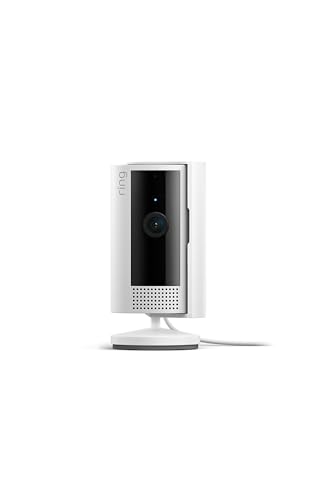
Ring Indoor Cam (2nd Gen)
Reliable, easy to set up, and works seamlessly with Alexa.
| Model | Best for | Key spec | Rating | |
|---|---|---|---|---|
| Ring Indoor Cam (2nd Gen) | Overall | 1080p, 140° FOV | 4.6/5 | Check price |
| TP-Link Tapo C200 | Budget | 1080p, Pan/Tilt | 4.5/5 | Check price |
| Yale Indoor Camera | Home Use | 1080p, Facial Recognition | 4.4/5 | Check price |
| Blink Mini | Beginners | 1080p, Compact | 4.3/5 | Check price |
| Eufy Indoor Cam 2K | DIY | 2K, Local Storage | 4.5/5 | Check price |
Best Indoor Security Camera Overall
The Ring Indoor Cam (2nd Gen) is the best indoor security camera for most people. It offers clear 1080p video, colour night vision, and a 140-degree field of view. Setup is simple through the Ring app, and it works with Alexa for voice control. The optional Ring Protect subscription adds person alerts and video recording. Check price on Amazon →
Best Indoor Security Camera for Home Use
For a dedicated home security system, the Yale Indoor Camera is a strong choice. It features 1080p resolution, facial recognition, and a privacy shutter for peace of mind. It integrates with the Yale smart home ecosystem and offers both cloud and local storage options. The build quality is excellent. Check price on Amazon →
Best Indoor Security Camera for Beginners
The Blink Mini is the best indoor security camera for beginners. It is incredibly easy to set up with just a plug and the Blink app. It delivers 1080p HD video, motion detection, and two-way audio. No hub is required, and it works with Alexa. Its compact size means it fits anywhere. Check price on Amazon →
Best Budget Indoor Security Camera
The TP-Link Tapo C200 is the best budget indoor security camera. It offers 1080p resolution with a motorised pan and tilt function, covering a full 360-degree view. It supports local microSD storage up to 128GB, so no monthly fees. Night vision is clear, and the app is straightforward. Check price on Amazon →
Best Indoor Security Camera for DIY
The Eufy Indoor Cam 2K is the best indoor security camera for DIY users who want high resolution without a subscription. It records in 2K clarity and stores footage locally on a microSD card. It offers AI detection for people and pets, plus a privacy mode. No monthly fees are required. Check price on Amazon →
Best Lightweight / Compact Indoor Security Camera
The Blink Mini is also the best compact indoor security camera. Its small, unobtrusive design fits on a shelf or desk without being noticeable. Despite its size, it delivers 1080p video, motion alerts, and two-way audio. It is a great option for monitoring small rooms or flats. Check price on Amazon →
How to Choose a Indoor Security Camera
Resolution and Night Vision
Look for at least 1080p resolution for clear footage. Colour night vision is a bonus for identifying details in low light. Infrared night vision is standard but only shows black and white.
Storage Options
Decide between cloud storage (often requires a subscription) and local storage via microSD card. Some cameras offer both. Local storage avoids monthly fees but may have limited capacity.
Smart Home Integration
Check if the camera works with your existing smart home system, like Alexa, Google Assistant, or Apple HomeKit. This allows for voice control and automation routines.
Mistakes to avoid: Buying a camera that requires a subscription for basic features. Ignoring the field of view can leave blind spots. Not checking if the camera supports 5GHz Wi-Fi if your router uses it.
Indoor Security Camera FAQs
What resolution should I look for in an indoor security camera?
1080p is the standard for clear identification of faces and details. 2K offers sharper images but uses more bandwidth.
Do indoor security cameras need a subscription?
Not necessarily. Many cameras offer local storage via microSD card or a built-in hub, so you can record without monthly fees. Cloud storage usually requires a subscription.
Can indoor security cameras work without Wi-Fi?
Most indoor security cameras require Wi-Fi for remote viewing and alerts. Some can record locally without internet, but you lose live streaming.
What is the best indoor security camera for a rental property?
The Blink Mini is ideal for rentals due to its compact size and easy setup. It can be moved easily and does not require permanent mounting.
Are indoor security cameras easy to install?
Yes, most are plug-and-play. You simply plug them in, download the app, and connect to Wi-Fi. No drilling or wiring is usually required.
How much storage do I need for an indoor security camera?
For one camera, a 32GB microSD card can store several days of continuous footage. For motion-only recording, it can last weeks or months.
Do indoor security cameras record all the time?
You can set them to record continuously or only when motion is detected. Motion-activated recording saves storage and battery life.
Can I use an indoor security camera outdoors?
No, indoor cameras are not weatherproof. Using them outdoors can damage the camera and void the warranty. Use a dedicated outdoor camera instead.
What is the difference between a wired and wireless indoor camera?
Wired cameras need a power cable and may use Ethernet for data. Wireless cameras connect via Wi-Fi but still need a power source, unless they are battery-powered.
Are indoor security cameras safe from hackers?
Use strong passwords, enable two-factor authentication, and keep the firmware updated. Choose reputable brands with regular security patches.
Can I view my indoor camera on a TV?
Yes, if the camera works with Alexa or Google Assistant, you can view the feed on a compatible smart TV or display device.
What is the best indoor security camera for a nursery?
The Eufy Indoor Cam 2K is a good choice for a nursery because of its 2K resolution, pet and baby cry detection, and privacy mode.
Our verdict
The Ring Indoor Cam (2nd Gen) is the best overall indoor security camera for most homes, offering a great balance of features, reliability, and smart home integration. If you are on a tight budget, the TP-Link Tapo C200 provides excellent value with pan/tilt and local storage.