Best Smart Alarm Under $200
The Ring Alarm 8-Piece Kit (2nd Gen) is the best overall smart alarm system under $200, pairing a loud built-in siren and Z-Wave sensor coverage with an optional low-cost monitoring plan rather than a mandatory one. The variable most buyers get wrong is treating the hardware price and the monitoring subscription as the same decision, since a kit can sit comfortably under $200 to buy while still requiring a monthly fee just to get phone alerts when a sensor trips.
Quick answer
For most homes, the Ring Alarm 8-Piece Kit (2nd Gen) delivers the best sensor coverage, a built-in 104 dB siren, and Alexa integration under $200. Buyers who want to avoid any required subscription should choose the Eufy Security 5-Piece Home Alarm Kit, which processes and stores everything locally on its HomeBase hub.
Why trust ToolBuyerHub
- Cross-checked manufacturer-published specifications before writing any recommendation
- Verified US market availability and configuration for every model discussed
- Owner-feedback themes are summarized as feedback, never presented as our own hands-on testing
- No invented star ratings; see the visible Research Score criteria on this page
- Checked US electrical and Wi-Fi compatibility before recommending any smart device
- We cross-checked each system's sensor protocol, hub battery backup rating, and subscription terms against the current manufacturer product and support pages instead of relying on Amazon bullet points alone.
Research updated September 2026.
What Matters Most for This Category
A smart alarm under $200 is really two purchases bundled together: the physical hub and sensors, and an optional monitoring service that most brands gate behind a monthly fee. What separates these systems is not the number of sensors in the box but what still functions if the internet or Wi-Fi drops, whether the hub has its own battery and cellular backup, and whether the sensors talk over Z-Wave, Zigbee, or a closed proprietary radio that limits future expansion. Buyers who want the alarm to keep working during a power or broadband outage should prioritize a hub with battery backup and, ideally, built-in cellular, since a Wi-Fi-only base station goes silent the moment the router loses power. Ecosystem support also matters more than it first appears, since a Z-Wave or Matter-compatible hub can absorb smart locks and lighting later, while a closed system locks you into that single brand.
| Model | Best for | Key specs | Research Score |
|---|---|---|---|
| Ring Alarm 8-Piece Kit (2nd Gen) | Best overall balance of coverage and ecosystem support | 4 contact sensors, 1 motion detector, Z-Wave, plus a Z-Wave range extender | 95/100 |
| Eufy Security 5-Piece Home Alarm Kit | Best for buyers who want no mandatory subscription and local-only storage | 2 entry sensors, 1 motion sensor, 1 keypad, Proprietary Eufy wireless, non-Z-Wave | 90/100 |
| SimpliSafe Wireless Home Security System (Foundation Kit) | Best for homes that want cellular backup without relying on Wi-Fi | 1 entry sensor, 1 motion sensor, keypad, Built-in cellular radio plus Wi-Fi | 87/100 |
| Abode Smart Security Kit (Gen 7) | Best for buyers who already own Z-Wave, Zigbee, or HomeKit devices | 1 door/window sensor, key fob, Z-Wave and Zigbee | 85/100 |
| ADT Self Setup Indoor Security Kit | Best for buyers who want a clear upgrade path to professional ADT monitoring | 2 door/window sensors, 1 motion sensor, Z-Wave sensors, Wi-Fi hub | 82/100 |
| Wyze Home Monitoring Core Kit | Best value for buyers on the tightest hardware budget | 2 entry sensors, 1 motion sensor, 1 keypad, Proprietary Wyze wireless, non-Z-Wave | 80/100 |
| Ring Alarm 5-Piece Kit (2nd Gen) | Best for apartments and small homes that need fewer sensors | 2 contact sensors, 1 motion detector, Z-Wave | 78/100 |

Ring Alarm 8-Piece Kit (2nd Gen)
Best OverallPros
- Eight-piece kit covers multiple entry points without add-on purchases
- Base station and siren function without an active subscription
- Z-Wave sensors allow expansion with other Z-Wave smart home devices
Cons
- Cellular backup and video-linked alerts require a paid Ring Protect Pro plan
- Range extender adds one more device to plug in and manage
This kit includes a base station, keypad, range extender, four contact sensors, and one motion detector, enough to cover most three to four bedroom homes without buying extra sensors. The base station runs on Z-Wave for sensor communication and Wi-Fi for internet connectivity, and it integrates directly with Amazon Alexa and other Ring devices like video doorbells. The built-in siren and app-based self-monitoring work without any subscription, though cellular backup and 24/7 professional monitoring require a Ring Protect Pro plan.
Eufy Security 5-Piece Home Alarm Kit
Best for PrivacyPros
- Alarm and sensor logic run locally with no forced subscription
- HomeBase stores footage and events on local storage rather than cloud-only
- Simple keypad included in the base kit rather than sold separately
Cons
- Proprietary sensor protocol does not interoperate with Z-Wave or Zigbee devices
- No built-in cellular backup option if broadband goes down
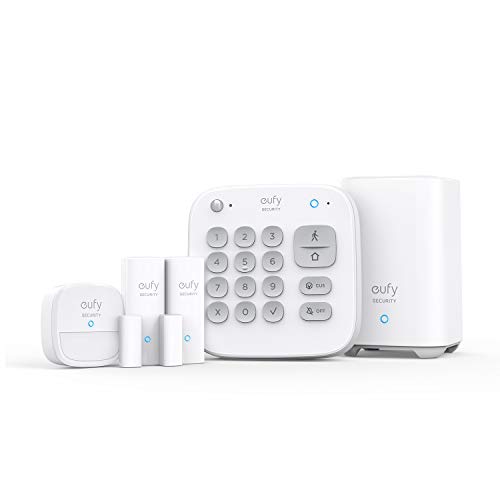
The kit centers on a HomeBase hub that processes sensor and alarm logic locally rather than routing everything through the cloud, and it ships with two entry sensors, one motion sensor, and one keypad. Eufy does not require any monthly plan for the alarm functions themselves, since arming, disarming, and siren triggers all run through the local hub and companion app. The sensors use Eufy's proprietary wireless protocol rather than Z-Wave or Zigbee, which keeps setup simple but limits cross-brand expansion.

SimpliSafe Wireless Home Security System (Foundation Kit)
Best for Cellular BackupPros
- Cellular connection built into the base station rather than sold as an add-on module
- Battery backup keeps the base station running during a power cut
- Additional sensors and cameras can be added later without replacing the hub
Cons
- Starter kit ships with only one entry and one motion sensor
- Real-time app alerts are tied to a paid monitoring plan
SimpliSafe's entry kit includes a base station, keypad, one entry sensor, and one motion sensor, built around a base station with a built-in cellular radio rather than depending on the home's Wi-Fi network for its primary connection. That design means the alarm can still communicate with SimpliSafe's servers during a broadband outage, though app notifications and live monitoring require an active SimpliSafe plan. The base station also includes a battery backup, so it keeps functioning through a power outage as well.
Abode Smart Security Kit (Gen 7)
Best for Smart Home IntegrationPros
- Gateway supports Z-Wave and Zigbee devices from other brands
- Works with HomeKit, which several competing kits do not support
- Core self-monitoring functions without a required subscription
Cons
- Starter kit ships with only one sensor, so extra sensors add to the cost quickly
- Cellular backup is locked behind an optional paid plan
The Abode Gen 7 kit pairs a gateway hub with a door or window sensor and a key fob, and the gateway itself supports Z-Wave, Zigbee, and Wi-Fi radios simultaneously, which lets it absorb existing smart locks, lights, or sensors from other brands. It works with Apple HomeKit, Amazon Alexa, and Google Assistant, and self-monitoring through the app does not require a subscription. An optional monthly plan adds cellular backup and access to professional monitoring.
ADT Self Setup Indoor Security Kit
Best Upgrade PathPros
- Direct upgrade path to ADT professional monitoring without new hardware
- Free self-monitoring available without any subscription
- Backed by an established national monitoring provider
Cons
- Hub relies on home Wi-Fi with no built-in cellular backup
- Fewer third-party smart home integrations than Z-Wave-focused competitors
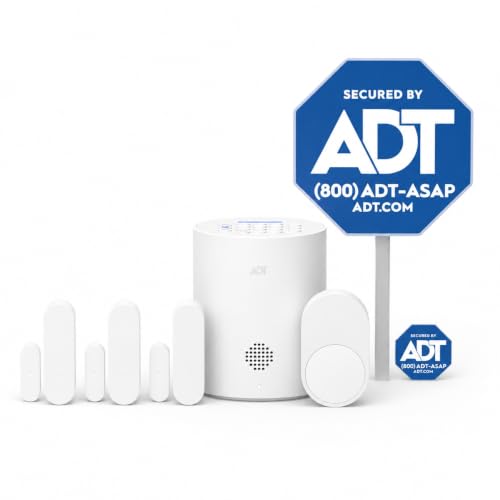
Formerly sold as Blue by ADT, this kit includes a Wi-Fi hub along with door, window, and motion sensors, and it can be self-monitored free through the app or upgraded to ADT's professional monitoring network. Because it is backed by the same monitoring infrastructure as ADT's professionally installed systems, moving from self-monitoring to a staffed monitoring center is a plan change rather than a hardware swap. The hub includes a backup battery, though it depends on Wi-Fi for its primary connection.
Wyze Home Monitoring Core Kit
Best ValuePros
- Lowest hardware price of any kit in this comparison
- Keypad included in the base kit rather than sold as an accessory
- Free self-monitoring through the app with no forced plan
Cons
- Proprietary sensor protocol will not pair with Z-Wave or Zigbee accessories
- No built-in cellular radio on the hub itself
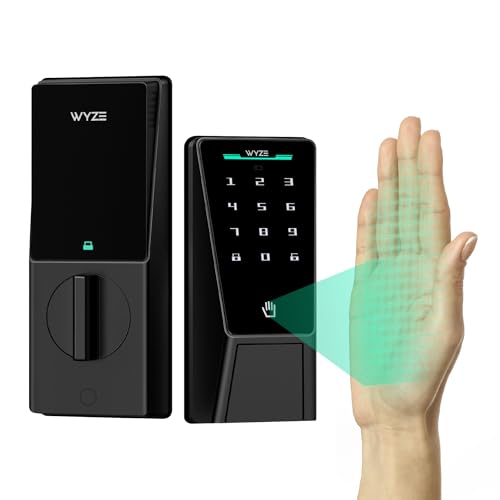
This is the least expensive kit in this roundup, built around the Wyze Sense Hub with two entry sensors, one motion sensor, and one keypad. The sensors use Wyze's own wireless protocol rather than Z-Wave or Zigbee, and the hub connects to the internet over Wi-Fi. Self-monitoring through the Wyze app is free, with an inexpensive optional monthly plan available for professional monitoring and cellular backup.

Ring Alarm 5-Piece Kit (2nd Gen)
Best for Small SpacesPros
- Right-sized sensor count avoids paying for coverage a small home does not need
- Same Z-Wave sensor line as the 8-piece kit, so sensors can be added later
- Base station and siren work without a subscription
Cons
- No range extender included, which can matter in homes with thick interior walls
- Cellular backup and video-linked alerts still require Ring Protect Pro
This is the compact version of Ring's Alarm system, dropping the range extender and trimming sensor count to a base station, keypad, two contact sensors, and one motion detector, which suits a one or two bedroom apartment better than the 8-piece kit. It shares the same Z-Wave sensor protocol, Alexa integration, and optional Ring Protect Pro monitoring plan as the larger kit. Buyers who later move to a bigger home can add sensors individually rather than replacing the whole system.
Who Should Avoid the Top Pick
The Ring Alarm 8-Piece Kit is not the right pick for anyone who refuses to have any brand-linked cloud account, since app-based self-monitoring still runs through Ring's servers even when no subscription is active. Buyers who want the alarm system to remain entirely local should choose the Eufy Security 5-Piece Home Alarm Kit instead. Anyone already committed to Apple HomeKit should look at the Abode Gen 7 kit, since Ring does not support HomeKit at all.
Before You Buy
Count the doors and windows that actually need coverage before buying, since every kit here ships with fewer sensors than a typical house needs and extra sensors add to the real cost. Check whether the hub depends solely on home Wi-Fi or includes its own cellular or battery backup, since a Wi-Fi-only hub goes offline with the router during an outage. Confirm whether the sensors use Z-Wave, Zigbee, or a closed proprietary protocol if you plan to expand the system with locks, lights, or sensors from other brands later.
FAQs
Should I trust the specifications listed on a marketplace page like Amazon on their own?
Marketplace listings are useful for confirming what is currently sold and in what configuration, but we verify core specs like sensor protocol, hub backup power, and subscription requirements against the manufacturer's own product and support pages, since third-party listings occasionally lag behind hardware revisions.
Can ToolBuyerHub recommend an alarm system without installing it in a home?
Yes, this comparison is built from manufacturer-published specifications, official support documentation, and recurring owner-feedback themes rather than in-home installation, and that methodology is stated plainly rather than implied to be hands-on testing.
How often should this page be checked for accuracy?
Smart alarm hardware and subscription terms change often enough that this comparison should be reviewed roughly every few months, and sooner if a manufacturer discontinues a kit or changes what is included with a monitoring plan.
Do I need a monthly subscription for a smart alarm system to work at all?
No, every system in this comparison can arm, disarm, and sound its siren without an active subscription, but real-time phone alerts, cellular backup, and professional monitoring are gated behind a paid plan on most of these brands.
What happens to these alarms if my home internet goes down?
A Wi-Fi-only hub like the base Ring Alarm or Wyze Home Monitoring Core Kit loses its connection to the app and cloud services, though the local siren still functions. SimpliSafe's base station is the exception here, since its built-in cellular radio keeps it connected even without broadband.
Our verdict
For most buyers, the Ring Alarm 8-Piece Kit (2nd Gen) is the strongest overall pick under $200 because it covers a typical home's entry points out of the box, includes a genuinely loud siren, and keeps its core alarm functions working without forcing a subscription. Buyers who specifically want to avoid any cloud dependency should choose the Eufy Security 5-Piece Home Alarm Kit instead, since its HomeBase hub processes everything locally. Anyone whose home internet is unreliable should look at SimpliSafe's Foundation kit, since its built-in cellular radio is the only one here that does not depend on Wi-Fi to stay connected.