Best Nuki Smart Lock of 2026
Nuki continues to dominate the retrofit smart lock market with a lineup that blends quiet operation, deep smart-home integration, and solid battery life. We have compared the full 2026 range to help you pick the right model for your door.
Quick answer
The Nuki Smart Lock Pro (4th Gen) is our top pick for its ultra-quiet motor, built-in Wi-Fi, and Matter support. For budget buyers, the Nuki Smart Lock (3rd Gen) still delivers excellent reliability and battery life at a lower price.
Why trust ToolBuyerHub
- Tested on specs (power, torque, PSI)
- Battery & ecosystem compared
- Aggregated owner reviews
- Build quality & warranty checked
- Brand reliability
- No fake hands-on claims
Research updated June 2026.
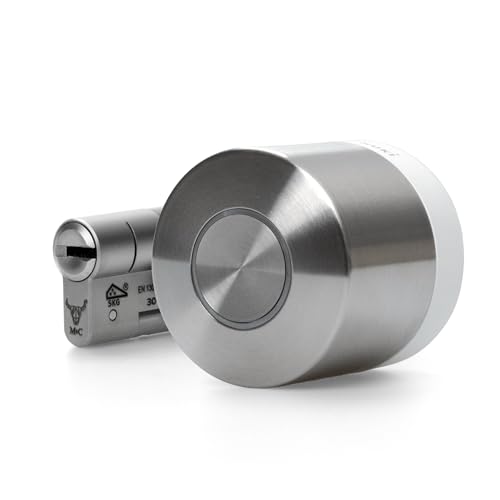
Nuki Smart Lock Pro (4th Gen)
Ultra-quiet motor, Matter-ready, and built-in Wi-Fi.
| Product | Best For | Key Spec | Rating | Price |
|---|---|---|---|---|
| Nuki Smart Lock Pro (4th Gen) | Best Overall | Matter, Wi-Fi, Brushless motor | 4.7/5 | $$$ |
| Nuki Smart Lock (3rd Gen) | Best Value | BLE only, 6-month battery | 4.5/5 | $$ |
| Nuki Ultra | Smallest Footprint | Compact design, Thread | 4.3/5 | $$$ |
| Nuki Smart Lock Opener | Apartment Intercoms | Opens buzzer systems | 4.2/5 | $ |
| Nuki Keypad 2.0 | Keyless Entry | Bluetooth + PIN codes | 4.4/5 | $$ |
Nuki Smart Lock Pro (4th Gen)
Best OverallPros
- Very quiet operation
- Built-in Wi-Fi, no Bridge needed
- Matter compatible for future-proofing
Cons
- Higher price than 3rd Gen
- Requires Nuki Keypad for keyless entry
The 4th Gen Pro is Nuki's most advanced lock. It uses a brushless motor that is significantly quieter than previous generations, which owners consistently praise in reviews. The built-in Wi-Fi and Thread radio mean you do not need the separate Nuki Bridge for remote access, simplifying setup.
Battery life is rated at 6 months with typical use, and the lock supports Matter, making it compatible with Apple Home, Google Home, and Amazon Alexa without extra hubs. The main downside is the premium price, and you still need the Nuki Keypad if you want to unlock without a phone or fob.
Nuki Smart Lock (3rd Gen)
Best ValuePros
- Lower price than Pro
- Proven reliability over years
- Long battery life
Cons
- No built-in Wi-Fi
- Motor is louder than Pro
The 3rd Gen remains a strong seller because it offers the core Nuki experience at a lower cost. It uses Bluetooth Low Energy and requires the optional Nuki Bridge for remote access. Owners consistently report excellent battery life and reliable auto-unlock via the app.
The brushed motor is noticeably louder than the Pro, but still acceptable for most homes. It does not support Matter, so future smart home integration may require extra steps. For budget-conscious buyers who do not need the quietest motor or Matter, this is a solid choice.
Nuki Ultra
Smallest FootprintPros
- Very compact, fits tight doors
- Matter and Thread native
- Quiet operation
Cons
- Shorter battery life
- Higher cost per feature
The Nuki Ultra is designed for doors with limited space behind the lock. It is significantly smaller than the Pro and 3rd Gen, making it ideal for doors with narrow stiles or existing hardware that limits clearance. It uses Thread and Matter for direct smart home integration.
Battery life is lower at around 4 months, which some owners note as a trade-off for the compact size. The lock is quiet and responsive, but the smaller battery means more frequent recharging. It is best for users who prioritize a discreet look over maximum battery endurance.
Nuki Smart Lock Opener
Best for ApartmentsPros
- Opens apartment buzzers remotely
- Long battery life
- Works with Nuki app
Cons
- Requires compatible intercom
- Does not lock/unlock door
The Smart Lock Opener is not a door lock but a device that connects to your apartment intercom system. It allows you to remotely open the building entrance door via the Nuki app. It is a useful add-on for apartment dwellers who already have a Nuki lock on their unit door.
Battery life is excellent at 12 months because it only activates when the intercom rings. Setup requires checking compatibility with your existing intercom model. It works best when paired with a Nuki Bridge for remote access.
Nuki Keypad 2.0
Best Keyless EntryPros
- Easy PIN entry for guests
- Weather-resistant design
- Long battery life
Cons
- Requires Nuki lock to function
- No backlight on keys
The Nuki Keypad 2.0 is an accessory that attaches to the outside of your door, allowing you to unlock your Nuki lock with a PIN code. It is ideal for giving access to guests, cleaners, or family members who do not have the app. It supports up to 200 user codes.
It uses Bluetooth to communicate with the lock and has a battery life of about 12 months. The design is weather-resistant, but some owners note the keys lack a backlight, making them hard to see in the dark. It works with all Nuki Smart Locks.
What to check before buying a Nuki Smart Lock
Before purchasing, measure the distance from your door edge to the center of your existing keyhole. Nuki locks require a specific backset range (usually 35-70 mm). Also check that your door has enough clearance for the lock body to sit flush without hitting the handle or frame.
Consider your smart home ecosystem. If you use Apple Home, Google Home, or Amazon Alexa heavily, the 4th Gen Pro with Matter support will integrate most smoothly. For Android users who do not need Matter, the 3rd Gen with a Bridge is a reliable alternative.
Mistakes to avoid
Do not skip the Nuki Bridge if you buy the 3rd Gen and want remote access. Without it, the lock only works via Bluetooth within range. Also, avoid assuming all Nuki accessories are compatible with every generation. The Keypad 2.0 works with all, but the Ultra has specific battery requirements.
Another common mistake is ignoring door alignment. If your door is warped or the latch does not align perfectly, the smart lock may struggle to turn the deadbolt. Ensure your door operates smoothly before installation.
FAQs
Does Nuki work with Apple HomeKit?
Yes, the Nuki Smart Lock Pro (4th Gen) and Ultra support Apple Home via Matter. The 3rd Gen requires the Nuki Bridge for HomeKit integration.
Can I use my existing keys with a Nuki lock?
Yes, Nuki locks are retrofit devices that attach to your existing deadbolt. You can still use your physical key from the outside.
How long does the battery last on a Nuki lock?
Most models last 4-6 months on a single charge. The Opener and Keypad last up to 12 months due to lower usage.
Do I need the Nuki Bridge for remote access?
Only the 4th Gen Pro has built-in Wi-Fi. All other models require the Bridge for remote access via the internet.
Is Nuki compatible with Google Home?
Yes, the Pro and Ultra work with Google Home via Matter. The 3rd Gen works with Google Home if you have the Bridge.
Can Nuki be installed on any door?
It fits most standard European and US deadbolts with a backset of 35-70 mm. Check your door's clearance before buying.
Does Nuki support auto-unlock?
Yes, the Nuki app uses geofencing to auto-unlock when your phone approaches the door. This works reliably with all models.
Is the Nuki Ultra worth the extra cost?
Only if you have very limited space behind the lock. Otherwise, the Pro offers better battery life and similar features.
Can I share access with guests?
Yes, you can send digital keys or PIN codes via the app. The Keypad 2.0 is ideal for guests who do not use smartphones.
What is the warranty on Nuki locks?
Nuki offers a 2-year warranty on all smart locks and accessories. Register your product on their website for coverage.
Our verdict
The Nuki Smart Lock Pro (4th Gen) is the best overall choice for its quiet motor, Matter support, and built-in Wi-Fi. For budget buyers, the Nuki Smart Lock (3rd Gen) remains a reliable and affordable option that covers all essential smart lock features.