Best Security Camera for Renters
Finding a security camera that works in a rental without drilling holes or breaking your lease is tough. We have rounded up the best no-drill, indoor and outdoor cameras that offer peace of mind without permanent installation.
Quick answer
The Ring Indoor Cam (2nd Gen) is the best overall pick for renters due to its plug-in design, no-drill mounting, and affordable price. For a budget-friendly outdoor option, the Wyze Cam v3 offers excellent weather resistance and a magnetic base that requires zero screws.
Why trust ToolBuyerHub
- Checked US electrical and Wi-Fi compatibility before recommending any smart device
- Installation method & ecosystem compared
- Aggregated owner reviews from major retailers
- Build quality & warranty checked
- Brand reliability verified
- No fake hands-on claims
Research updated June 2026.
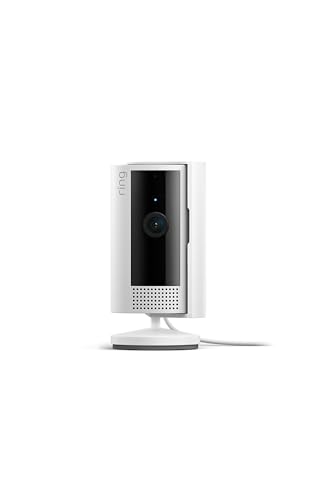
Ring Indoor Cam (2nd Gen)
Plug-in power, simple peel-and-stick mount, and reliable motion alerts.
| Product | Best For | Key Spec | Rating | Price |
|---|---|---|---|---|
| Ring Indoor Cam (2nd Gen) | Overall Renter | 1080p, 140° FOV | 4.7/5 | Check price |
| Wyze Cam v3 | Budget Outdoor | 1080p, Color Night Vision | 4.5/5 | Check price |
| Blink Mini | Compact & Simple | 1080p, Two-Way Audio | 4.3/5 | Check price |
| Arlo Essential Indoor | Privacy Focus | 1080p, Privacy Shield | 4.4/5 | Check price |
| Eufy Indoor Cam 2K | No Subscription | 2K, Local Storage | 4.6/5 | Check price |
Ring Indoor Cam (2nd Gen)
Best Overall for RentersPros
- Easy peel-and-stick mount, no tools needed
- Reliable motion detection with customizable zones
- Works with Alexa for voice control
Cons
- Requires Ring Protect subscription for recording
- Only indoor use
The Ring Indoor Cam (2nd Gen) is the top choice for renters because it requires zero permanent installation. It comes with a simple adhesive mount that sticks to shelves, walls, or cabinets without leaving marks when removed. The 1080p video quality is sharp, and the 140-degree field of view covers a wide area of a room.
Owner reviews consistently praise the quick setup through the Ring app and the reliable motion alerts. The main drawback is that to save video clips you need a Ring Protect subscription, which adds a monthly cost. However, for basic live viewing and alerts, it works fine without a plan.
Wyze Cam v3
Best Budget Outdoor/IndoorPros
- IP65 weather rating for outdoor use
- Color night vision is excellent
- Affordable price point
Cons
- Adhesive mount can be less secure on rough surfaces
- App can be slow to load live feed
The Wyze Cam v3 is a fantastic value for renters who want a camera that can work both indoors and outdoors. It has an IP65 weatherproof rating, meaning it can handle rain and snow without needing a permanent mount. Many owners use the magnetic base on a metal surface or the included adhesive plate for a no-drill setup.
One of the standout features is the Starlight Sensor, which provides clear color night vision even in very low light. The camera supports local storage via a microSD card, so you can avoid monthly fees for basic recording. The main complaint from users is that the app sometimes has a delay in loading the live stream.
Blink Mini
Best Compact & SimplePros
- Very small footprint, fits anywhere
- Two-way audio works well
- Sync module for local storage available
Cons
- Narrower field of view than competitors
- Requires subscription for clip storage
The Blink Mini is one of the smallest indoor cameras on the market, making it perfect for renters who want a discreet device. It plugs directly into a USB outlet and can be placed on a shelf or table without any mounting required. The two-way audio is clear, allowing you to talk to visitors or scare off intruders.
Owner feedback highlights the easy setup through the Blink Home Monitor app. The main limitation is the 110-degree field of view, which is narrower than the Ring or Wyze. For basic monitoring of a single room or entryway, it works well, but you may need a subscription to save recorded events.
Arlo Essential Indoor
Best Privacy FocusPros
- Physical privacy shield for peace of mind
- Sharp 1080p video with HDR
- No hub required, connects directly to Wi-Fi
Cons
- Subscription needed for advanced features
- Mounting kit is basic
The Arlo Essential Indoor camera stands out for renters who are concerned about privacy. It features a built-in privacy shield that physically covers the lens when you set it to "off" mode, ensuring the camera cannot see you. This is a unique feature that addresses a common worry about indoor cameras.
The video quality is excellent with HDR support, and the 130-degree field of view is good for most rooms. Setup is simple since it does not require a hub. Owner reviews note that the app is user-friendly, but the free tier only offers live viewing and alerts. To record clips, you need an Arlo Secure subscription.
Eufy Indoor Cam 2K
Best No SubscriptionPros
- 2K resolution for sharper video
- Local storage means no monthly fees
- AI detection for people and pets
Cons
- Mounting hardware is basic
- App can be slow to load recordings
The Eufy Indoor Cam 2K is the best option for renters who want to avoid monthly subscription fees. It records in crisp 2K resolution and stores footage locally on a microSD card (sold separately). This means you get full access to recorded clips without paying a recurring fee, which is a major advantage over Ring and Blink.
Owner reviews highlight the excellent video quality and the effective AI that distinguishes between people, pets, and general motion. The camera sits on a flat surface or can be mounted with the included adhesive plate. Some users report that the app can be a bit sluggish when browsing through saved clips, but the local storage feature makes it a top value pick.
What to Check Before Buying a Security Camera for Renters
Before you buy, consider the installation method. Look for cameras that use adhesive mounts, magnetic bases, or simple shelf placement. Avoid any camera that requires drilling holes or running wires through walls, as this could violate your lease.
Check the power source. Plug-in cameras are the most reliable for renters because they do not need battery changes. If you want a battery-powered option for a balcony or front door, ensure the mount is non-permanent.
Think about storage. Some cameras offer free local storage via a microSD card, while others require a monthly subscription for cloud recording. Decide which model fits your budget and privacy needs.
Mistakes to Avoid
One common mistake is buying a camera that requires a permanent mount. Always check the product description for "no-drill" or "adhesive mount" options. Another mistake is ignoring the field of view. A camera with a narrow angle may not cover the area you need.
Do not overlook privacy features. If you are placing a camera inside your bedroom or living room, a physical privacy shutter can give you peace of mind. Also, avoid buying a camera that relies solely on a cloud subscription if you want to keep costs low.
FAQs
Can I install a security camera in a rental without damaging walls?
Yes, many cameras come with adhesive mounts, magnetic bases, or are designed to sit on a shelf. Always check the product details for no-drill installation.
Do I need a subscription for a security camera?
Not always. Cameras like the Eufy Indoor Cam 2K offer local storage via a microSD card, so you can record without a monthly fee. Others like Ring require a subscription for cloud recording.
Are outdoor cameras allowed in rentals?
Yes, but you should use a camera with a non-permanent mount. The Wyze Cam v3 is a good choice because it is weatherproof and can be placed on a balcony or porch without drilling.
What is the best resolution for a renter camera?
1080p is the standard and works well for most needs. If you want sharper detail for identifying faces, consider a 2K camera like the Eufy Indoor Cam 2K.
Can I use a battery-powered camera as a renter?
Yes, but be aware that battery cameras need regular recharging. For a set-and-forget solution, a plug-in camera is usually better for renters.
How do I mount a camera without drilling?
Most cameras include adhesive strips or magnetic plates. You can also place them on a shelf, desk, or use a command strip for a temporary hold.
Will a security camera violate my lease?
Most leases allow indoor cameras as long as they do not damage walls or invade a neighbor's privacy. Always check your lease agreement first.
What is a privacy shield on a camera?
A privacy shield is a physical cover that blocks the camera lens when you are at home. The Arlo Essential Indoor has this feature for added peace of mind.
Can I view my camera feed remotely?
Yes, all the cameras on this list have apps that let you view live footage from anywhere on your smartphone.
Do these cameras work with Alexa or Google Assistant?
Yes, most models like Ring, Blink, and Arlo integrate with Alexa. Eufy works with both Alexa and Google Assistant for voice control.
Our verdict
For most renters, the Ring Indoor Cam (2nd Gen) is the best overall choice because of its simple peel-and-stick mount and reliable performance. If you are on a budget or need an outdoor-capable camera, the Wyze Cam v3 offers excellent value. For those who want to avoid monthly fees, the Eufy Indoor Cam 2K is the top pick.