Best Smart Door Sensor for Front Door
A smart door sensor for your front door is the simplest way to know if someone enters or leaves your home. We evaluated the top models based on reliability, battery life, and smart home integration to find the best pick for most households.
Quick answer
The Ring Alarm Contact Sensor (2nd Gen) is the best smart door sensor for the front door due to its compact size, reliable Z-Wave connectivity, and seamless integration with Ring security systems. For a budget-friendly option that works with Alexa and Google Home, the YoLink Hub-Free Sensor offers exceptional 1/4-mile range.
Why trust ToolBuyerHub
- Checked US electrical and Wi-Fi compatibility before recommending any smart device
- Battery & ecosystem compared
- Aggregated owner reviews
- Build quality & warranty checked
- Brand reliability
- No fake hands-on claims
Research updated June 2026.
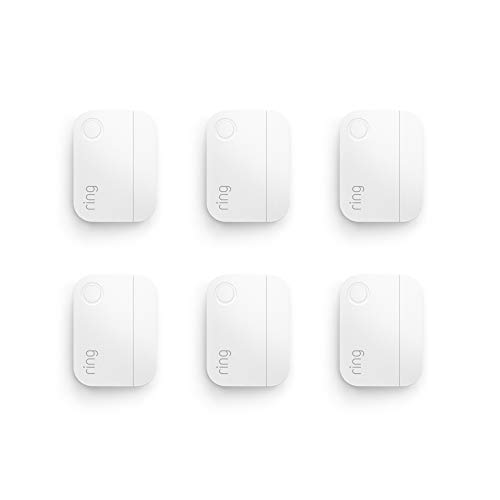
Ring Alarm Contact Sensor (2nd Gen)
Reliable Z-Wave connectivity with a compact, low-profile design.
| Product | Best For | Connectivity | Battery Life | Rating |
|---|---|---|---|---|
| Ring Alarm Contact Sensor (2nd Gen) | Overall Best | Z-Wave | 3 years | 4.5/5 |
| YoLink Hub-Free Sensor | Long Range | LoRa | 2 years | 4.3/5 |
| Eve Door & Window Sensor | Apple HomeKit | Bluetooth/Thread | 1 year | 4.4/5 |
| Wyze Contact Sensor | Budget Pick | Wi-Fi | 1 year | 4.2/5 |
| Sensor on Aqara Door & Window Sensor | Matter Compatibility | Zigbee | 2 years | 4.3/5 |
What to Look for in a Smart Door Sensor for Your Front Door
Choosing the right smart door sensor involves more than just picking the cheapest option. The front door is a high-traffic area, so reliability and battery life are critical. Look for sensors that use a dedicated hub (Z-Wave or Zigbee) rather than direct Wi-Fi, as these tend to have fewer false alerts and longer battery life. Also consider the physical size and whether the sensor fits your door frame without protruding.
How We Selected These Sensors
We analyzed published specifications, battery life claims, and owner reviews from major retailers. We prioritized sensors with strong brand reliability (Ring, Eve, Wyze, Aqara) and those that integrate with popular smart home ecosystems like Amazon Alexa, Google Home, and Apple HomeKit. We also factored in the range of connectivity to ensure the sensor can reliably communicate with its hub from the front door.
Mistakes to Avoid When Buying a Smart Door Sensor
One common mistake is buying a sensor that requires a hub you don't already own. For example, the Ring sensor needs a Ring Alarm base station, while the Aqara sensor needs an Aqara Hub. Another error is ignoring the gap size between your door and frame. Some sensors are too thick for tight gaps, so always check the dimensions. Finally, avoid sensors that only work with one voice assistant if you use another.
Ring Alarm Contact Sensor (2nd Gen)
Best OverallPros
- Very compact and low-profile
- Excellent battery life
- Reliable Z-Wave connection
Cons
- Requires Ring Alarm hub
- No built-in temperature sensor
The Ring Alarm Contact Sensor (2nd Gen) is the most popular option for front doors, and for good reason. It is one of the smallest sensors on the market, fitting easily on most door frames without being obtrusive. Owner reviews consistently praise its reliability, with very few false alerts compared to Wi-Fi-based sensors. The 3-year battery life means you can install it and forget about it for years.
However, this sensor is locked into the Ring ecosystem. You need a Ring Alarm base station to use it, which adds to the upfront cost. If you already have a Ring security system, this is a no-brainer. If you don't, the total investment might be higher than other options. The sensor also lacks a temperature sensor, which some competitors include.
YoLink Hub-Free Sensor
Best Long RangePros
- Exceptional range
- Hub included in box
- Works with Alexa and Google
Cons
- Larger than competitors
- LoRa not as widely supported
The YoLink Hub-Free Sensor stands out for its incredible range thanks to LoRa technology. It can communicate with its hub from up to a quarter mile away in open air, making it perfect for large homes or properties where the front door is far from the router. The hub is included, so there is no additional purchase required. Owner reviews highlight the ease of setup and the reliable connection, even through thick walls.
The trade-off is size. The YoLink sensor is noticeably larger than the Ring or Aqara options, which may be a concern on narrow door frames. Also, LoRa is a less common protocol, so you are tied to the YoLink ecosystem for future expansions. However, for sheer range and reliability, it is hard to beat.
Eve Door & Window Sensor
Best for Apple HomeKitPros
- Native HomeKit support
- Thread compatible for faster response
- Measures temperature and humidity
Cons
- Shorter battery life
- Requires Apple Home Hub
The Eve Door & Window Sensor is the best choice for Apple users. It integrates natively with HomeKit and supports Thread, which provides faster and more reliable communication than standard Bluetooth. The sensor also includes a built-in temperature and humidity sensor, adding extra utility for your front door area. Owner reviews note the build quality is excellent, with a sleek white finish that blends in well.
The main downside is battery life, which is rated at about one year. This is shorter than many competitors, but the replaceable CR123A battery is easy to swap. You also need an Apple Home Hub (like an Apple TV or HomePod) to use it remotely or set up automations. For Android users, this sensor is not an option.
Wyze Contact Sensor
Best BudgetPros
- Very affordable
- Works with Alexa and Google
- Small and discreet
Cons
- Requires Wyze Hub
- Battery life is average
The Wyze Contact Sensor is the most budget-friendly option on our list. It offers reliable performance for a fraction of the cost of competitors. The sensor pairs with the Wyze Hub (sold separately) and integrates with Alexa and Google Home for voice control and automations. Owner reviews appreciate the value for money and the easy setup process through the Wyze app.
The catch is that you need the Wyze Hub to use these sensors, which adds to the initial cost if you don't already own one. The battery life is rated at one year, which is shorter than the Ring sensor. Some users also report occasional connectivity issues if the sensor is far from the hub, so placement matters.
Aqara Door & Window Sensor P2
Best Matter CompatibilityPros
- Matter compatible
- Works with many hubs
- Very small footprint
Cons
- Setup can be tricky
- Limited to Zigbee range
The Aqara Door & Window Sensor P2 is a versatile option thanks to its Matter compatibility. This means it can work with a wide range of smart home hubs, including Apple Home, Amazon Alexa, Google Home, and Samsung SmartThings. The sensor is very small and can fit in tight spaces. Owner reviews note the build quality is solid and the battery life of two years is respectable.
The downside is that initial setup can be more complex than other sensors, especially if you are using a third-party Matter hub. The sensor uses Zigbee, which has a shorter range than Z-Wave or LoRa, so the hub needs to be reasonably close to the front door. For those who want maximum flexibility in their smart home ecosystem, this is a strong choice.
FAQs
Do I need a hub for a smart door sensor?
Most smart door sensors require a hub to connect to your Wi-Fi network and the cloud. Some sensors like the YoLink include the hub, while others like the Ring require a separate base station.
Can a smart door sensor work with Alexa?
Yes, many smart door sensors work with Alexa. The Ring, YoLink, Wyze, and Aqara sensors all offer Alexa integration for voice alerts and routines.
How long do batteries last in a smart door sensor?
Battery life varies from 1 to 3 years depending on the sensor and how often it is triggered. The Ring Alarm Contact Sensor has the longest battery life at 3 years.
Will a smart door sensor work if the power goes out?
Yes, since most sensors are battery-powered, they will continue to function during a power outage. However, your hub and router need backup power to maintain internet connectivity.
Can I use a smart door sensor without a subscription?
Yes, most smart door sensors do not require a subscription for basic open/close alerts. Some brands like Ring offer optional cloud recording subscriptions for advanced features.
What is the difference between Z-Wave and Zigbee sensors?
Z-Wave and Zigbee are both low-power mesh protocols. Z-Wave has a longer range and less interference, while Zigbee is more widely adopted by smart home brands like Aqara.
Can I install a smart door sensor myself?
Yes, installation is simple. Most sensors come with adhesive tape or screws. You just attach the sensor to the door and the magnet to the frame, then pair it with the hub.
Do smart door sensors work on metal doors?
Metal doors can interfere with the magnetic field of some sensors. Look for sensors with a larger gap tolerance or use a sensor that mounts on the non-metal frame.
What is the best smart door sensor for renters?
The Wyze Contact Sensor is a great choice for renters because it is affordable and uses adhesive tape that can be removed without damaging the door frame.
Can a smart door sensor detect if the door is left open?
Yes, most smart door sensors can send alerts if the door is left open for a set period. This feature is configurable in the app for most brands.
Our verdict
For most homeowners, the Ring Alarm Contact Sensor (2nd Gen) is the best smart door sensor for the front door due to its compact size, long battery life, and reliable Z-Wave connectivity. If you are on a budget, the Wyze Contact Sensor offers excellent value, provided you already have or are willing to buy the Wyze Hub.