How Long Do Smart Lock Batteries Actually Last?
Smart lock battery life is one of the most important specs you will never see printed on the box, because it depends as much on your Wi-Fi, your door fit, and your usage as it does on the lock itself. Most quality smart locks run on four AA alkaline batteries and last somewhere between six months and a year, but heavy remote access, poor door alignment, and cold weather can cut that in half.
Quick answer
For most US homes, a well-reviewed model like the Schlage Encode Plus with four AA batteries is the realistic pick, delivering roughly six to twelve months per set depending on Wi-Fi usage and door fit.
Why trust ToolBuyerHub
- Cross-checked manufacturer-published specifications before writing any recommendation
- Verified US market availability and configuration for every model discussed
- Owner-feedback themes are summarized as feedback, never presented as our own hands-on testing
- No invented star ratings; see the visible Research Score criteria on this page
- Checked specifications against manufacturer documentation before publishing
- Battery estimates here come from manufacturer spec sheets and recurring owner-feedback themes, not from a sponsored test bench, so treat every number as a range rather than a guarantee.
Research updated September 2026.
What Matters Most for This Category
The single biggest factor in smart lock battery life is not the lock brand, it is how often the lock talks to the network. Wi-Fi locks that stay connected to an app burn through batteries faster than Z-Wave or Zigbee models that only wake up when your hub pings them, and a door that needs a shove to latch forces the motor to work harder on every single cycle. Before you blame the batteries, check that the deadbolt slides freely with the door open, then decide whether you want the convenience of direct Wi-Fi or the longer runtime of a hub-based protocol.
| Model | Best for | Key specs | Research Score |
|---|---|---|---|
| Schlage Encode Plus Smart WiFi Deadbolt | Best Overall | 4 AA alkaline, Up to 6 months on Wi-Fi, longer on lower-traffic doors | 94/100 |
| August Wi-Fi Smart Lock (4th Gen) | Best for Renters | 2 CR123 lithium, Around 3 to 6 months typical | 90/100 |
| Yale Assure Lock 2 (Z-Wave) | Best Battery Life | 4 AA alkaline, Up to 1 year or more on Z-Wave | 92/100 |
| Kwikset Halo Touch Wi-Fi Smart Lock | Best Fingerprint Option | 4 AA alkaline, Roughly 6 months typical | 87/100 |
| Eufy Security Smart Lock Touch | Best Value | 4 AA alkaline, Around 6 months typical | 85/100 |
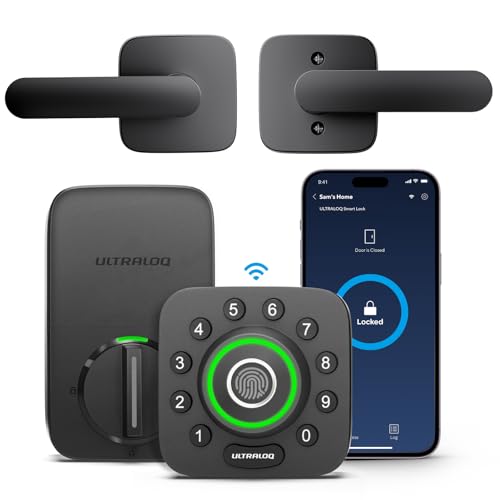
| Ultraloq U-Bolt Pro WiFi | Best Multi-Method Entry | 4 AA alkaline, About 4 to 6 months with Wi-Fi on | 83/100 |
| Level Lock Plus (Apple Home) | Best Hidden Design | 1 CR2 lithium, Around 6 months typical | 80/100 |

Schlage Encode Plus Smart WiFi Deadbolt
Best Wi-Fi runtimePros
- No hub required, connects straight to your home Wi-Fi
- Apple Home Key and Matter support reduce app-only dependence
- Exterior 9V jump point means you are never locked out by dead batteries
Cons
- Wi-Fi radio is the main battery drain
- Costs more than hub-based alternatives
Schlage's flagship Wi-Fi deadbolt is the model most US buyers compare everything else to, and its battery story is typical of always-connected locks. Expect roughly six months of real-world use on the included AAs, with longer stretches if you rarely use the app. The 9V backup terminal is the feature that makes the shorter runtime tolerable.

August Wi-Fi Smart Lock (4th Gen)
Retrofit favoritePros
- Keeps your existing keys and exterior hardware
- Small enough to leave the door looking unchanged
- Auto-unlock and doorSense work well for hands-free entry
Cons
- CR123 lithium cells cost more than AA alkalines
- Shorter runtime than most AA-based locks
August's fourth-generation lock replaces only the interior thumb turn, which makes it the go-to pick for apartments and rentals where you cannot swap the whole deadbolt. The trade-off is a two-cell CR123 power supply that generally needs replacing more often than a four-AA design. Buy lithium cells in bulk to keep the cost per change reasonable.

Yale Assure Lock 2 (Z-Wave)
Longest runtimePros
- Z-Wave sips power compared with Wi-Fi
- Hub integration enables automations without constant radio chatter
- Touchscreen keypad is easy to read at night
Cons
- Requires a smart home hub you may not own
- No direct Wi-Fi app control out of the box
Yale's Assure Lock 2 in its Z-Wave version is the clearest example of how protocol choice changes battery life. Because the lock only wakes when your hub communicates with it, owners routinely report a year or more per set of four AAs. The catch is that you need a hub such as SmartThings, Hubitat, or Ring Alarm to get remote access.

Kwikset Halo Touch Wi-Fi Smart Lock
Touch entryPros
- Fingerprint reader means fast entry without a phone
- Direct Wi-Fi connection, no hub needed
- Familiar Kwikset keyway and re-key options
Cons
- Fingerprint sensor draws extra power on each use
- Wi-Fi plus biometrics shortens runtime
The Halo Touch adds a fingerprint reader to the standard Wi-Fi smart lock formula, which is convenient but adds another power draw. Owners generally report around six months per set of four AAs, with heavier fingerprint use pushing that lower. It is a solid pick if you want keyless entry without pulling out a phone.

Eufy Security Smart Lock Touch
Budget fingerprintPros
- Fingerprint entry at a lower price than most rivals
- Bluetooth-only mode stretches battery life
- Multiple entry methods cover most situations
Cons
- Remote access needs an add-on bridge
- App experience is less polished than premium brands
Eufy's fingerprint deadbolt undercuts most competitors while still offering biometric entry. Running it in Bluetooth-only mode is the trick to longer battery life, since the lock is not maintaining a constant Wi-Fi connection. Add the bridge only if you truly need remote access.
Ultraloq U-Bolt Pro WiFi
Versatile entryPros
- Unusually long list of entry methods
- Auto-lock and auto-unlock work reliably
- Fits standard US deadbolt prep
Cons
- Wi-Fi radio shortens battery life
- App can be slow to sync
Ultraloq packs fingerprint, keypad, app, key, and even a shake-to-open gesture into one deadbolt, which is a lot of convenience for the price. All those radios and sensors come at a cost, and owners typically see four to six months per set of AAs with Wi-Fi enabled. Turning off Wi-Fi when you do not need remote access helps.

Level Lock Plus (Apple Home)
Invisible smartPros
- Nothing changes on the outside of your door
- Thread support improves reliability with Apple Home
- Quiet motor
Cons
- Single CR2 cell is less common to keep on hand
- No keypad, so guests need a phone or key
Level hides the entire smart mechanism inside the door, which is the cleanest look of any lock here. The trade-off is a single CR2 lithium battery that generally lasts around six months, and no keypad for code-based guest entry. It is a design-first choice rather than a battery champion.
Who Should Avoid the Top Pick
Skip any smart lock that requires you to drill new holes or that has no exterior power backup if you rent, travel often, or have a door that already sticks. Also avoid buying a Wi-Fi lock purely for battery life claims, because no always-connected lock will match a Z-Wave or Zigbee model in runtime.
Before You Buy
Measure your door's backset and cross bore before ordering, confirm whether you want Wi-Fi or a hub, and check whether the lock includes a physical key override or a 9V jump terminal. Buy a spare set of the correct battery type at the same time so a dead lock never strands you outside.
FAQs
How long do smart lock batteries really last?
Most quality locks last six months to a year on a set of alkaline batteries, with Wi-Fi models landing closer to six months and hub-based Z-Wave or Zigbee models often reaching a year or more.
Do Wi-Fi smart locks drain batteries faster?
Yes. Maintaining a constant Wi-Fi connection is the single biggest power draw, which is why hub-based locks typically outlast direct Wi-Fi models.
Can cold weather shorten smart lock battery life?
Cold weather reduces alkaline battery performance, so locks on exterior doors in northern states often need batteries changed more frequently in winter.
What batteries should I use in a smart lock?
Use the type the manufacturer specifies, usually AA alkaline or CR123 and CR2 lithium. Lithium cells handle cold better, while alkalines are cheaper for mild climates.
How do I know when my smart lock battery is low?
Most locks send an app notification and flash a warning light or beep at the keypad. Check the app's battery percentage monthly so you are not surprised.
Does a sticking door affect battery life?
Yes, significantly. If the deadbolt has to force itself into the strike plate, the motor works harder on every cycle and drains batteries faster, so fix alignment first.
Our verdict
Battery life on a smart lock is mostly a story about radios and door fit, not brand magic. If runtime is your priority, choose a Z-Wave or Zigbee lock like the Yale Assure Lock 2 and accept the hub requirement. If you want the simplest setup, the Schlage Encode Plus is the best all-rounder, just plan on changing four AAs about twice a year.