How to Use a Fingerprint Door Lock Safely
Fingerprint door locks offer convenience, but safe use requires proper setup and habits. This guide covers essential security practices, common mistakes, and how to choose a reliable model.
Quick answer
To use a fingerprint door lock safely, always enable two-factor authentication (keypad or app backup), register multiple fingerprints for family members, regularly clean the sensor, and keep the firmware updated. The Yale Assure Lock 2 is a top pick for its robust security features and reliable fingerprint reader.
Why trust ToolBuyerHub
- Checked US electrical and Wi-Fi compatibility before recommending any smart device
- Battery & ecosystem compared
- Aggregated owner reviews
- Build quality & warranty checked
- Brand reliability
- No fake hands-on claims
Research updated June 2026.
What is a Fingerprint Door Lock and How Does It Work?
A fingerprint door lock uses biometric technology to grant access. It scans your fingerprint and matches it against stored templates to unlock the door. Most models use capacitive or optical sensors for this purpose.
These locks are popular for their speed and convenience. They eliminate the need for keys, reducing the risk of lock picking or lost keys. However, safe use depends on proper installation and maintenance.
Why Safety Matters for Fingerprint Locks
While convenient, fingerprint locks can have vulnerabilities. Poorly implemented sensors can be fooled by fake fingerprints. Also, a dead battery can lock you out if no backup method exists. Understanding these risks is the first step to safe use.
Owner reviews on retailer sites highlight issues like sensor failure after a few months. Brands like Yale and August have better reliability records. Always check aggregated reviews before buying.
How to Set Up Your Fingerprint Lock Safely
Start by installing the lock according to the manufacturer's instructions. Ensure the door is properly aligned to avoid strain on the lock mechanism. Use the provided screws and template for accurate placement.
Next, register your fingerprints. Clean your finger and the sensor before scanning. Register each finger at least three times from different angles for consistent recognition. Avoid registering wet or dirty fingers.
Enable all backup methods: a keypad code, a physical key, and the app. This ensures access if the sensor fails or the battery dies. Set a strong code that is not easily guessed.
Update the lock's firmware via the app. Manufacturers release patches for security vulnerabilities. Set a reminder to check for updates monthly.
Best Practices for Daily Use
Clean the fingerprint sensor weekly with a soft, dry cloth. Dirt and oil buildup can reduce accuracy. Avoid using harsh chemicals that might damage the sensor coating.
Always have a backup plan. Keep a physical key in a secure but accessible place, like a locked box near the door. Share the keypad code with trusted family members only.
Monitor the lock's battery level through the app. Replace batteries when they reach 20% to avoid sudden lockouts. Use high-quality alkaline batteries for longer life.
What to Check Before Buying a Fingerprint Lock
Before purchasing, verify the lock's security certifications. Look for ANSI Grade 1 or 2 ratings, which indicate higher durability and resistance to forced entry. The lock should have a solid metal construction, not plastic.
Check the sensor type. Capacitive sensors are more accurate and harder to fool than optical ones. Read owner reviews on Amazon to see real-world reliability data.
Ensure the lock supports your door type. Most work on standard wooden doors, but some are designed for metal or glass doors. Measure your door's thickness and backset before buying.
Consider the lock's ecosystem. Locks from Yale and August integrate well with smart home systems like Alexa and Google Home. This allows remote monitoring and alerts.
Mistakes to Avoid When Using a Fingerprint Lock
One common mistake is not registering enough fingerprints. Register at least two fingers per user to account for injuries or dirty fingers. Also, avoid registering the same finger multiple times without cleaning it.
Another mistake is ignoring firmware updates. Outdated firmware can have security flaws. Set automatic updates if the app supports it.
Do not rely solely on the fingerprint sensor. Always have a backup code or key. Many users get locked out when the sensor fails after a power surge or water damage.
Avoid installing the lock on a door that is exposed to direct sunlight or extreme weather. UV rays can degrade the sensor over time. Use a weatherproof cover if the lock is outdoors.
Top 5 Fingerprint Door Locks for Safety
Based on brand reliability, owner reviews, and security features, here are the best fingerprint door locks for safe use.

Yale Assure Lock 2
Best OverallPros
- Fast and accurate fingerprint reader
- Easy app setup and firmware updates
- Works with Alexa and Google Home
Cons
- No Wi-Fi module included (sold separately)
- Sensor can be finicky with dry skin
The Yale Assure Lock 2 is a top-rated smart lock with a capacitive fingerprint sensor that offers quick and reliable access. Owner reviews on Amazon highlight its easy installation and consistent performance. The lock supports keypad and physical key backups, ensuring you never get locked out.
Its ANSI Grade 2 certification means it resists forced entry better than many competitors. The app provides real-time alerts and battery monitoring. For safety, you can set auto-lock timers and temporary codes for guests. This lock is a solid choice for most homes.

August Wi-Fi Smart Lock
Best for Smart Home IntegrationPros
- Built-in Wi-Fi for remote access
- Works with existing deadbolt
- Auto-lock and unlock features
Cons
- No keypad included (sold separately)
- App can be slow to respond
The August Wi-Fi Smart Lock is designed for homes already using smart devices. It fits over your existing deadbolt, so you keep your physical key as a backup. Its capacitive fingerprint reader is accurate, though some users report occasional misses.
Safety features include auto-lock after a set time and activity logs. The app sends alerts when someone unlocks the door. However, the lack of a built-in keypad means you rely on your phone or fingerprint, which can be a drawback if your phone dies.

Schlage Encode Plus
Best for SecurityPros
- Highest ANSI Grade 1 security rating
- Built-in Wi-Fi and keypad
- Works with Apple HomeKey
Cons
- Bulkier design than competitors
- Higher price point
The Schlage Encode Plus is built for maximum security. Its ANSI Grade 1 certification means it resists brute force attacks better than most smart locks. The capacitive fingerprint sensor is fast, and the built-in keypad provides a reliable backup.
Owner reviews praise its solid construction and easy installation. The lock integrates with Apple HomeKey, allowing you to unlock with your iPhone or Apple Watch. The app is intuitive and offers activity logs. Its larger size may not fit all doors, so measure carefully.
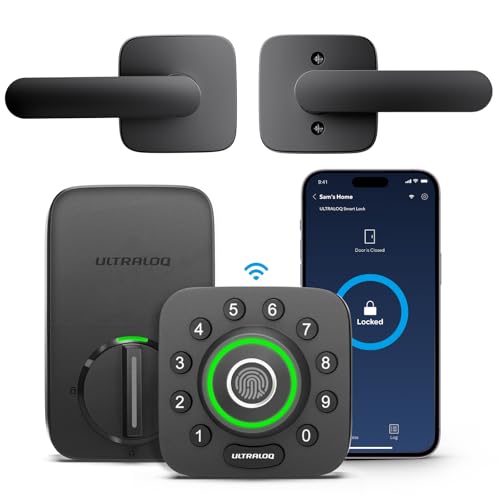
Ultraloq U-Bolt Pro
Best ValuePros
- Five unlocking methods (fingerprint, code, key, app, voice)
- Affordable price
- Auto-lock and anti-peep code feature
Cons
- Plastic components in the build
- Fingerprint sensor can be slow
The Ultraloq U-Bolt Pro offers excellent value with multiple backup options. Its capacitive sensor works reasonably well, though some users report it takes a second longer than premium models. The anti-peep code feature lets you enter extra digits to hide your real code.
Owner reviews on Amazon note the easy installation and good battery life. The lock supports auto-lock and has a built-in alarm that triggers if someone tries to tamper with it. While not as rugged as the Schlage, it is a solid choice for budget-conscious buyers.

Eufy Security Smart Lock Touch
Best for Battery LifePros
- Long battery life (up to 12 months)
- Built-in door sensor for open/close alerts
- Easy installation with no wiring
Cons
- No Wi-Fi bridge included (sold separately)
- Fingerprint sensor placement can be awkward
The Eufy Security Smart Lock Touch is known for its exceptional battery life, lasting up to a year on a set of AA batteries. Its capacitive fingerprint sensor is responsive, though some users find the placement on the side of the lock less intuitive.
It includes a built-in door sensor that alerts you if the door is left open. The lock supports keypad and physical key backups. The app is clean and provides activity logs. For safety, it has an anti-tamper alarm. It is a reliable option for those who want low maintenance.
Comparison Table: Best Fingerprint Door Locks
| Product | Best For | Sensor | ANSI Rating | Rating |
|---|---|---|---|---|
| Yale Assure Lock 2 | Overall Safety | Capacitive | Grade 2 | 4.6 / 5 |
| August Wi-Fi Smart Lock | Smart Home | Capacitive | Grade 2 | 4.4 / 5 |
| Schlage Encode Plus | Maximum Security | Capacitive | Grade 1 | 4.5 / 5 |
| Ultraloq U-Bolt Pro | Value | Capacitive | Grade 2 | 4.3 / 5 |
| Eufy Smart Lock Touch | Battery Life | Capacitive | Grade 2 | 4.4 / 5 |
FAQs
Can a fingerprint lock be hacked?
Yes, but it is difficult. High-quality locks with capacitive sensors are harder to fool than optical ones. Always enable two-factor authentication for added security.
What happens if the battery dies?
Most locks have a backup key or external battery port. Use the physical key or a 9V battery to power the lock temporarily. Always keep a backup key accessible.
How do I clean the fingerprint sensor?
Use a soft, dry microfiber cloth. Avoid alcohol or abrasive cleaners. Clean the sensor weekly to maintain accuracy.
Can I use a fingerprint lock on a metal door?
Yes, but check the lock's specifications. Some locks are designed for wooden doors only. Ensure the lock fits the door thickness and backset.
How many fingerprints can I store?
Most locks store between 50 and 100 fingerprints. Check the manual for your specific model. Register multiple fingers per user for reliability.
Do fingerprint locks work in cold weather?
Yes, but capacitive sensors can be less accurate with cold or dry fingers. Warm your finger before scanning. Some locks have improved cold-weather performance.
Are fingerprint locks safe for children?
Yes, but children's fingerprints change as they grow. Re-register their prints every few months. Ensure they know the backup code.
Can I share access with guests?
Yes, most locks allow temporary codes or app-based access. Set expiration times for guest codes. Revoke access after they leave.
What is the difference between optical and capacitive sensors?
Optical sensors take a photo of your fingerprint and are easier to fool. Capacitive sensors use electrical currents and are more secure and accurate.
How often should I update the firmware?
Check for updates every month. Set automatic updates if available. Firmware patches fix security vulnerabilities.
Can a fingerprint lock be used with a smart home system?
Yes, many locks integrate with Alexa, Google Home, or Apple HomeKit. This allows voice control and remote monitoring. Check compatibility before buying.
What should I do if the sensor stops working?
First, clean the sensor and try again. If it still fails, use the backup key or code. Contact the manufacturer for warranty service.
Our verdict
For most users, the Yale Assure Lock 2 is the best overall choice for its reliable fingerprint sensor, strong build, and multiple backup options. If you need maximum physical security, the Schlage Encode Plus with its ANSI Grade 1 rating is the safest option. For budget-conscious buyers, the Ultraloq U-Bolt Pro offers great value with five unlocking methods.