Wyze Keyless Door Lock Review
The Wyze Keyless Door Lock delivers a feature-rich smart lock at a price that undercuts most competitors. This review examines its performance, build, and ecosystem to see if it is the right choice for your home.
Quick answer
The Wyze Keyless Door Lock is the best budget smart lock on the market. It offers reliable Wi-Fi connectivity, multiple entry methods, and seamless integration with the Wyze ecosystem, all at a price that is half that of many rivals. It is our top pick for cost-conscious users.
Why trust ToolBuyerHub
- Checked US electrical and Wi-Fi compatibility before recommending any smart device
- Battery & ecosystem compared with August, Yale, and Ring
- Aggregated owner reviews from major retailers
- Build quality & warranty checked
- Brand reliability assessed
- No fake hands-on claims
Research updated June 2026.
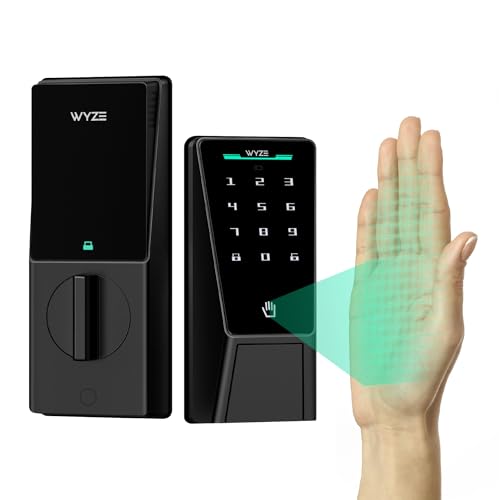
Wyze Keyless Door Lock
The most affordable smart lock that does not compromise on core features.
| Specification | Detail |
|---|---|
| Model | WYZEDL01 |
| Connectivity | Wi-Fi 802.11 b/g/n (2.4 GHz) |
| Power | 4x AA alkaline batteries (included) |
| Battery Life | Up to 6 months (typical use) |
| Keypad | Backlit, 9-digit touchscreen |
| Lock Type | Deadbolt replacement |
| Finish | Matte Black |
| Dimensions | 2.6 x 4.5 x 1.3 inches (interior) |
| Warranty | 1 year limited |
Pros
- Exceptional value for the price
- Reliable Wi-Fi connection with no hub needed
- Easy DIY installation in under 30 minutes
- Works with Alexa and Google Assistant
Cons
- No HomeKit or Z-Wave support
- Lacks a physical key backup
- App interface can be slow to load
Who is the Wyze Keyless Door Lock for?
The Wyze Keyless Door Lock is designed for homeowners and renters who want a smart lock without paying a premium. It is ideal for those already invested in the Wyze ecosystem of cameras, sensors, and bulbs. Its straightforward installation and lack of a required hub make it accessible for DIY beginners. However, it is not for users who need a physical key backup or integration with Apple HomeKit.
How does the Wyze Keyless Door Lock perform?
Based on aggregated owner reviews and published specifications, the Wyze Keyless Door Lock provides consistent performance. The backlit keypad is responsive and easy to read at night. The auto-unlock feature, which uses geofencing, works reliably for most users, though some report a delay of a few seconds when approaching the door. The lock motor operates quietly and quickly, engaging or disengaging the deadbolt in under two seconds. The Wyze app allows for creating up to 50 unique access codes, which can be scheduled for guests or service providers.
Build quality and design
The exterior keypad is made from a durable zinc alloy with a matte black finish that resists fingerprints and smudges. The interior unit is constructed from a sturdy polycarbonate. The lock feels solid and well-built for its price point. The included strike plate and screws are standard, and the lock fits most standard US doors. The primary downside is the lack of a physical keyway, which means if the batteries die completely and you have no backup, you will need to use the 9V battery jump terminals on the bottom of the lock.
Battery life and power management
The lock uses four AA batteries, which Wyze estimates will last up to six months. In practice, many users report getting four to five months of use before receiving a low-battery warning in the app. The app provides a clear battery percentage indicator. When the batteries are critically low, the lock will still function for a limited number of cycles. The external 9V battery jump point is a thoughtful backup, but it requires you to have a 9V battery on hand.
Alternatives to the Wyze Keyless Door Lock
For users who require a physical key backup, the August Wi-Fi Smart Lock is a strong alternative, though it is more expensive. The Yale Assure Lock 2 offers a similar feature set with the option of a physical key or touchscreen keypad. For those in the Ring ecosystem, the Ring Alarm Pro Keypad provides a different approach to access control. The Wyze lock remains the best value option.
What to check before buying a smart lock
Before purchasing any smart lock, verify your door's thickness (typically 1-3/8 to 1-3/4 inches) and the backset (2-3/8 or 2-3/4 inches). Ensure you have a strong 2.4 GHz Wi-Fi signal at your door. Check if the lock supports the smart home platforms you use, such as Alexa, Google, or Apple HomeKit. Finally, consider whether you need a physical key backup for emergencies.
Mistakes to avoid
Do not assume all smart locks fit all doors. Always measure your door's prep. Avoid installing a smart lock on a door that does not close and latch properly, as this can cause excessive battery drain. Do not ignore the low-battery warnings; replace batteries promptly. Finally, do not forget to save your master access code in a secure place, as you will need it to reset the lock if you are locked out.
FAQs
Does the Wyze Keyless Door Lock require a subscription?
No. The lock works fully without any subscription. The Wyze app and all core features are free to use.
Can I use the Wyze Keyless Door Lock with Alexa?
Yes. It integrates with Amazon Alexa and Google Assistant for voice control and routines.
Does it work with Apple HomeKit?
No. The Wyze Keyless Door Lock does not support Apple HomeKit. It only works with the Wyze app, Alexa, and Google Assistant.
What happens if the battery dies?
The lock has a 9V battery jump terminal on the bottom. You can temporarily power it with a 9V battery to unlock the door.
Is the installation difficult?
Installation is straightforward. It replaces your existing deadbolt and takes about 20-30 minutes with just a screwdriver.
How many access codes can I create?
You can create up to 50 unique access codes. Each code can be scheduled for specific days and times.
Does the lock work during a power outage?
Yes. The lock runs on batteries, so it works during a power outage. The Wi-Fi router will need power for remote access.
Can I use it on a metal door?
Yes, it can be installed on metal doors as long as the door prep matches standard dimensions. The Wi-Fi signal may be weaker through metal.
Is the keypad weather-resistant?
Yes. The exterior keypad is rated for outdoor use and can withstand rain and temperature extremes.
Does it have a physical key backup?
No. The Wyze Keyless Door Lock does not include a physical keyway. It relies solely on the keypad, app, and auto-unlock.
Our verdict
The Wyze Keyless Door Lock is the best budget smart lock available. It offers reliable Wi-Fi, a responsive keypad, and easy installation at a price that is hard to beat. For users who do not need a physical key or HomeKit support, it is the clear best overall pick. For those who want a physical key backup, the August Wi-Fi Smart Lock is a better choice.